

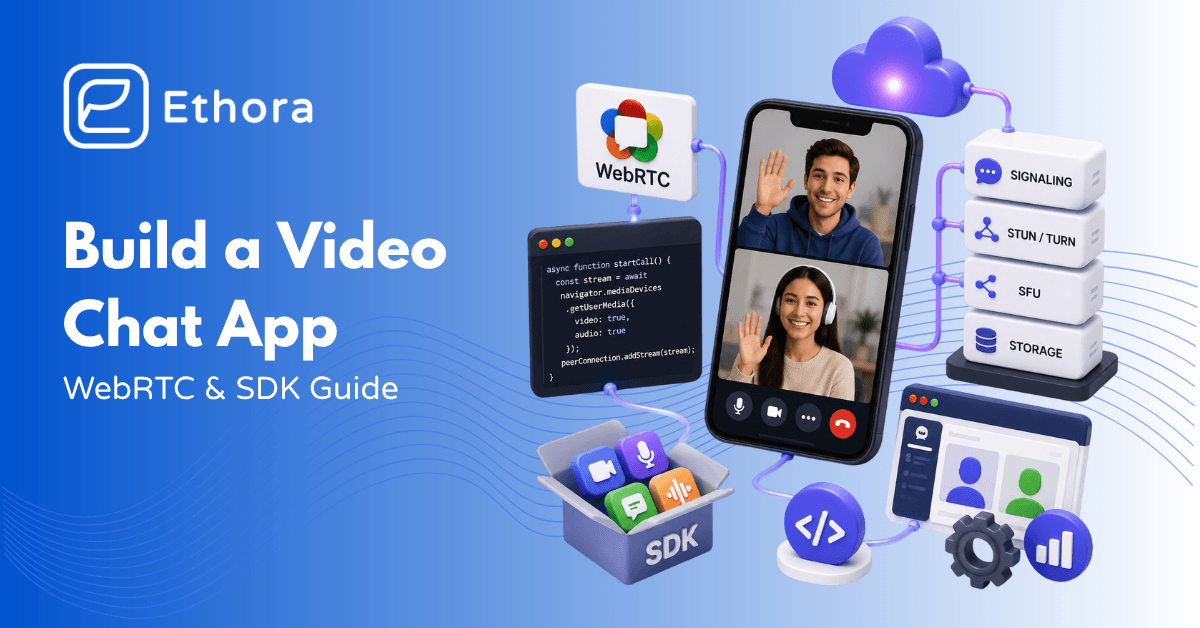
Getting a camera feed on screen is a one-liner. Getting a call that reconnects gracefully on a flaky mobile network, works through corporate firewalls, scales beyond four participants without choking, and stores recording – that’s months of infrastructure work nobody warned you about.
The video conferencing market sits at $11.65 billion as of 2024 and is growing at 8.2% annually. The interesting growth isn’t in standalone Zoom-style apps – it’s in embedded video: telehealth portals, fintech onboarding, marketplace calls, social apps. Teams that thought they’d add video in a sprint are discovering it’s a systems problem.
This article walks the actual architecture – WebRTC, signaling, STUN/TURN, SFU – with real code, an honest scope estimate for building from scratch, and an objective look at the SDK landscape and which ones fit which situation.
What a Video Chat App Actually Needs
Most “build a video chat app” tutorials show you getUserMedia, declare victory, and stop. That’s the easy 5%. Here’s what the other 95% involves:
This is what the app handles on the client side: Camera and mic captures, your video preview and the other participant’s video stream, mute and camera toggles, call states (ringing, connected, ended), and automatic reconnection. On smartphones, it also enables background calls. Because it’s integrated via the native system UI (CallKit on iOS, ConnectionService on Android), everything feels like a regular call.
Signaling: This is where most people get surprised. WebRTC handles media transport but deliberately leaves signaling to you. You need a server – usually a WebSocket server – that passes session descriptions and network candidates between peers so they can find and connect. WebRTC says nothing about how to do this. You write it.
NAT traversal: Devices behind routers and firewalls usually can’t reach each other directly. STUN server steps in to tell each device its public IP address. When STUN is not enough, like with symmetrical NAT or strict firewalls, a TURN server takes over and relays the media entirely. Roughly 15-20% of real-world calls need TURN. TURN is bandwidth-heavy and the billing surprise nobody plans for.
Media routing for groups: Peer-to-peer works for 1:1. At three participants, full-mesh P2P means each person uploads two streams. At six, it’s five uploads. Devices can’t handle it, and neither can most mobile connections. An SFU – Selective Forwarding Unit – solves this: each client sends one stream up to the server, which forwards the relevant streams down to each participant. SFU is how every production group-call app works.
Supporting services include: Authentication and presence (who’s online, or in a call), push notifications (making the phone ring), recording, and in-call text chat.
Compliance: For super-regulated fields like finance and healthcare, and really any business dealing with customer info, meeting HIPAA, SOC 2, GDPR, and other strict rules is a must. These regulations affect everything from your infrastructure choice to data storage, needed encryption, right down to your vendor picks.
The WebRTC Architecture, Explained
getUserMedia – captures the camera and microphone
getUserMedia is the browser API that asks permission and gives you a MediaStream from the camera and microphone. One call, one stream object you can attach to a video element or pass into an RTCPeerConnection.
const stream = await navigator.mediaDevices.getUserMedia({
  video: { width: { ideal: 1280 }, height: { ideal: 720 } },
  audio: true
});
// Attach to a local preview element
document.getElementById('local-video').srcObject = stream;
RTCPeerConnection – the engine
RTCPeerConnection handles codec negotiation, DTLS-SRTP encryption, and media transport between peers in WebRTC. Add tracks from your MediaStream, then listen for ICE candidates. It takes care of the rest for the transport layer.
const pc = new RTCPeerConnection({
  iceServers: [
    { urls: 'stun:stun.yourdomain.com:3478' },
    { urls: 'turn:turn.yourdomain.com:3478', username: 'user', credential: 'pass' }
  ]
});

// Add local tracks to the connection
stream.getTracks().forEach(track => pc.addTrack(track, stream));

// When remote tracks arrive, render them
pc.ontrack = ({ streams: [remoteStream] }) => {
  document.getElementById('remote-video').srcObject = remoteStream;
};
Signalling – the part you write
To connect, two peers need first to exchange session descriptions and ICE protocols. SDPs (Session Description Protocols) describe the codecs supported by a peer and how it wants to receive media. ICE candidates are the network addresses to try. WebRTC doesn’t define how this exchange happens – you build a WebSocket server (or use a library) that passes these between peers.
The flow:
// CALLER: creates an offer and sends via your signaling server
const offer = await pc.createOffer();
await pc.setLocalDescription(offer);
socket.emit('offer', offer);   // your signaling

// CALLEE: receives offer, creates answer
await pc.setRemoteDescription(offer);
const answer = await pc.createAnswer();
await pc.setLocalDescription(answer);
socket.emit('answer', answer);

// Both sides: relay ICE candidates as they're discovered
pc.onicecandidate = ({ candidate }) => {
  if (candidate) socket.emit('ice-candidate', candidate);
};
socket.on('ice-candidate', candidate => pc.addIceCandidate(candidate));
STUN and TURN – getting through firewalls
STUN is lightweight. A peer asks, “What’s my public IP?” and the STUN server answers. That’s enough for most home and office network setups. TURN is the fallback for when symmetric NAT or strict corporate firewalls block direct peer-to-peer entirely. When TURN is needed, the server relays every audio and video packet – it costs real bandwidth, typically $0.40-0.80 per GB. Coturn is the standard open-source TURN server. In production, you run your own rather than relying on Google’s free STUN, which has no SLA and no TURN.
SFU for group calls, Full-mesh P2P breaks around 3-4 participants. Everyone is uploading N-1 streams. An SFU fixes this: each client sends one stream up, the SFU forwards relevant streams down. Each client still receives N-1 streams, but only uploads one. For 10 participants, that’s the difference between uploading 9 streams and uploading 1.
You can use open-source SFU like LiveKit (Go, WebRTC-native, actively maintained, with a managed cloud option), mediasoup (Node.js/C++, super flexible, but steeper setup), Janus, and Jitsi Videobridge. In 2026, LiveKit leads for new projects.
Mesh vs SFU vs MCU at 4 participants
Full-mesh P2P: each person sends 3 streams, receives 3. 12 total streams in the room. SFU: each person sends 1 stream, receives 3. 4 total uploads, server forwards to the rest. MCU: each person sends 1 stream, receives 1 mixed composite. Easy on the client, heavy on the server. SFU is the right default for most group-call apps.
Building From Scratch: What It Really Looks Like
Here’s the honest scope breakdown, because the source articles that say “build a video app in a weekend” are describing step one of about twelve.
Weekend: 1:1 prototype
getUserMedia, RTCPeerConnection, and a Node.js WebSocket signaling server. Two browser tabs or two laptops on the same network. Works. Impressive demo. Handles approximately none of the real-world problems you haven’t hit yet.
Week 1-2: Add TURN and survive the real internet
Stand up coturn. Configure credential rotation (static credentials are a security hole). Test on mobile networks, corporate Wi-Fi, VPN. Discover that ~15-20% of your test calls fail without TURN. Add it. Now pay for bandwidth.
Month 1-2: Group calls with an SFU
Integrate LiveKit or mediasoup. This is where the scope expands fast: SFU operations, simulcast configuration (sending multiple quality layers so the SFU can adapt to each receiver’s bandwidth), bandwidth estimation, subscription management. Plan on this taking longer than it looks.
Month 2-4: Mobile
WebKit’s WebRTC implementation on iOS has its own quirks. Background call handling requires platform-specific work. CallKit (iOS) and ConnectionService (Android) make incoming calls look like real phone calls – without them, it’s a push notification that nobody answers. React Native wrappers around WebRTC exist, but have their own rough edges.
Month 3-5: Reliability
When connection quality drops, bandwidth adapts by reducing resolution, then dropping frames if needed, before ending the call. Echo cancellation and noise suppression help too; the browser does some of this, while AI-based on-device suppression works as an extra layer. Quality metrics logging so you can diagnose call problems after the fact.
Month 4-7: Recording and compliance
Server-side recording requires compositing individual streams and muxing them. Storage, encryption at rest, retention policies, consent UI. For healthcare: HIPAA BAA with every infrastructure vendor that touches the media. For fintech: audit logging, data residency, and liveness detection for KYC flows.
Realistic timeline
A 1:1 call prototype: days. A production group-call app with TURN coverage, SFU, mobile support, reliability handling, recording, and compliance: 4-9 months with a team that has real WebRTC experience. Most teams underestimate by 2-3x.
The SDK Landscape in 2026
| SDK | Pricing model | Self-host | Prebuilt UI | AI features | Compliance | Best for |
|---|---|---|---|---|---|---|
| LiveKit | Free OSS / usage-based cloud | Yes (OSS) | Partial | Yes (Agents) | SOC 2 | OSS-first, AI/agents, Twilio migrants |
| Daily | Per-participant-minute | No | Yes | Basic | HIPAA (enterprise) | Fast time to market, prototypes |
| Agora | Per-minute (10K free/mo) | No | Yes | Basic | SOC 2, HIPAA | Large-scale consumer apps, global reach |
| Vonage | Per-minute | No | Yes | Basic | SOC 2, HIPAA | Regulated enterprise |
| MirrorFly | One-time license | Yes | Yes | Limited | HIPAA | On-prem, one-time cost model |
| Ethora | Flat monthly tier | Yes | Yes (React kits) | BYO LLM | HIPAA, SOC 2, GDPR | Regulated industries, predictable cost, self-host |
| Zoom Video SDK | Per-minute | No | Yes | Basic | HIPAA (enterprise) | Embedding Zoom UX in your app |
A few notes on the decision dimensions that the table doesn’t fully capture:
Per-minute pricing punishes success. At low volume, it looks cheap. At 100,000 calls per month with 5 participants averaging 30 minutes, you’re paying $15,000-60,000/month in usage fees – before anything else. Teams that don’t model their traffic at scale get surprised by this in year two.
Self-hosting changes the compliance story. HIPAA compliance requires a BAA with every vendor that touches protected health information. Some vendors sign BAAs; some don’t, or only do at the enterprise tier. Self-hosted infrastructure means your team handles the compliance posture directly, which is harder to set up but easier to demonstrate to an auditor.
AI features are not equal. “AI moderation” (most vendors) and “BYO-LLM with function calling inside the call” (LiveKit Agents, Ethora) are different products. If you want an AI agent that can join a call, answer questions from your documentation, and hand off to a human, that’s a different capability than filtering profanity in chat.
5 Steps to Ship Video Calling
Now, let’s move to actionable steps. There five of them.
Step 1. Define use case and scale requirements
1:1, small group, or broadcast? What’s the max participant count? This determines your architecture before you write a line of code – P2P for 1:1, SFU for groups, CDN for broadcast. What vertical? That determines compliance requirements. Healthcare and fintech add months of work if you don’t account for them at the start.
Step 2. Decide: build vs buy vs self-host open-source
Only build raw WebRTC if video is a key product feature and you’ve got experts for it. Otherwise, pick from a managed SDK for speed and per-minute billing, a self-hosted SFU like LiveKit for full control but no software costs, or a flat-tier SDK that you manage yourself.
Step 3. Pick the stack
Frontend: For most tasks, React Native will work. Need a codebase across iOS, Android, and web? Then use Flutter. Signaling: a WebSocket server (Socket.io is fine for most scale, roll your own, or use a library). TURN: run your own Coturn or use a managed TURN service. SFU: LiveKit or mediasoup if self-hosting, your chosen managed SDK if not. Backend: Node.js or Python for signaling, whatever you already run for auth and recording.
Step 4. Build the call flow and UI
The core flow: request media → create peer connection → signaling (offer/answer/ICE) → render remote stream → call controls (mute, camera off, screen share, end call). Grid vs speaker view for groups. When users receive an incoming call, they see a UI and a push notification that wakes the app. If the connection drops, the app should quietly try to fix it before showing any errors.
Step 5. Test and scale
For testing, use real devices and real-world networks. Try it on mobile data, through a VPN, even the sketchy hotel Wi-Fi people end up using. Track call quality metrics like packet loss and jitter, and the MOS score too, to figure out what went wrong later.
What it Costs to Build a Video App
The real price can differ depending on the method you choose to build your video app. Let’s do the math.
Build from scratch
For a production group-call app, budget $300,000 to $600,000 for engineering time – 2 to 4 specialists working 4 to 9 months. Also factor in TURN bandwidth costs of $0.40 to $0.80 per GB (hundreds of GBs monthly), SFU infrastructure that’s $100 to $500 a month per mid-size node, and developer hours for maintenance due to API.
Managed SDK (per-minute)
Daily and Agora prices around $0.001-0.004 per participant-minute, depending on resolution. A 5-person daily standup at 30 minutes is $0.15-0.60 per team per day. At 1,000 teams, that’s $150-600/day, $55,000–219,000/year – for 30-minute standups. When you’re building a consumer app where sessions are longer, the math gets uncomfortable faster.
Self-hosted SFU (LiveKit/mediasoup)
Software is free. A mid-tier server handling 50-100 concurrent rooms costs $100-500/month on AWS or GCP, depending on size and region. Your cost scales with infrastructure, not call minutes. The trade-off is that you own the ops.
Flat-tier SDK
Fixed monthly fee regardless of call volume. The math gets better as usage grows. Right for teams that know their traffic will scale and want predictable unit economics from day one.
The rule
Prototype on a per-minute basis to validate the product. Once you know users are there and calls are happening at volume, run the math on self-hosted or flat-tier. The crossover point is usually somewhere between 50,000 and 200,000 participant-minutes per month, depending on the per-minute rate you negotiated.
Adding AI to Your Video App
Not so long ago, artificial intelligence was more of an automation than something really smart. Today, it’s not even a differentiator. Almost everyone implements it, looking for the best way to use it in their apps. Here’s how your video app can be improved with AI.
Live transcription and captions
Pipe the audio track from the call through a transcription service – Whisper (open-weight, can run on your servers), Deepgram, or AssemblyAI for managed. Feed the transcript back to the client as captions. Near-real-time with Deepgram’s streaming API. Useful for accessibility, for AI processing downstream, and as the input to everything else on this list.
Real-time translation
Transcription → LLM translation → captions in the target language. 500ms-2 seconds of lag depending on model and network. Good enough for most professional conversations. The use case driving this the fastest is cross-language customer support, where the alternative is limited language coverage.
Meeting summaries and action items
Post-call: pipe the full transcript to GPT-4o or Claude with a prompt engineered for meeting structure. Get a summary and structured action items. Your transcript quality determines your summary quality – the chain starts with audio, not the LLM.
AI noise suppression
RNNoise and Krisp-style on-device models run in the browser or natively on mobile without a server round-trip. Handle this in the SDK or browser media pipeline – don’t wait for users to buy better microphones.
AI agents that join calls
A bot participant that can answer questions from your documentation, schedule follow-ups, handle FAQs, or assist the human agent. LiveKit Agents and Ethora’s AI Bots SDK both support this. Requires: a STT pipeline feeding to an LLM with function calling, a TTS pipeline sending audio back into the call, and conversation state management across turns. More infrastructure than it looks, but the product experience is genuinely different.
Ship Video Calling Faster with Ethora
The per-minute pricing model works until it doesn’t. When your product gains traction and calls start happening at scale, the SDK bill grows with every new user. That’s by design – it’s the vendor’s business model. Teams that didn’t model their traffic at 10x their current volume get surprised.
Ethora’s video call SDK ships 1:1 and group video alongside the full chat layer on a flat monthly fee. No per-participant-minute meter. The underlying stack is WebRTC media, SFU for group calls, SRTP encryption, adaptive bitrate for weak networks, and reconnection handling – the infrastructure that the build-from-scratch path makes you write yourself.
The AI Bots SDK for transcription adds live transcription and post-call summaries via OpenAI, Anthropic, or any self-hosted model. If you need call content off external infrastructure – for HIPAA or just for data sovereignty – run the LLM on your own servers. The API surface doesn’t change, only the endpoint.
For HIPAA-compliant video SDK deployments – telehealth, mental health, video-KYC – Ethora runs entirely on your servers with a BAA on Enterprise. Chat, AI, audit logs, and video in the same deployment. No separate video vendor BAA to negotiate. The React Native video call SDK covers iOS and Android from one codebase.
You can start building now, for free. Free tier includes video and audio calls, self-hosting, and AI.
Start building right now or book a call if you’d like to learn more.

Share with your community


More Articles

Development
Oct 5, 2026
Cross-Platform App Development Frameworks in 2026: 10 Options Compared, Real Trade-offs, and Chat + AI SDK Fit
In 2026, evaluating cross-platform frameworks is a complex matter. There are many practical questions: Which ones have solid chat and AI SDK support today? Which ones won’t force a painful migration when the next major OS version drops? And what are the real engineering trade-offs once you move past the marketing claims? We’ll look at […]


Healthcare
Oct 1, 2026
HIPAA-Compliant Video API in 2026: What Actually Makes One, Vendor Comparison, and Twilio Video Migration
Consultations, psychiatry meetings, medication management, triage, and other medical encounters often do not require physical presence. Adding video to your healthcare app or platform can be a great idea, as it allows you to hold sessions online without losing the human touch. Using a messaging API to incorporate video into your application makes the whole […]

Try Out Ethora in Action
Experience Ethora's messaging with a dedicated demo from our CEO or start building your App right now!
