

Self-hosted LLM
Run LLMs Locally: 7 Tools to Self-Host AI Models on Your Own Hardware

If you aren’t using large language models in 2026 you risk falling behind the competition – they speed up processes, help structure the information, can serve as 24/7 support agents, and much more. But for some businesses, for example, those operating in healthcare, finance, or other regulated industries, it’s critical to keep their data in their systems. And the best option here is to run LLM locally.
Self-hosting AI may scare many, as it has its technical requirements and can consume a lot of resources. Worry not, because modern, lightweight models like Llama 3.3 70B, Qwen 2.5 72B, and DeepSeek V3 deliver performance that rivals or matches GPT-4-class systems on many benchmarks. A single 24GB consumer GPU can now serve a capable 70B-class model at usable latency.
Below, we answer the most common questions about running LLM on your software, from how to choose the tool that fits your workflows and what resources you need, to how much it costs.
Why run an LLM locally in 2026
Six reasons drive most self-hosting decisions today:
- Data privacy. Prompts and outputs never leave your network. This is non-negotiable for HIPAA, GDPR, attorney-client privilege, or defense work
- Cost predictability. You eliminate per-token billing surprises. A well-utilized GPU often undercuts high-volume cloud spend
- Latency. Removing 100-500 ms network round-trips helps real-time applications
- No rate limits. Your ceiling is your hardware, not a vendor tier
- Offline operation. Essential for air-gapped environments, ships, remote sites, or hospitals
- Full model control. Swap weights, apply custom fine-tunes or LoRAs, and quantize without approval
When not to self-host: Very low volume (< a few million tokens/month), no operations bandwidth, or when you need the absolute latest closed frontier model for edge-case reasoning. Cloud APIs remain simpler there.
Hardware reality: what you actually need
Match your model size and expected load to realistic hardware tiers. Numbers below use Q4_K_M GGUF or equivalent AWQ quantizations and include typical KV cache overhead for moderate context (4K-8K tokens).
Laptop tier
8–16 GB unified/VRAM, M2/M3/M4 or integrated GPU laptops
Runs 7-9B models comfortably (Llama 3.1 8B, Qwen 2.5 7B, Phi-3 Mini). Expect 15-50 tokens/sec on Apple Silicon. Fine for personal use and light prototyping.
Workstation tier
24 GB VRAM – RTX 4090/5090 or single A10
Handles 13-34B models well; 70B-class at aggressive quantization with some offloading or lower batch sizes. Throughput: 30-80 tokens/sec for interactive use. RTX 5090 (often 32 GB) is a popular sweet spot.
Pro tier
40–80+ GB VRAM – A100, H100, or multi-GPU
Full 70B at Q4/Q5 or even higher precision with healthy batching. 60–150+ tokens/sec per request, thousands with continuous batching. Multi-GPU shines here.
Cluster tier
multi-node H100/A100
Frontier open models (Llama 405B-class or DeepSeek V3 671B MoE).
CPU-only
Viable with llama.cpp for 1-7B models or batch/offline jobs (1-8 tokens/sec). Not great for chat.
Apple Silicon note: Unified memory is a big advantage. A Mac Studio or Mac Pro with 64-128 GB can run surprisingly large models faster than you might expect from a discrete 24 GB GPU setup.
The 7 best local LLM tools in 2026
Here’s a deeper, practical look at the tools that actually get used in engineering teams today. We’ve included setup commands, real-world strengths/weaknesses, and use cases each one suits best.
Ollama
Ollama remains the go-to starting point for most developers. It combines a simple CLI, a built-in model registry, and a robust OpenAI-compatible API running on http://localhost:11434. You can pull and run models with one command and integrate them into your stack almost instantly:
curl -fsSL https://ollama.com/install.sh | sh

ollama pull llama3.3:70b

ollama run llama3.3
Pros: Dead simple, great model management, solid for prototyping and small-team use, active ecosystem.
Cons: Not optimized for high concurrency in production (struggles beyond ~5–10 simultaneous users without tuning).
Best for: Developers who want to go from zero to a local API in minutes.
LM Studio
This polished desktop GUI excels at model discovery and evaluation. It features an integrated Hugging Face browser, hardware compatibility checks, side-by-side model comparison, and its own local OpenAI-compatible server.
Setup: Download the installer from lmstudio.ai (available for Mac, Windows, and Linux). Launch it, search for models directly in the app, and start chatting or expose the local server.
Pros: Excellent for evaluation and non-CLI users; great hardware detection.
Cons: GUI overhead makes it less ideal as a pure production server.
Best for: Model experimentation, demos, and teams that value a clean interface.
llama.cpp
The foundational C/C++ inference engine that powers much of the local LLM ecosystem (including parts of Ollama). llama.cpp delivers maximum efficiency and flexibility across CPU, GPU, and exotic hardware.
Setup (common method):
git clone https://github.com/ggerganov/llama.cpp

cd llama.cpp

make LLAMA_CUBLAS=1  # For NVIDIA GPU support

./llama-cli -m models/llama-3.3-70B-Q4_K_M.gguf -p "Hello"
Pros: Supports a wide range of GGUF quantizations (down to 2-bit), outstanding performance on CPU and Apple Silicon, highly portable.
Cons: Steeper learning curve and more manual setup.
Best for: Maximum performance tuning, embedded/edge deployments, or when you need to squeeze every last token per second.
vLLM
vLLM is the production inference server of choice in 2026. It uses PagedAttention for continuous batching, supports multi-GPU, and ships with a full OpenAI-compatible endpoint.
Quick start:
pip install vllm

vllm serve meta-llama/Llama-3.3-70B-Instruct \

  --quantization awq \

  --tensor-parallel-size 2 \

  --port 8000
Pros: Dramatically higher throughput under load (often 2-5x or more versus naive serving thanks to continuous batching), excellent for multi-user services.
Cons: Primarily NVIDIA GPU-focused and requires more initial configuration.
Best for: Any production backend, internal APIs, or applications expecting real concurrent traffic.
Jan
A fully open-source, privacy-first desktop ChatGPT alternative built on local-first principles with strong extension support.
Setup: Download from jan.ai for your operating system. After installation, you can search and download models directly in the app or import GGUF files. It also exposes a local OpenAI-compatible endpoint.
Pros: Clean interface, stays completely offline by default, active community contributions.
Cons: Performance mirrors other desktop tools (not optimized for high-scale serving).
Best for: Teams that prioritize privacy and want a full desktop app experience.
GPT4All
A straightforward cross-platform desktop application with excellent built-in support for chatting directly over your local documents.
Setup: Download the installer from the official GPT4All website or GitHub releases. Once installed, you can browse models inside the app and point it at local document folders for private RAG.
Pros: Strong local RAG features (point it at folders of PDFs/text), beginner-friendly.
Cons: Less emphasis on high-scale API serving.
Best for: Knowledge workers, offline document Q&A, and non-technical team members.
Open WebUI
The self-hosted web frontend that turns any OpenAI-compatible backend (Ollama, vLLM, LM Studio, etc.) into a polished, multi-user ChatGPT-like interface.
Docker one-liner for Open WebUI:
docker run -d -p 3000:8080 \

  -v open-webui:/app/backend/data \

  --name open-webui \

  ghcr.io/open-webui/open-webui:main
Pros: User accounts, conversation sharing, document upload, plugins, and search tools.
Cons: It depends on a strong backend inference engine.
Best for: Giving non-technical teammates or larger teams easy, controlled access to your self-hosted models.
| Tool Name | Interface (CLI/GUI/Server) | OS Support | Production Ready? | Format Support | Best For |
| Ollama | CLI & API Server | Linux, macOS, Windows | No (Dev/Prototyping focus) | GGUF, Ollama Registry | Developers prototyping and quick local API setups |
| LM Studio | Desktop GUI & Local Server | macOS, Windows, Linux | No (Desktop evaluation/demos) | GGUF (HuggingFace Integration) | Non-CLI users, model evaluation, and local demos |
| llama.cpp | CLI & API Server | Cross-platform (Linux, Mac, Win, iOS, Android) | Yes (Highly optimized for specific targets) | GGUF (Quantization 2-bit to 8-bit) | Maximum control, embedded targets, and CPU inference |
| vLLM | Production API Server | Linux (GPU-only) | Yes (Industry Standard) | AWQ, GPTQ, FP8, Unquantized | Serving LLMs at scale with high concurrency |
| Jan | Desktop GUI & Local Server | macOS, Windows, Linux | No (Desktop application) | GGUF, TensorRT | Privacy-focused desktop users needing clean open UI |
| GPT4All | Desktop GUI | macOS, Windows, Linux | No (Desktop application) | GGUF, Proprietary Formats | Knowledge-worker desktop use and offline document RAG |
| Open WebUI | Web GUI (Frontend wrapper) | Cross-platform (Docker-based) | Yes (Multi-user frontend) | Connects to any OpenAI API backend | Giving non-technical teammates web access to local LLMs |
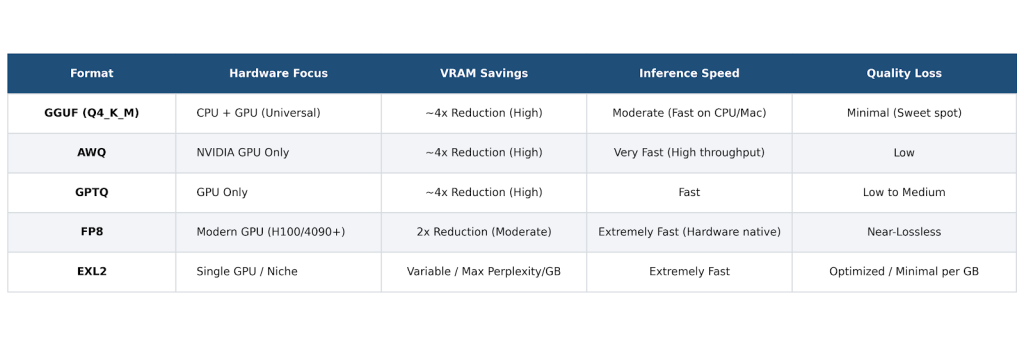
Quantization Formats: GGUF, AWQ, GPTQ, FP8, and EXL2
The quantization format and bit depth largely determine whether a model will fit in your available VRAM and how fast it will run. Choosing the wrong one can waste memory or leave significant performance on the table.
GGUF (from the llama.cpp ecosystem) is the universal workhorse. It supports everything from CPU to GPU to Apple Silicon. Q4_K_M remains the everyday sweet spot for most users – it offers an excellent balance between size, quality, and speed with minimal perceptible degradation on general tasks. This is the default format used by Ollama, LM Studio, Jan, and GPT4All.
AWQ (Activation-aware Weight Quantization) and GPTQ are 4-bit GPU-optimized formats. They often deliver noticeably better inference speed on NVIDIA hardware than GGUF at similar bit widths, making them popular choices for vLLM deployments.
FP8 provides near-lossless performance on modern hardware (H100, RTX 40/50-series) and unlocks the highest speeds where tensor cores support it.
EXL2 (ExLlamaV2) uses variable bit-rate quantization. It frequently achieves the best quality-per-GB on single-GPU setups, especially for 70B-class models.
Practical rule of thumb: Start with GGUF Q4_K_M for desktop use, laptops, Ollama, or mixed hardware. Switch to AWQ or FP8 when running vLLM on modern NVIDIA GPUs for production workloads.
Open-weight models worth running in 2026
7-9B class (Llama 3.3 8B, Qwen 2.5 7B/8B, Mistral Small 3 variants). These fit comfortably on laptops and deliver solid performance for chat, simple agents, and lightweight RAG. Expect 30–70+ tokens/sec on good hardware.
13-34B class (Qwen 2.5 32B, DeepSeek R1 Distill 32B variants). These provide a noticeable step up in reasoning and instruction-following while still running well on workstation GPUs (24-32 GB VRAM). They are strong all-rounders for most internal tools.
70B+ class (Llama 3.3 70B, Qwen 2.5 72B). These serve as true production workhorses on pro hardware. At aggressive 4-bit quantization, they deliver excellent quality for complex tasks, coding, and multi-step reasoning.
Specialized models:
- Coding – Qwen 2.5 Coder or DeepSeek Coder variants
- Math/Reasoning – DeepSeek R1 series or QwQ models
- Safety/Moderation – Llama Guard series
- Multimodal (vision) – Llama 3.2 Vision or Qwen 2.5 VL
Here’s a quick cheat sheet to make the choice easier.
| Use Case & Class | Recommended Models (as of 2026) | VRAM Requirements (at Q4) | Best Fit / Primary Apps |
| Small / Edge | Phi-3 Mini (3.8B), Qwen 2.5 (1.5B), Gemma 2 (2B) | < 4 GB (Laptops, mobile devices) | On-device processing, lightweight text tasks, Apple Intelligence / Gemini Nano class applications. |
| General-purpose (7–9B) | Llama 3.1 (8B), Qwen 2.5 (7B), Mistral 7B v0.3 | 8 GB (Consumer-grade GPUs) | Standard chat, simple automation, basic classification, home setup deployments. |
| General-purpose (13–14B) | Phi-3 Medium, Qwen 2.5 (14B) | 12 GB (Mid-tier hardware) | A noticeable step up in reasoning quality and instruction following over 8B models. |
| General-purpose (32B) | Qwen 2.5 (32B), DeepSeek R1 Distill (32B) | 24 GB (Single flagship card like 3090/4090) | High-level reasoning, production-grade tasks, deep contextual analysis. |
| Code-specialized | Qwen 2.5 Coder (32B) (2026 SOTA open code), DeepSeek Coder V2 | 24 GB (For 32B versions) | Heavy-duty coding, multi-file refactoring, debugging, and autocomplete engines. |
| Reasoning-specialized | DeepSeek R1 (Full), QwQ (32B), Llama 3.3 (70B) with CoT | 24 GB (for 32B) / Cluster setup (for Full R1) | Complex math, hard science, logic-heavy tasks requiring extended Chain-of-Thought (CoT). |
| Multimodal (Vision + Text) | Llama 3.2 Vision (11B/90B), Qwen 2.5 VL, Pixtral (12B) | 12 GB to 48 GB+ (Size dependent) | Image recognition, chart/diagram parsing, document OCR, visual question answering. |
| Safety / Moderation | Llama Guard 3 (8B), Llama Guard 4 (Meta) | 8 GB | Content moderation, guardrails, and purpose-built classification for harm taxonomy. |
| Frontier open-weight | Llama 3.3 (70B), Qwen 2.5 (72B), DeepSeek V3 (671B MoE) | 48 GB (at Q4) / 80 GB (at Q8) / Cluster | Commercial API-grade performance, enterprise pipelines, maximum accuracy. |
From Laptop to Production: Deployment Patterns
Start simple with Ollama or LM Studio for prototyping and evaluation. When you need to serve real traffic, migrate to vLLM (or alternatives like Hugging Face Text Generation Inference / SGLang). Because nearly everything exposes an OpenAI-compatible API, your application code usually requires only a base URL change.
Key production techniques:
- Continuous batching with PagedAttention in vLLM. This routinely delivers 5-20x throughput gains over naive request-by-request serving by dynamically batching at the token level.
- Orchestration. Use Kubernetes with KServe or Ray Serve for scaling, model rolling updates, and multi-GPU/node management.
- Observability. Integrate Langfuse, Helicone, or Phoenix from day one to track latency, token usage, errors, and costs.
- Reliability. Implement circuit-breaker logic that falls back to a cloud provider (OpenAI/Anthropic) during outages or OOM events.
- Security. Always put authentication (API keys, OAuth, mTLS), rate limiting, and input/output moderation in front of the endpoint. Never expose raw inference directly to the internet.
Cost: self-hosted vs cloud API at three traffic tiers
The numbers tell a pretty clear story. At low usage – around 1 million tokens per month – cloud pricing is almost trivial (roughly $5 for GPT-4o), while self-hosting makes zero financial sense because you’re still paying for the GPU whether it’s running or not.
Even at 100 million tokens, cloud usually comes out cheaper (~$500 vs $1,500+ for a rented A100 running Llama 3.3 70B).
Things start shifting around 1 billion tokens per month. At that point self-hosting on two A100s (at ~70% utilization) often lands in the $3,000-4,000 range, beating GPT-4o’s $5,000 price tag while giving you complete data control. At 10 billion tokens, the difference becomes dramatic – cloud can easily hit $50,000 while a well-tuned self-hosted setup might cost $10-20k.
An RTX 5090 bought for around $2,000 can pay for itself in 3-6 months versus GPT-4o-mini at sustained 100M+ tokens/month and 80% utilization.
Just remember the hidden costs: electricity ($50-200 per GPU per month), cooling, maintenance, and engineering time. In practice, the real breakeven for most steady workloads lands somewhere between 10 and 50 million tokens per month.
Common Pitfalls When Self-Hosting
Most teams run into the same handful of hard lessons when moving from experimentation to production. The biggest one is VRAM underestimation – people look at the model size and forget that weights are only 60-70% of total usage. The rest gets eaten by the KV cache, especially with longer contexts. A 70B model at 4-bit can easily need 40GB+ just for weights, plus another 4-10GB depending on your context length and batch size.
Other frequent mistakes include using the wrong quantization (running GGUF on an H100 wastes tensor cores – switch to AWQ or FP8 for real speed) and serving requests without proper batching. Without continuous batching, you can easily waste 70-80% of your GPU’s potential.
Long context surprises also bite people hard – 32k+ prompts can blow up memory if you’re not careful. Then there’s model drift: open models update frequently, so pinning versions and regression-testing prompts against a golden dataset becomes essential.
Finally, many teams try to run Ollama in production with more than a handful of concurrent users, then wonder why latency explodes. Ollama is fantastic for prototyping, but for anything beyond light traffic, you should migrate to vLLM or similar. The good news is the switch is usually painless thanks to the shared OpenAI-compatible API.
Add proper observability (Langfuse, Helicone, etc.) from day one – flying blind is a painful way to learn.
Plan ahead for regular model updates, prompt regression testing on a golden dataset, and security hardening from the first deployment.
Conclusion
Self-hosting an LLM in 2026 is mature. The ecosystem has converged around OpenAI-compatible endpoints, strong open-weight models, and clear tool separation between experimentation and serving.
Choose your tool based on stage: Ollama or LM Studio to start, vLLM to scale, Open WebUI to share. The harder ongoing work is integration – reliable calling, fallback, logging, moderation, and swapping models without rewriting application logic.
If you want a full-featured chat and AI agent layer that treats any local or self-hosted OpenAI-compatible endpoint as native, check out the Ethora AI Bots SDK. It works with Ollama, vLLM, LM Studio, or your GPU cluster – no vendor lock-in. Point it at your endpoint and ship. Built for React, React Native, and backend, with strong support for regulated environments.
Build Your Own: Ship a Self-Hosted LLM App with Ethora
The Ethora AI Bots SDK gives you chat, multi-turn agents, tool calling, and RAG that plugs directly into your self-hosted endpoint. One config change switches from Ollama to vLLM to a future model – or adds a cloud fallback.
It includes encryption, audit logs, and offline capabilities that pair naturally with local LLMs. Teams in healthcare and fintech use it for HIPAA/GDPR-compliant deployments where prompts must stay on-prem.
Setup is straightforward: install the SDK, set your base URL, and you get production-ready chat components, moderation hooks, and more. The Ethora MCP Server further extends tool access for local models in editors like Cursor or VS Code.
Whether you run a single workstation or a GPU cluster, Ethora accelerates delivery while keeping full control.
Self-hosting is no longer experimental. With the right stack, you get privacy, cost control, and performance that meets production needs – on hardware you already understand.

Share with your community


More Articles

Development
Oct 5, 2026
Cross-Platform App Development Frameworks in 2026: 10 Options Compared, Real Trade-offs, and Chat + AI SDK Fit
In 2026, evaluating cross-platform frameworks is a complex matter. There are many practical questions: Which ones have solid chat and AI SDK support today? Which ones won’t force a painful migration when the next major OS version drops? And what are the real engineering trade-offs once you move past the marketing claims? We’ll look at […]


Healthcare
Oct 1, 2026
HIPAA-Compliant Video API in 2026: What Actually Makes One, Vendor Comparison, and Twilio Video Migration
Consultations, psychiatry meetings, medication management, triage, and other medical encounters often do not require physical presence. Adding video to your healthcare app or platform can be a great idea, as it allows you to hold sessions online without losing the human touch. Using a messaging API to incorporate video into your application makes the whole […]

Try Out Ethora in Action
Experience Ethora's messaging with a dedicated demo from our CEO or start building your App right now!
