


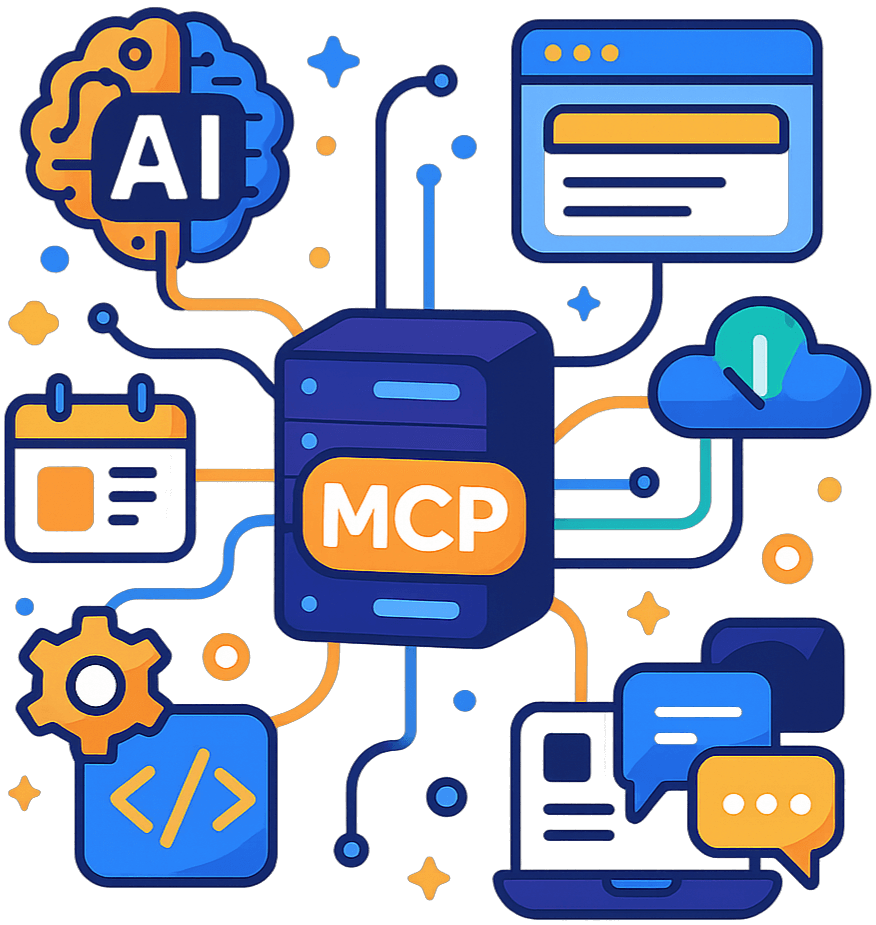
Connect in 60 seconds
One endpoint, three ways to prove who you are. Pick your client below; the tools are the same everywhere.
Get a personal connector URL
Sign in to the Ethora web app, open Account, then the AI Assistants tab, and create an API key. It shows a personal connector URL, a Claude Code one-liner and a Cursor config with copy buttons.
No account yet? Your agent can create one itself: connect to the open endpoint and call ethora-user-register.
Paste it into your client
Claude.ai and ChatGPT take the URL as a custom connector. Claude Code, Cursor, VS Code, Windsurf, Cline and Gemini CLI take the endpoint plus a Bearer header. Snippets for each are below.
Ask
“Create an app called Clinic Desk, add a room called Front desk, crawl clinic.example.com into its knowledge base, create a friendly receptionist agent and put it in the room, then give me the widget snippet.” The assistant calls ethora-help when unsure and works through the tools in order.
Claude.ai and Claude Desktop (custom connector) Full guide
Settings, Connectors, Add custom connector. Paste the personal URL; every conversation is then authenticated with no login step.
https://mcp.chat.ethora.com/mcp/k/<your API key>
ChatGPT (connectors, developer mode) Full guide
Turn on developer mode (Settings, Security and login), then add a connector with the personal URL. The server implements the search and fetch tools ChatGPT expects, plus the 88 Ethora tools.
https://mcp.chat.ethora.com/mcp/k/<your API key>
Claude Code Full guide
One command. Add --scope user to make it available in every project; check with claude mcp list.
# with a personal connector URL (no headers needed)
claude mcp add --transport http ethora https://mcp.chat.ethora.com/mcp/k/<your API key>

# or the open endpoint plus a Bearer header
claude mcp add --transport http ethora https://mcp.chat.ethora.com/mcp --header "Authorization: Bearer <your API key>"
Cursor, Windsurf, Cline, Gemini CLI Full guide
.cursor/mcp.json, ~/.codeium/windsurf/mcp_config.json, cline_mcp_settings.json or ~/.gemini/settings.json: same block.
{
  "mcpServers": {
    "ethora": {
      "url": "https://mcp.chat.ethora.com/mcp",
      "headers": { "Authorization": "Bearer <your API key>" }
    }
  }
}
VS Code and GitHub Copilot agent mode Full guide
.vscode/mcp.json; note the top-level key is servers.
{
  "servers": {
    "ethora": {
      "type": "http",
      "url": "https://mcp.chat.ethora.com/mcp",
      "headers": { "Authorization": "Bearer <your API key>" }
    }
  }
}
Autonomous agents with no account yet Auth guide
Connect to the open endpoint with no credentials and register inside the session. The call returns a generated password, an API key and a personal connector URL exactly once. No browser, no email confirmation.
1. connect  https://mcp.chat.ethora.com/mcp
2. call     ethora-user-register { email, firstName, lastName }
3. store    apiKey and connectorUrl from the result
4. next time, reconnect with  Authorization: Bearer <apiKey>
Local stdio CLI (still supported)
For local development, CI, and clients that launch a command. Credentials come from environment variables.
ETHORA_API_URL=https://api.chat.ethora.com/v1 ETHORA_APP_JWT="JWT <your app jwt>" npx -y @ethora/mcp-server
| Entry point | Who supplies identity | Typical client |
|---|---|---|
/mcp | Nobody at connect time. Call ethora-user-login or ethora-user-register in the session, or send Authorization: Bearer <token> on every request. | Agents, Claude Code, Cursor, connectors added as “no auth” |
/mcp/k/<api-key> | The key in the path, applied like a Bearer header. | Claude.ai and ChatGPT custom connectors, which take a URL but no headers |
/mcp/oauth | An OAuth 2.1 access token from the Ethora authorization server (dynamic client registration, PKCE, scopes read, write, admin). | Connector directories; the vendor runs the login flow |
/.well-known/mcp | Discovery document: endpoint, transport, auth options and OAuth metadata, also mirrored at ethora.com/.well-known/mcp. | Crawlers, registries, agents finding the server |
| stdio | Env vars ETHORA_APP_JWT and optional ETHORA_B2B_TOKEN, or ethora-session-configure at runtime. | Local CLI |
What a connected assistant can do
90 tools in 12 groups, every one with a human title and read-only or destructive flags so clients auto-approve reads and confirm the rest. Full list on the tool reference.
Accounts and API keys
Sign in, or let an agent register its own account and mint, list and revoke API keys. 5 tools · Auth guide
Apps (tenants)
Create, update, export and import isolated chat workspaces; manage their app tokens. 11 tools · Build a chat app
Rooms and messages
Create rooms, post and broadcast, read history, search messages and count unread per user. 12 tools · Messaging guide
AI agents
Create agent personas, put them in rooms, make one the default responder, inspect live bot instances. 18 tools · Agents guide
RAG knowledge base
Crawl websites and upload documents into an app’s retrieval index, tag, reindex and prune. 14 tools · RAG guide
Website chat widget
Generate the embed script and a React starter so the agent answers on your site. 2 tools · Agents guide
Users and files
Provision end users in batches of up to 100 and manage the signed-in user’s files. 6 tools · Build a chat app
A first session, tool by tool
The journey a new user usually asks for, and the calls the assistant makes. ethora-help returns this and eight other recipes filled in for the current state; ethora-recipe-run executes one end to end.
ethora-user-registerorethora-user-login: an authenticated session and an API key.ethora-app-create { displayName }thenethora-app-select: the new app becomes the current context.ethora-chat-create { title }: a group room. Every room tool accepts the room JID or the bare chat id.ethora-agent-create { name, prompt }: an AI agent persona in that app.ethora-agent-invite: the agent joins the room; a bot instance spawns live, no restart.ethora-message-send { text, waitForReplySec: 45 }: post a message and get the agent’s answer back in the same call.ethora-agent-activatethenethora-widget-snippet-get: make the agent the default responder and get the script tag for your website.
Documentation the assistant can read
Resources load integration guides into the model’s context, prompts start the common tasks, and search / fetch answer questions about the tools themselves, with no sign-in.
ethora://docs/auth-mapAuthentication guide and token comparisonethora://docs/chat-component/quickstartQuickstart for the React chat componentethora://docs/sdk-backend/quickstartBackend SDK integration guideethora://docs/recipesCommon integration patterns and code recipesethora-vite-quickstart ethora-nextjs-quickstart ethora-backend-sdk-quickstart ethora-agents-quickstartReusable prompts that walk the assistant through a setupsearch { query } fetch { id }Search the server’s reference: auth model, quickstarts, recipes and one entry per tool with its inputsAuthentication and security
Built for the directory reviews at Anthropic and OpenAI and for regulated deployments where agent traffic must stay in your own infrastructure.
OAuth 2.1 with PKCE and scopes
RFC 9728 protected-resource metadata, dynamic client registration and three scopes. Read-only tools need read, destructive ones need admin, everything else write. Grants are visible and revocable under Account, AI Assistants.
Revocable API keys
Keys default to 90 days (max 365), are shown once, act as the user, and stop working the moment you revoke them. The server never logs request URLs.
Destructive tools are flagged
Every tool carries read-only, destructive and open-world annotations, so Claude, ChatGPT, Cursor and Claude Code confirm deletions and revocations with you. No tool on the hosted server moves money or tokens.
Private sessions, your infrastructure
Each MCP session keeps its own in-memory state; one client’s login or selected app is never visible to another. Self-host the same server with the Ethora monoserver and agent traffic never leaves your network. Data is encrypted in transit and at rest.
Three ways to run it
Hosted and self-hosted are the same server started in HTTP mode. The stdio CLI is the same code again, launched by your client.
Hosted (Ethora Cloud)
https://mcp.chat.ethora.com/mcp. For Claude.ai, ChatGPT, Claude Code, Cursor and agents that talk to Ethora Cloud with nothing to install. Free tier included.
Self-hosted
Ships with the Ethora monoserver deploy: enable services.mcp.enabled in deploy.yml and it is served at mcp.<your domain>/mcp with the same tools and OAuth. For dedicated and on-premise installs.
Local stdio CLI
npx -y @ethora/mcp-server on your machine, configured with environment variables. For local development, CI, and clients that launch a command. One-click install buttons for Cursor and VS Code are in the README.
Works with every MCP client
Whatever model your client runs, the protocol is the same. These are the ones we test against.
| Client | How it connects |
|---|---|
| Claude.ai and Claude Desktop | Custom connector with the personal URL, or the OAuth endpoint for the listed connector |
| ChatGPT | Custom connector in developer mode with the personal URL; search and fetch included |
| Claude Code | claude mcp add --transport http, remote; or the stdio command |
| Cursor | mcp.json with URL and Bearer header, or the one-click stdio install |
| VS Code and GitHub Copilot | .vscode/mcp.json with "type": "http", or the one-click stdio install |
| Windsurf, Cline, Gemini CLI, Codex CLI | Same URL and header block in each client’s config file |
| Autonomous agents and frameworks | Any MCP client library over Streamable HTTP; register in-session, then reuse the API key |
Save Months of Work with Ethora
Build any chat use case into your product: in hours.
Free
- Community Support
- 30 Days of Free Support
- No Credit Card Required
Small Business
- Tech Support
- SLA 99.9%
- AI Allowance
- Custom Domain
Enterprise
- 24/7 Phone Support
- Self-hosted AI
- Custom Configuration
- Dedicated / On-prem hosting
Our Case Studies
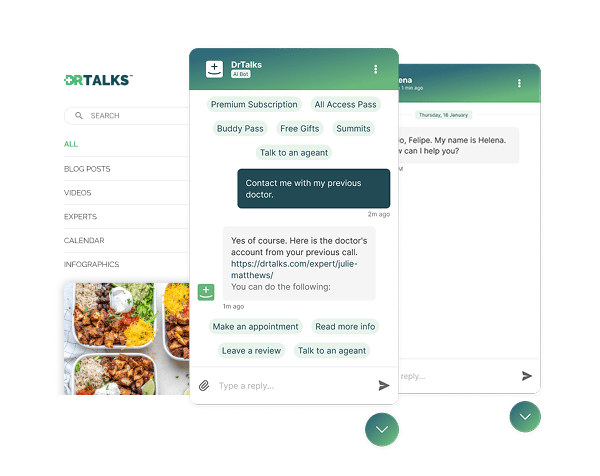

Dr. Talks is one of the most prominent organizers of online healthcare conferences and summits.
Ethora enabled them to create a context-aware AI-powered chatbot to help users navigate thousands of pages of medical content, correctly referencing pages, authors, videos and timestamps. 100% secure and HIPAA-compliant.
This assistant enhances user experience by simplifying interaction with the platform and reducing search time.
- 1000+ summits indexed by AI bot
- Instant user engagement
- Vector embeddings enable intelligent domain expert AI responses
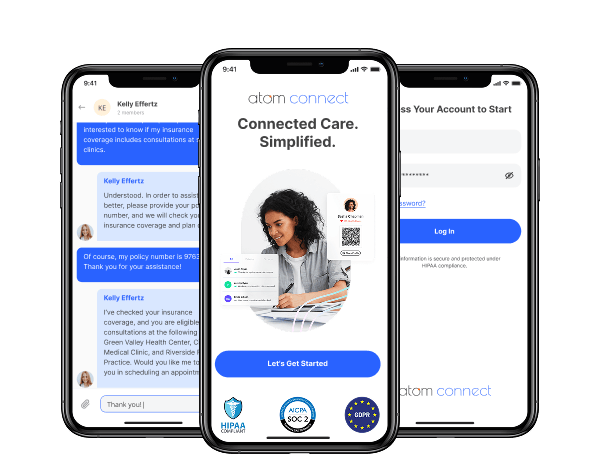

Atom Advantage is a provider of innovative AI powered workers compensation and health insurance solutions in the United States.
Ethora engine has enabled Atom Connect product used for communication between injured workers, nurses, and caseworkers. AI-powered, with documents exchange, and compliant with all regulations such as HIPAA and SOC2.
This solution reduces manual labour for caseworkers and improves patients experience.
- Integration into caseworkers web portal
- White-labelled mobile app for chat and health documents wallet for injured workers
- Instant messaging between caseworkers and injured workers
Give your assistant a chat platform to run
Create a free account, open Account then AI Assistants, and paste your personal connector URL into Claude, ChatGPT, Cursor or Claude Code. Building something bigger, or need it on your own servers? Talk to us.
FAQ
Do I need an Ethora account to connect?
A human user creates a free account and an API key under Account, AI Assistants. An autonomous agent does not need a human: it connects to the open endpoint and calls ethora-user-register, which creates the account and returns an API key once.
OAuth or API key: which should I use?
API keys are the quickest for your own clients and act as you until revoked. OAuth 2.1 is for listed connectors where the vendor runs the sign-in flow and you grant read, write or admin scope; you can see and disconnect those grants in the web app.
Which clients are supported?
Any MCP client. We document Claude.ai, Claude Desktop, ChatGPT, Claude Code, Cursor, VS Code with GitHub Copilot, Windsurf, Cline, Gemini CLI and Codex CLI, plus agent frameworks that speak Streamable HTTP.
Is the stdio version still available?
Yes. npx -y @ethora/mcp-server runs the same server locally with credentials from environment variables. It is the right choice for local development and CI.
Can I self-host the MCP server?
Yes. It ships with the Ethora monoserver deploy. Enable services.mcp.enabled and it is served at mcp.<your domain>/mcp with the same tools and OAuth, so agent traffic never leaves your infrastructure. That matters for healthcare and finance deployments.
What stops an assistant from deleting my app?
Deletions and revocations are annotated as destructive, which is what makes Claude, ChatGPT, Cursor and Claude Code ask before running them. On the OAuth endpoint they also need the admin scope. No tool on the hosted server transfers money or tokens.
How much does it cost?
The MCP server is free to use with any Ethora plan, including the free tier. You pay for the Ethora platform as usual; see the pricing table above.
Where is the full list of tools?
On the tool reference, generated from the server’s own tool list, and in the GitHub README.
