

Last week, I was testing our AI widget feature (part of Ethora AI Agents SDK) with a client’s website, and it hit me: most businesses deploying AI chatbots are making a critical mistake that renders their investment almost worthless.
Contents
- The Problem: LLMs Don’t Know Your Business
- The Solution: Retrieval Augmented Generation (RAG)
- The Technical Magic Behind RAG
- Real Results: Before and After RAG
- Implementation: Easier Than You Think
- Why This Matters for Your Business
- Beyond Basic Web Crawling
- The Infrastructure Reality
- Don’t Deploy “Dumb” AI
- Full Demo Transcript
They’re essentially putting a fancy ChatGPT clone on their website that knows nothing about their business, their products, or their services. When a visitor asks “What does your company do?” the bot responds with generic nonsense like “I’m not familiar with that specific company” or worse, hallucinates completely wrong information.
This isn’t just embarrassing – it’s potentially damaging to your business.
The Problem: LLMs Don’t Know Your Business
Here’s what most people don’t understand about large language models (LLMs): they have a knowledge cutoff. OpenAI’s latest models, for instance, have training data that stops around October 2023. That’s almost two years behind current events.
Even if your business existed back then, unless you’re Wikipedia-famous, the LLM probably doesn’t know much about you. And if you’ve updated your website, launched new products, or pivoted your business model since 2023? The AI is completely in the dark.
I demonstrated this recently using a client’s website for a sustainable energy company called Preshent. When I asked the basic question “What is Preshent?” the AI responded:
“Preshent appears to be a misspelling of present. It could refer to a gift or something that exists or is happening now.”
Completely useless. The AI had no idea this was actually an innovative blockchain-based sustainability platform with specific “spheres” of focus, a dedicated team, and tokenomics.
The Solution: Retrieval Augmented Generation (RAG)
This is where RAG comes in – and why it’s absolutely critical for any business AI deployment.
RAG stands for Retrieval Augmented Generation. Instead of relying solely on the LLM’s pre-trained knowledge, RAG systems first retrieve relevant information from your business-specific knowledge base, then use that context to generate accurate, informed responses.
Think of it like giving the AI a cheat sheet about your business every time someone asks a question, rather than expecting it to know everything from memory.
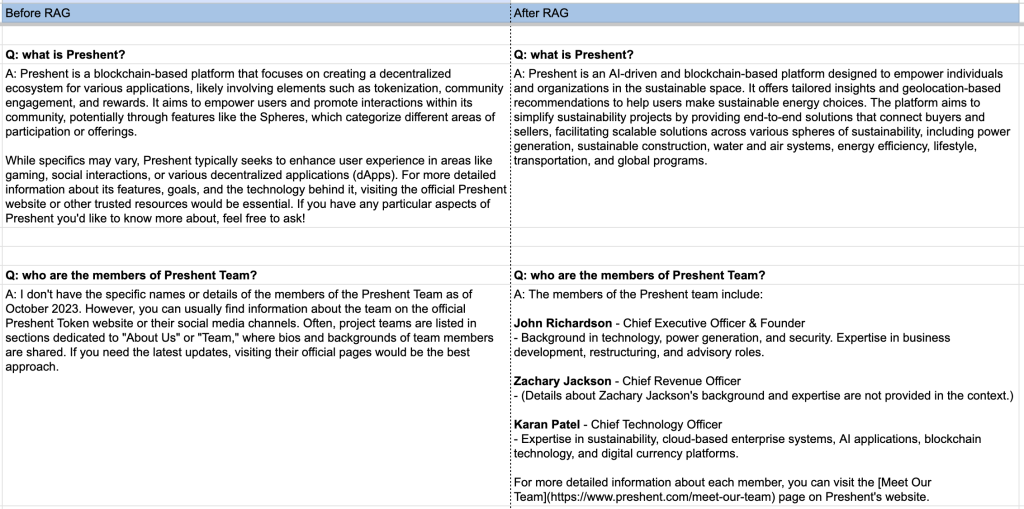
Figure 1: Comparison table – AI bot answers before and after applying RAG (1/2)
The Technical Magic Behind RAG
Here’s what happens behind the scenes:
- Web Crawling: The system crawls your website, following internal links and extracting content from all your pages
- Vector Embeddings: This content gets converted into mathematical representations (vectors) that the AI can efficiently search through
- Contextual Retrieval: When a user asks a question, the system finds the most relevant pieces of information from your indexed content
- Augmented Response: The LLM gets both the user’s question AND the relevant context from your website, enabling accurate, business-specific answers
The beauty is that this happens automatically and only retrieves relevant information for each query. Ask about your team? It pulls team page content. Ask about pricing? It finds your pricing information.
Real Results: Before and After RAG
Let me show you the dramatic difference RAG makes using the same Preshent website example:
Before RAG:
- Question: “What is Preshent?”
- Answer: “Preshent appears to be a misspelling of present…”
After RAG (5 minutes later):
- Question: “What is Preshent?”
- Answer: “Preshent is an AI-driven and blockchain-based platform designed to empower individuals and organizations in the sustainable space. It offers tailored insights and geolocation-based recommendations to help users make sustainable energy choices…”
The difference is night and day. The AI went from completely clueless to providing accurate, detailed, business-specific information.
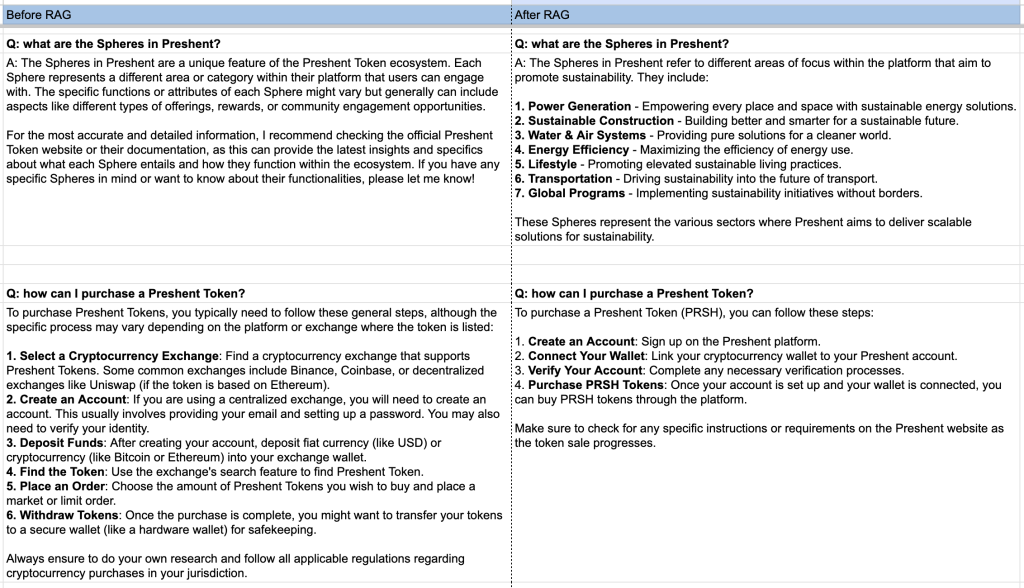
Figure 2: Comparison table – AI bot answers before and after applying RAG (2/2)
Implementation: Easier Than You Think
At Ethora, we’ve made this process ridiculously simple. Here’s literally all you need to do:
- Create an account at ethora.com (free tier available)
- Copy the HTML widget code from your dashboard
- Paste it into your website’s body tag (or use our WordPress plugin)
- Add your website URL to the RAG crawling feature
- Hit the crawl button
That’s it. The system automatically indexes your entire website, converts it into vector embeddings, and your AI widget immediately becomes a knowledgeable assistant about your business.
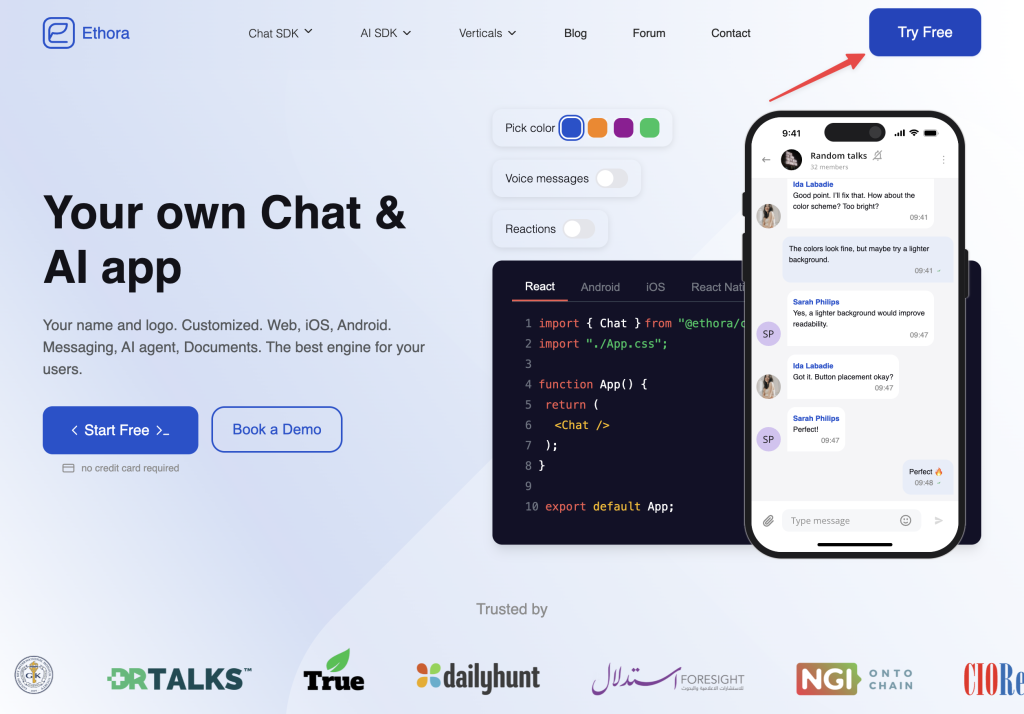
Figure 3: Just sign up for a free account at Ethora.com to test the AI Widget feature
Why This Matters for Your Business
Think about your website visitors. They land on your page, maybe browse around a bit, but they have specific questions:
- “Do you serve my industry?”
- “What’s included in your premium plan?”
- “How does your security work?”
- “What’s your refund policy?”
Without RAG, your AI gives generic, unhelpful responses. With RAG, it becomes like having your best customer support representative available 24/7, instantly answering questions with information pulled directly from your website.
Beyond Basic Web Crawling
While URL indexing is the easiest way to get started, RAG systems can also process:
- Internal documents and manuals
- Product specifications
- FAQ databases
- Training materials
- Policy documents
This makes RAG valuable not just for customer-facing chatbots, but for internal knowledge management and employee training systems.
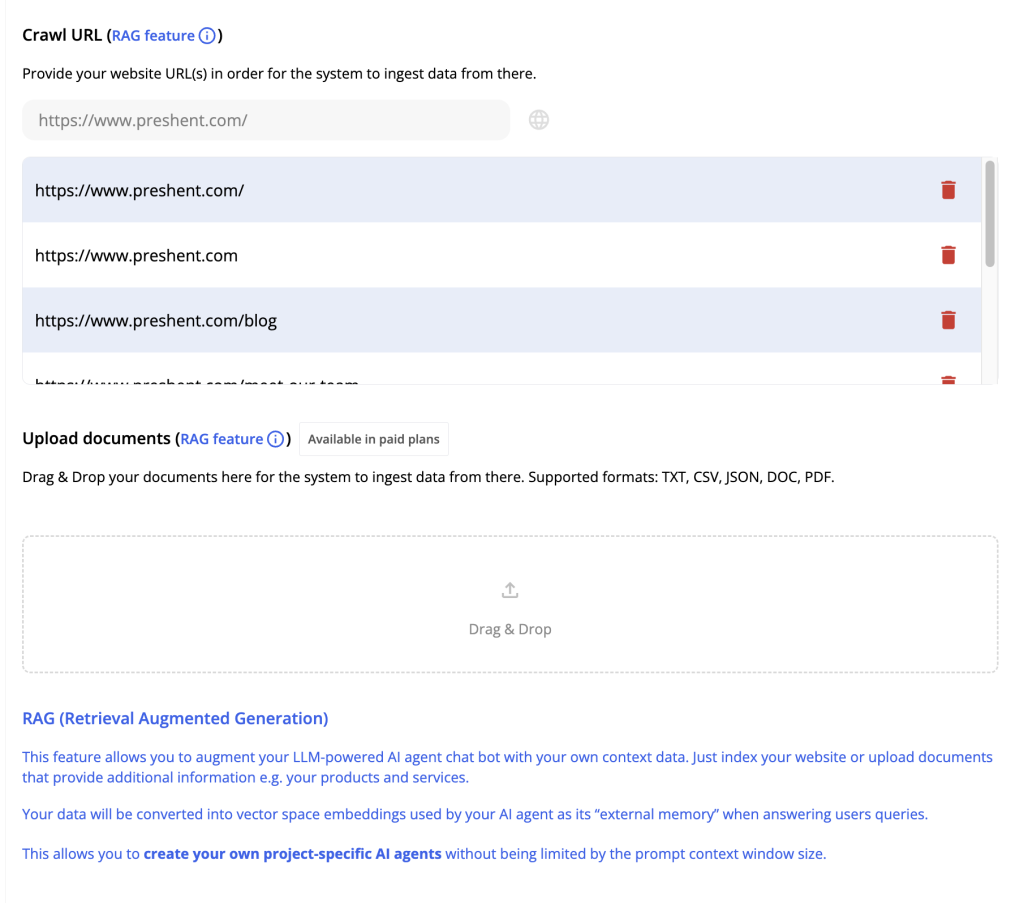
Figure 4: RAG features available in Ethora admin panel
The Infrastructure Reality
One important note: most RAG implementations rely on third-party LLM APIs like OpenAI. For many businesses, this is perfectly fine – your website content is already public anyway.
But for enterprises dealing with sensitive data, we also offer self-hosted solutions where both the RAG system and the LLM run on your own servers. This ensures complete data privacy while still delivering the RAG benefits.
Don’t Deploy “Dumb” AI
If you’re considering adding an AI chatbot to your website, please don’t make the mistake of deploying a “bare” LLM that knows nothing about your business. You’re essentially paying for an expensive way to frustrate your visitors.
RAG isn’t optional – it’s essential. It’s the difference between an AI that actively helps your business and one that potentially damages your reputation.
The good news? As I’ve shown, implementing RAG can literally take just a few minutes. There’s no excuse for deploying ignorant AI when knowledgeable AI is this accessible.
Try it yourself. Set up a simple AI widget with RAG on your website and watch how it transforms from a generic chatbot into a genuine business asset. Your visitors (and your conversion rates) will thank you.
Want to see this in action? Check out our AI widget with URL indexing at ethora.com. Free tier includes generous usage allowances perfect for testing and small projects.
Full Demo Transcript
Below is the complete formatted transcript from my demonstration video, showing the entire process of setting up and testing the AI widget with RAG functionality.
Introduction and Problem Overview
Hello, today is Friday, 8th of August, 2025, and I’m going to tell you about the AI widget feature and also a bit about the concepts of RAG, Retrieval Augmented Generation, and how to teach your AI agent to know more of context of your business, and then how to place the chat widget with the AI bot with this AI agent on your website.
So to do this in our platform in Ethora, it’s very simple to do that. So you can go to ethora.com, click on try free. You can sign up with Google, for example. And I already have an account.
So when you create an account, you will be prompted to create an app. I’m going to demonstrate this using one of our clients’ websites, so the company called Preshent. So I want to create a test demo for them.
Setting Up the Basic AI Widget
So our task, our goal is, so we have this website, and imagine that the visitor knows nothing about this business as they normally do initially. They visited the website. And as business owners, you want your AI agent to be able to answer specific questions about your business for your visitors.
So you want to have this AI widget somewhere like here in the bottom right, for example, with your chats that is responsive. So let’s do this and let’s learn about the concepts of retrieval-augmented generation and URL indexing, vector embeddings and related things as we go.
Because I can imagine I’m the website owner, so I create an app. So an app in Ethora is like a project. So it’s just the context in which you want to use our engine. So in this case, it will be this AI widget. So I’m creating an app called Preshent demo.
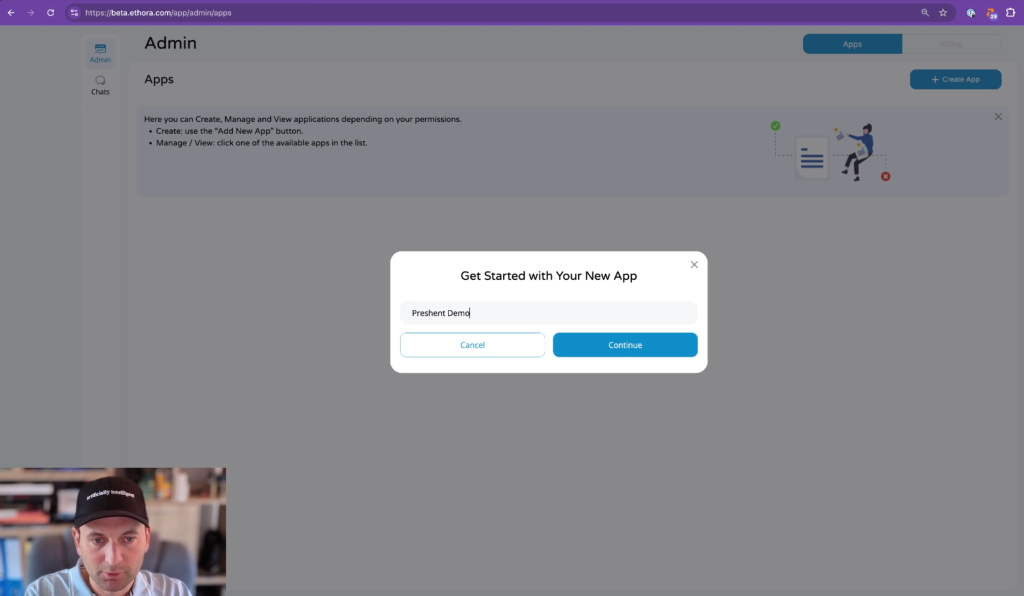
Figure 5: Creating your App (project) in Ethora admin panel
And then next thing, so I see this admin panel dashboard. And AI widget is actually the first tab that I see here. So it shows me that AI bot is offline and there is a code for my website or if I had the WordPress, there is like WordPress plugin code, but I just, I want to use this option, HTML widget.
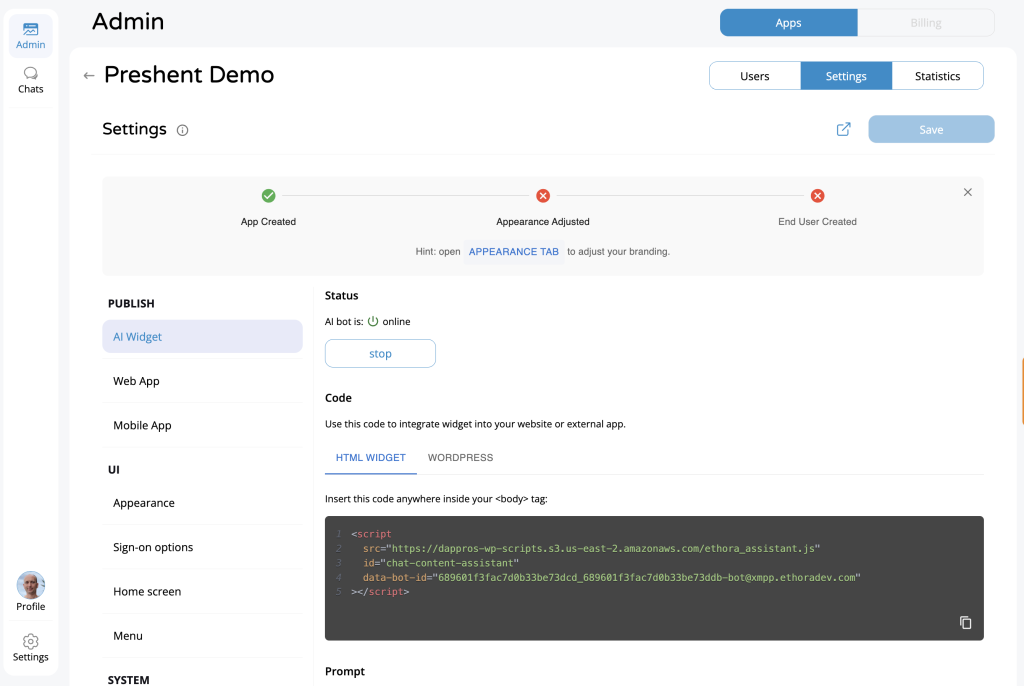
Figure 6: AI Widget tab in Ethora admin panel
So what this means is there is a special code that I need to add to my website so that this AI widget works. So I have copied the code and I’m not going to, I don’t even have access to this website in production, but even if I had, I don’t want to, for the demo purposes to modify it.
So what I’ve done is I created a local copy. So I just, I’ve done this file, save page as, and I created a local copy of this website. So I can play with it for demo purposes.
Implementing the Widget Code
What I’m going to do next is, I’m going to open the, the code, this HTML code of the website in the editor. Right, and as our in admin panel of Ethora, as our instruction says, insert this code anywhere inside your body tag.
So in HTML programming language, there is a special tag body within the code, which designates where we can start editing our content. The header above this is like more technical information. So we shouldn’t place our widget code inside the header.
And I appreciate that for some of the users, this might be a bit too deep and too technical already to start editing some website and some HTML code. So for such purposes, there is an option, for example, to use the WordPress plugin if your website is running on WordPress, or use our no-code options of web app and mobile app.
But I’m going to demonstrate this using this HTML widget. Just be aware that there are other options which don’t involve coding as well. Or you could ask someone to take this code and add it to your website, which for a webmaster or anybody technical within the company shouldn’t be a problem.
So I need to find the body. So this is the body, this is where it starts. And I just want to hit copy and copy paste my code here. Save.
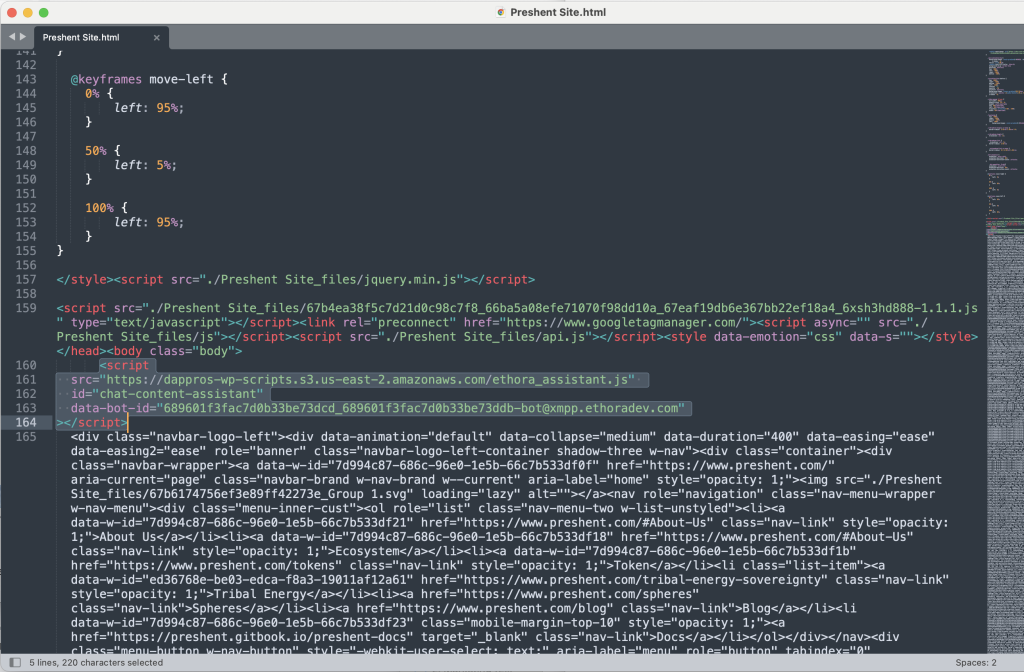
Figure 7: Adding AI Chat Bot Widget HTML code into your website
Let’s refresh this local website. And let me just switch the window back. Now I’m going to, so I save my changes in the Sublime Editor for the HTML code. And now back to our website. I’m going to reload it.
And you will see that in the bottom right corner, we have the widget.
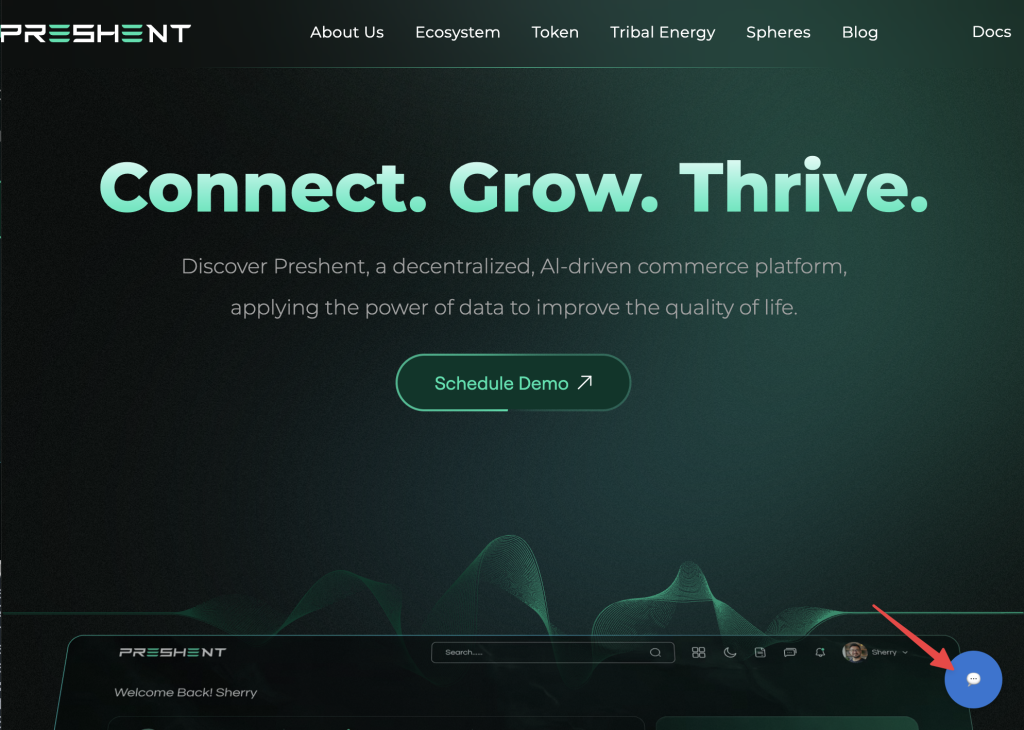
Figure 8: AI assisted widget icon (bottom right corner)
So it says AI helper will answer your questions.
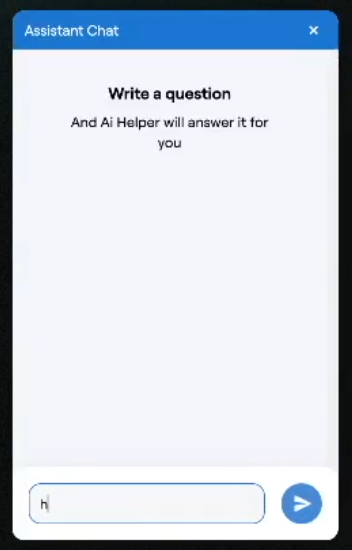
Figure 9: AI assistant widget (activated)
Testing the “Bare” AI Agent
Now, it’s important to understand some things at this point. So right now, this AI bot is offline. So if I ask something, it will not work. So we need to start it and we can test it.
Okay, let’s say hello. And there is no answer. So you have this control in your Ethora Admin panel. So I hit the Start button, and then I can go back to, and you can see the response has arrived. Hello, how can I assist you today?
Another thing which I would like to do is, I would like to now start testing this AI widget. So important thing to explain here is that right now it’s powered by an LLM, large language model. And for our purposes, as a website, as a business owner, we can put potentially an AI assistant powered by an LLM in our website.
However, it will be no better than our visitors just using chat GPT, for example, or Claude, or one of those AI assistants available for them elsewhere. And so there might be some use you can extract from that, so they don’t have to go like to some other interface, but it’s very limited to use for this purpose.
So let’s test this and ask, for example, this about our business. Does it understand anything about our business? “What is Preshent?”
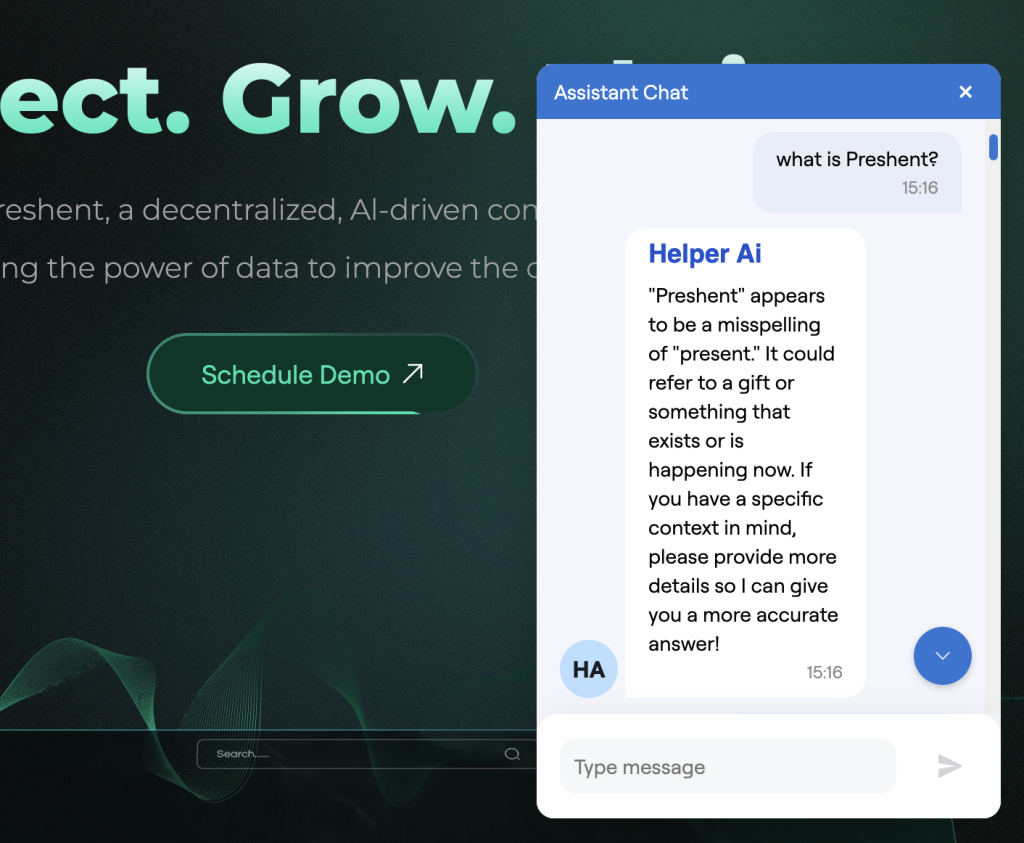
Figure 10: testing the “bare” LLM powered AI agent (sans RAG)
So this is my question for it. So it says, “Preshent appears to be a misspelling of present. It could refer to a gift or something that exists or is happening now.”
It has no idea, in other words. It has no idea about my business, assuming I’m the owner of this business, I want my agent to be helpful. I don’t want to repeat the same things again and again for my visitors, for my customers.
And if my website is large and complex, they might not be able to read and navigate all the documentation. And I want to provide them with the convenience of this human interface, so they can ask questions in human language and ask about my business, ask about my products and services. And this is what I get.
Understanding LLM Limitations (e.g. knowledge cut-off time)
And actually in this implementation, this AI widget is powered by OpenAI API. So it’s the same as if you integrate OpenAI API or chat-gpt, you ask about this. If it’s not able to do like web search or do other external tool calls, which normally is what’s available for you in API integration of the LLM, this is the limitation we hit immediately.
Let’s try something else. So for example, who are the members of the Preshent team? So, because in the website, I have this information. So we do have information about the members of our team. We have three team members listed in the website.
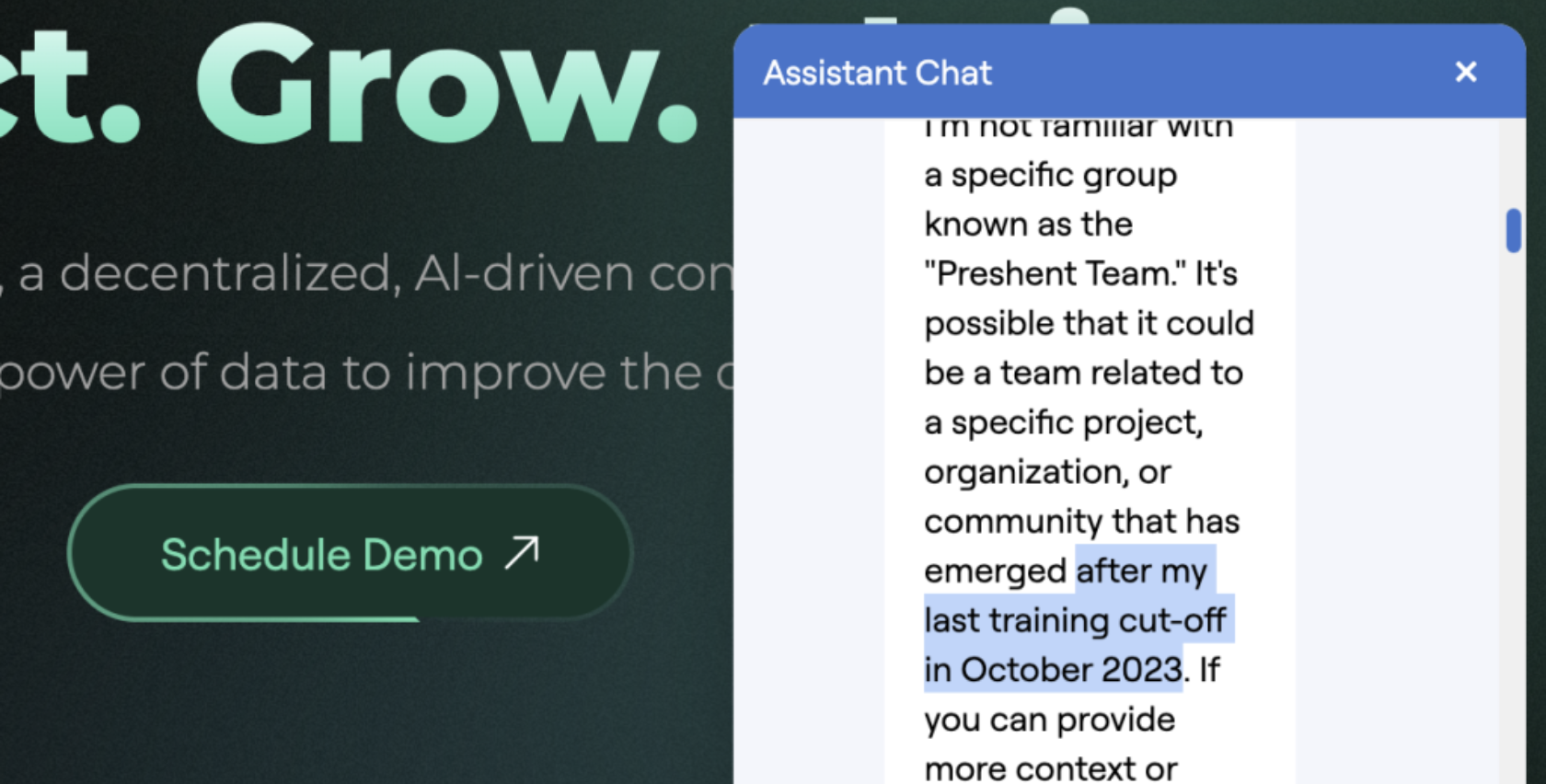
How do we… So let’s ask our AI agent. It says, “I’m not familiar with the specific group known as the Preshent team. It’s possible that it could be a team related to a specific project or organization. Importantly…” See, this is important.
“Or community that has emerged after my last training cut off in October, 2023.”
So this is hugely important point that here our AI agent powered by OpenAI, so this is latest OpenAI API available for us as of 8th of August, 2025. And it confirms that it’s training cut off is almost two years back, October, 2023.
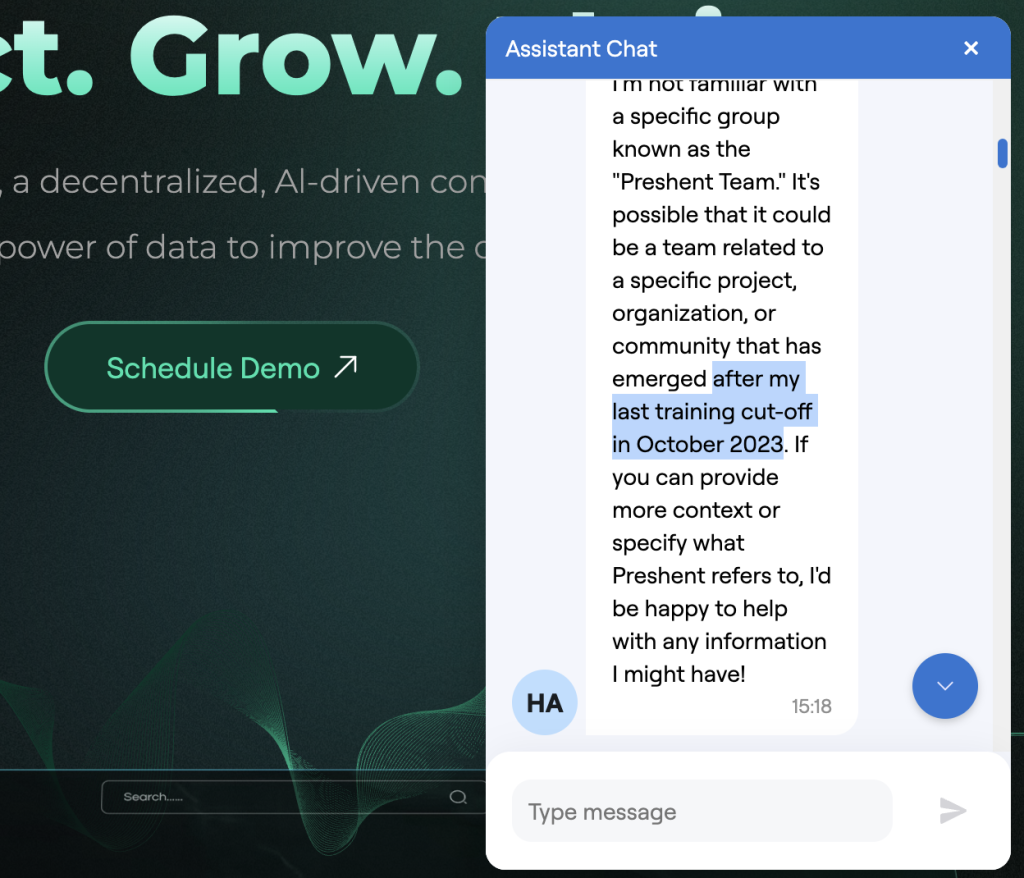
Figure 11. Demonstration of OpenAI LLM knowledge cut-off issue (currently October 2023)
So this is like super important. We should understand this is how like standard LLM works. And the reason it works like this, it would probably love to provide us and be able to know and index everything, but it costs a lot of money to train the LLM. So they don’t retrain it every day.
The way it works in the chat GPT and Claude and other interfaces is they have an LLM with trained weights. And for example, they have indexed like the whole internet, everything that was available publicly at a certain date. They have trained this into a neural network, into vector space, into all these embeddings.
And LLM at its core is using that to answer the questions and to predict the text and to do all this AI agent, AI assistance magic that we are able to witness and use.
The Need for Current Information
But in order to be able to answer specific questions about specific things, for example, if you ask who is the President of the United States, or other like more up-to-date information, if it was using just the LLM core, it would often provide incorrect responses that are not relevant to the current date and time, or just not provide enough information.
So that’s why the web interfaces, the public facing chat interfaces, they are augmented with additional tools. So for example, ChatGPT or Claude, Perplexity, they’re able to do a web search and be augmented with additional data. So it will probably be able to provide this.
However, when we run a chatbot specifically for our visitors or customers, or if we want to build, implement a similar chatbot internally for our internal team to use, we are not able to embed like chat GPT or other interfacing here and for different reasons we might not want to.
So we, for example, use either the API or even we self-host our own open source LLM system so that the data doesn’t travel anywhere outside of our systems, which we might prefer for compliance, security, or other business or commercial purposes.
More Testing Before RAG
So this means that obviously this doesn’t, is of very limited help because it tells us, my knowledge cutoff is October, 2023. So this is one thing to remember, knowledge cutoff is back in the past.
And another important thing is it has not, in most likely if we are like a small business or we have emerged recently, we just updated our website recently. When if we are a large business, we are not on Wikipedia, we are not on internet archive, our latest website, it doesn’t know anything about us, or it only knows like some limited information which was available in the past.
Right, and just to complete our comparison, because I’m going to now tell you about how this works before and after. So another important aspect of this specific business on this specific website I see is spheres.
So what is spheres? Spheres is like something specific to Preshent, the way they structure, it’s about power generation, sustainable construction, energy efficiency, transportation. So the structure, the information, and the business within the spheres. This is obviously an important aspect for the business.
So let’s ask again for our testing purposes, “what are the spheres in Preshent”? And here again, we get like similar response that it doesn’t know what that is. It likely refers to different areas or categories that the organization or the project focuses on. Really woolly and unhelpful answer.
And I just want to quickly mention here that this might fluctuate. So for example, I will show you in another page where I recorded when I experimented with this before that it was able in some instances to provide me with slightly better answers, but still it was like really generic and not helpful.
Another aspect, again, for comparison purposes, there is a token, so we can see there is certain market, there is a token that people can invest into or purchase. And these tokens are probably available for sale. So this is, we can understand this from the website.
And let’s, Let’s ask the AI agent, how can I purchase a Preshent token? So here, actually, so what we got in response is something a bit more specific. So it says research. So it understands that this is related to certain cryptocurrency or blockchain related project.
It says I should research first, choose a cryptocurrency exchange that lists this token, create an account, deposit funds, buy transfer to wallet, stay informed. It’s a bit more specific, but again, a generic answer and potentially this will be misleading or even dangerous for my visitors if I just put this chatbot powered just by OpenAI API out there because this information might simply be a bit misleading.
Introducing RAG Features
So what is, if this token is not listed on exchanges, or what if there is certain specific algorithm which is presented on the website for the token, and it is presented there, but the AI bot does not reflect that.
So this is all sort of introduction to explain why it is important to have the retrieval augmented generation or RAG functionality when you deploy an AI agent at your website or to be used internally.
And this is how it works. It’s much simpler and much faster than what we just have gone through in discussing this problem. Because in the Ethora system, we just automated this and made it available in the admin panel.
So there is a functionality called RAG features. So we can crawl URLs and upload documents as long as we are on the paid plan. On the free plan, I can crawl my website. I just add the URL of my website here and I hit this button.
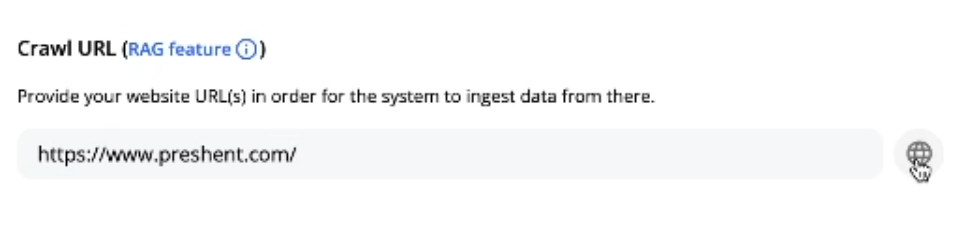
Figure 12: the Crawl URL RAG feature in Ethora admin panel
What it does, it’s checking this URL that I have provided and it’s also in the background, our server is checking which other URLs are available on the website, which are linked from the one, the homepage, assumingly, that I have provided.
And it crawls those URLs available there. You can see the blog is indexed, meet our team is indexed, spheres, tokens, and tribal energy sovereignty. All those pages have been indexed.
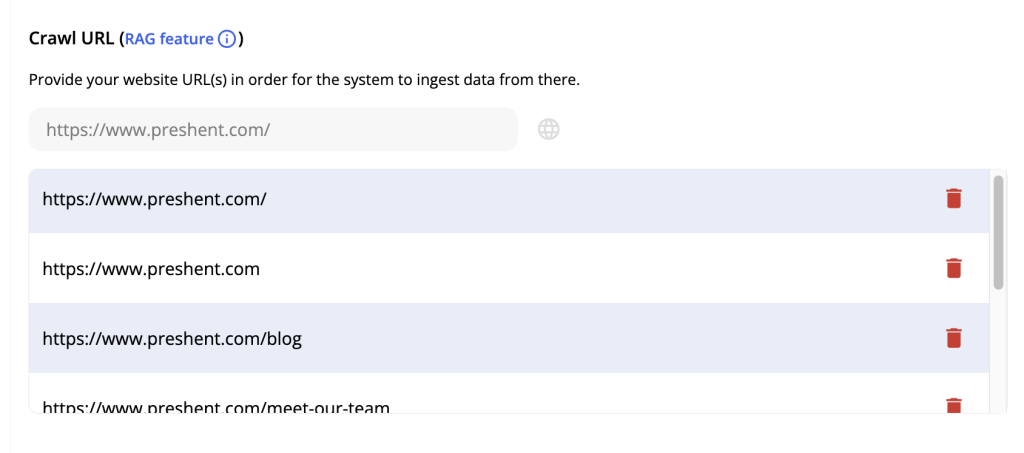
Figure 13: Pages indexed via Crawl URL feature from your business website.
How URL Crawling Works
So it does two things. It crawls, it follows the URLs to check the whole of your website, but it will only limit to your domain name. So it doesn’t index the whole internet.
And then its second step, it indexes the web pages to extract information from them. So behind the scenes, I will show you later how this looks a little bit, but let’s just test it in our chatbot. if it has affected its behavior.
So same question which I have already asked. “What is Preshent?” The answer is Preshent is an AI-driven and blockchain-based platform designed to empower individuals and organizations in the sustainable space.
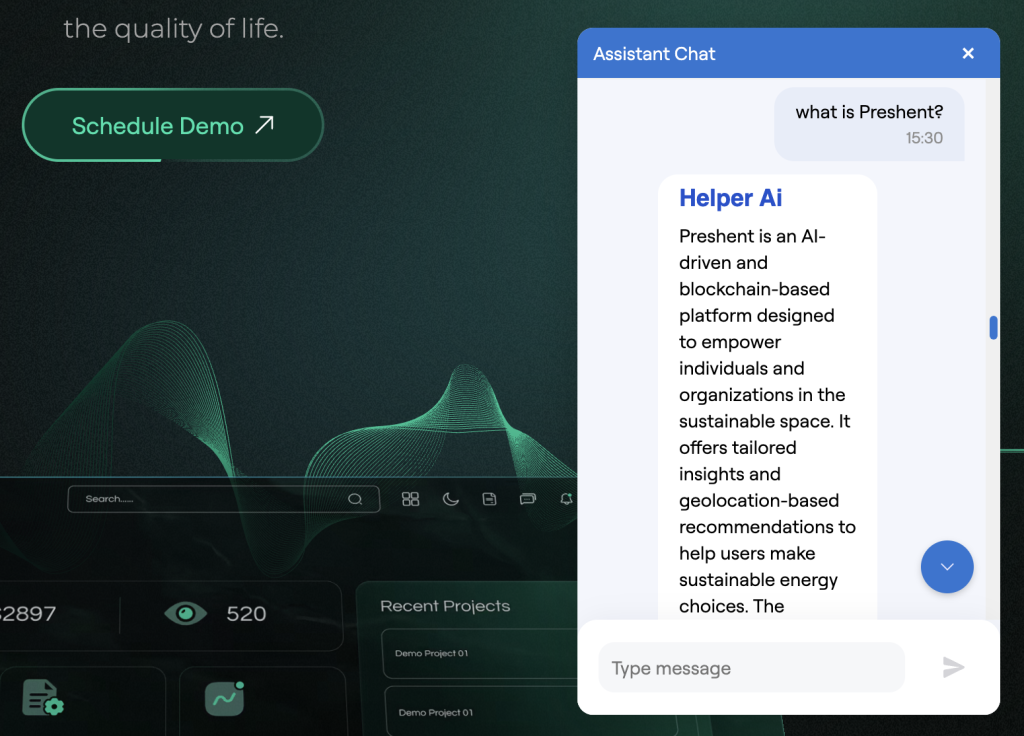
Figure 14: AI chat bot response after RAG (Url Crawling and website indexing) has been applied.
This is new, this is brilliant, This is like specific context. This is specific to our business. It offers tailored insights and geolocation-based recommendations to help users make sustainable in energy choices. Solutions to connect buyers and sellers, facilitating scalable solutions, energy efficiency, transportations.
So this is, you can see immediately, this is like specific. This provides clear, concise, correct answers to answer to the question.
Testing Team Information After RAG
Who are the members of the Preshent team? Let’s see if it answers this, if it’s able to answer this correctly. Again, we see that the response is actually spot on.
So we see, it says John Richardson, CEO and founder, the background, Zachary Jackson, CRO, Chief Revenue Officer. We can see there is a limitation of the context here. So let’s look into this point quickly afterwards.
It says Karan Patel, CTO, Chief Technology Officer and his background. And for more information, it now provides us with a specific link to the website page, Meet Our Team.
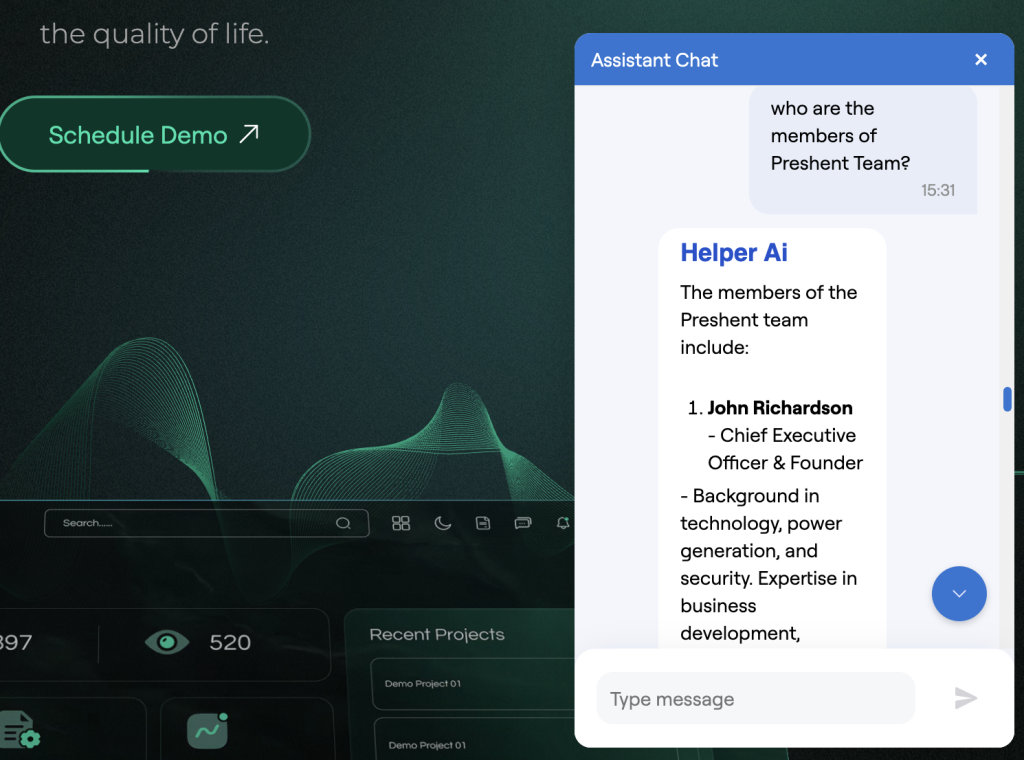
Figure 15: AI chat bot response after automatically discovering, crawling and indexing “Our team” section
Again, you can compare it with the previous answer. The AI agent has been able in this instance, after we have done the URL crawling and indexing, it is now able to provide us with correct names of the team, their backgrounds, and link to the website.
The only hiccup we see here is that it acknowledges that the certain context limitation. So that’s, we can talk a little bit about this later. Let’s just finish our testing for the questions.
Testing Spheres Information
So let’s ask about the spheres because that was another important aspect. The spheres in Preshent refer to whereas areas of focus within the platform that aim to promote sustainability. They include power generation, sustainable construction, water and air systems, energy efficiency, lifestyle, transportation, and global programs.
This answer is spot on. It’s not generic, it’s not woolly, it’s not hallucinating anymore because that’s another problem with LLMs. Sometimes if they don’t know the answer, they might hallucinate.
So by us doing the URL indexing and providing retrieval augmented generation, providing this additional business specific context, we are making sure that it doesn’t hallucinate, it doesn’t invent things, it just answers using our specific information.
So this is again, this is spot on, this is brilliant. Let’s try with the token purchase question.
Testing Token Purchase Information
How can I purchase a Preshent token? Create an account, connect your wallet, verify your account, purchase PreSh tokens. So again, specifics, we have specifics. We see this as information corresponding to the website.
We see the correct abbreviation of the token. We see that it doesn’t talk about some generic exchanges. it actually has provided the information akin to a technical support, customer support officer would be able to provide reading the documentation.
So in this case, this is actually helpful. So the user has been able to ask the question using the human language and the system has responded using the information from the website.
Summary of Results
Right, so this is, this I would say is a great result and you were able to see that we achieved it really in a few minutes, if not seconds. So it took me like just a few moments to create an app at ethora.com to copy this HTML widget.
To then we spend time talking about and testing the AI agent, like bare AI agent powered by, in this case, by OpenAI API. We saw that it was not able to respond to specific questions. However, it’s obviously it will be helpful generally as a LLM powered AI, but in our business specific questions, it did not perform well.
But then how much of a difference and how significant the change was when we simply, again, for just a few seconds, we just ran this crawling URL RAG feature and how much of a difference that has made towards the behavior, the clarity, the knowledge of our AI agent.
I’ll just quickly– so that’s it in a nutshell. So it’s possible to do this in just a few minutes, so like 5, 10, 15 minutes, and you have the AI agent widget on your website, especially important for large and complex websites.
But I would say this would be useful for any websites, any businesses that think that in some cases their visitors would want to and would appreciate a human language question to be answered in human language without them having to read through all the pages of the website, all the available documentation.
Behind the Scenes: Technical Implementation
That’s it in a nutshell. I will just provide some additional information now in terms of what happens behind the scenes for those of you who might be interested in that.
So let’s see what do we have available in our admin panel in our dashboard in Ethora. So I already explained that this button allows you to start and stop the AI bot. This section allows you to copy the widget code.
So how this works is behind the scenes on the server of Ethora, there is a chatbot [service] that is running a copy of the chatbot, which is only is specific to your specific project. So to my application, in this case, it’s called Preshent demo.
So if I create it for one of my websites, it will only be a copy running for my website. Obviously, it’s a different instance, different context for someone else’s website.
And then we have multiple options of how to embed or integrate that into our business or into our interfaces for either our visitors, our customers, or maybe our team or our partners, depending on what you want to do.
Widget Integration Options
So in here, in the AI widget section, we have the HTML code, which we can copy into any website like we saw here, or we could even have some local page, intranet page, internal web portal. So anything like that can be served with HTML widget.
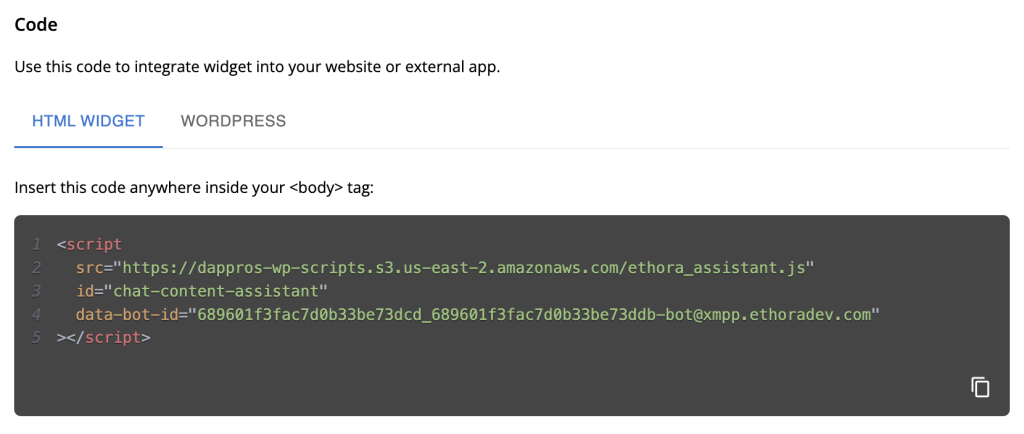
Figure 16: AI Chat Bot widget HTML/Javascript code (integration option)
Another option is the WordPress plugin. So for WordPress website owners, that is even simpler and easier. You just install it from the WordPress plugins directory. And then in the settings in your WordPress admin panel, you just need to provide this address for this chatbot.
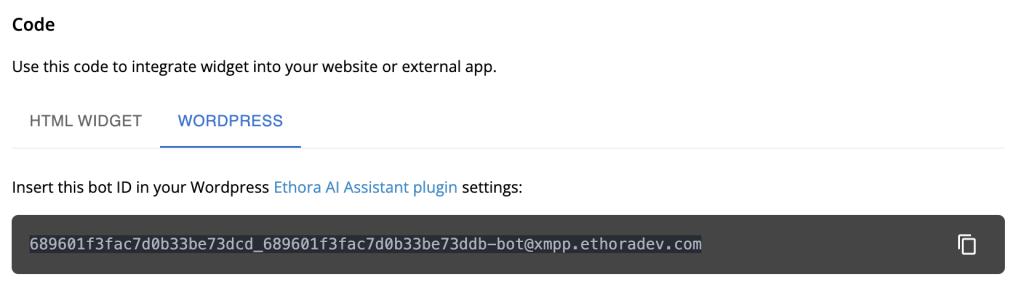
Figure 17: WordPress plugin (via chat bot ID) integration option for Ethora AI Chat Bot widget
Again, this is chatbot, so you need to provide the correct bot ID to make sure that it is the one that belongs to your application, to your project. And those are the options for the widget.
There are also options available in our platform for sort of no-code options to build your own web app and or your mobile app for iOS and Android. So you can build your own web application, change the color, colors, logos, set up different sign-on options, create chat rooms and put the AI bot into one of the chat rooms over there.
So you can choose where it should be. It’s kind of more advanced additional options that would be relevant for some projects. But for majority of the projects, majority of the websites, the AI widget is the way to go.
RAG Features and Prompts
So you simply copy the code or use the plugin and embed it, make sure you start it. And then you can use the crawl URL feature. So don’t forget this. Provide your website URL. It will index the whole thing for you.
If you need to remove pages, you can just simply remove pages from here. You can re-index, you can remove pages. So, like so.
Another thing to mention here is prompt. Prompt is something that, as many of you would know, is what is going to the LLM as the question. So what happens behind the scenes when something like this is used, there are two options.
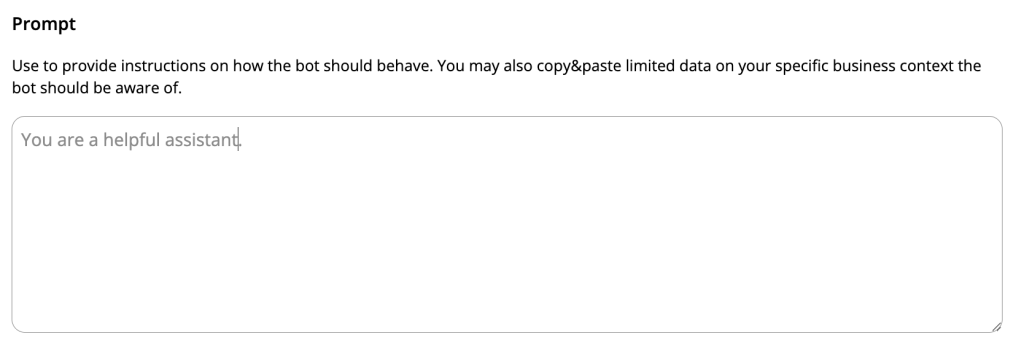
Figure 18: Prompt (for your AI Agent / LLM) input option in Ethora admin panel
Again, I should reinforce and underscore that you have options in terms of how this system works. By default, this AI bot is running powered by OpenAI API integration. So our system takes care of this widget, of this admin panel of the backend layer, but the LLM part is fulfilled by OpenAI mainly.
So what that means is that we send a prompt, so with each request, with each question from your visitor, from your user, we take that question, we add the prompt. So for example, the standard prompt is “You’re a helpful assistant.”
And we send that question to the OpenAI LLM via API, similar to how you would use chat GPT, for example, but this is done in automated way. And then the response will be provided to the user.
How RAG Augments the Process
However, it is important to explain here that what happens when we use this functionality, crawl URL or RAG, retrieval augmented generation functionality.
In here, we have an additional layer. It’s like additional knowledge layer, a memory layer, extra memory if you want, that our Ethora platform provides. So when it has indexed your URL according to your request, It has crawled your website URLs and indexed all the pages.
It stores the information internally and converts it into vector space so that LLM can use it as additional extra memory. So here, for example, is how this looks like during the pre-processing stage.
So we store them into text MD files. So for example, you can see here the team.
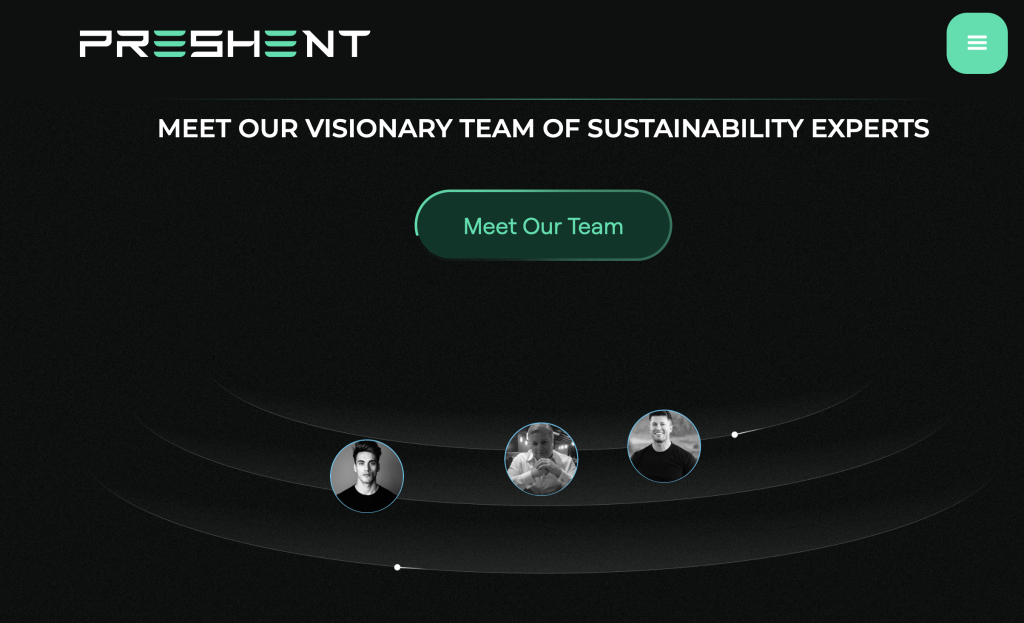
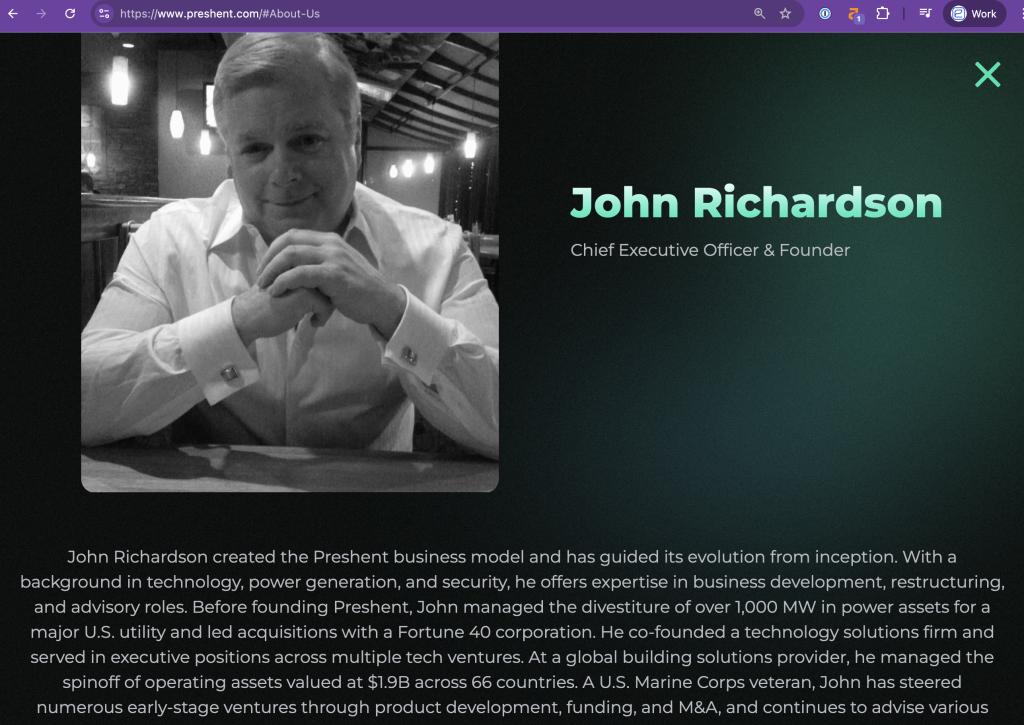
Figures 19 and 20: the “Team” section at your website
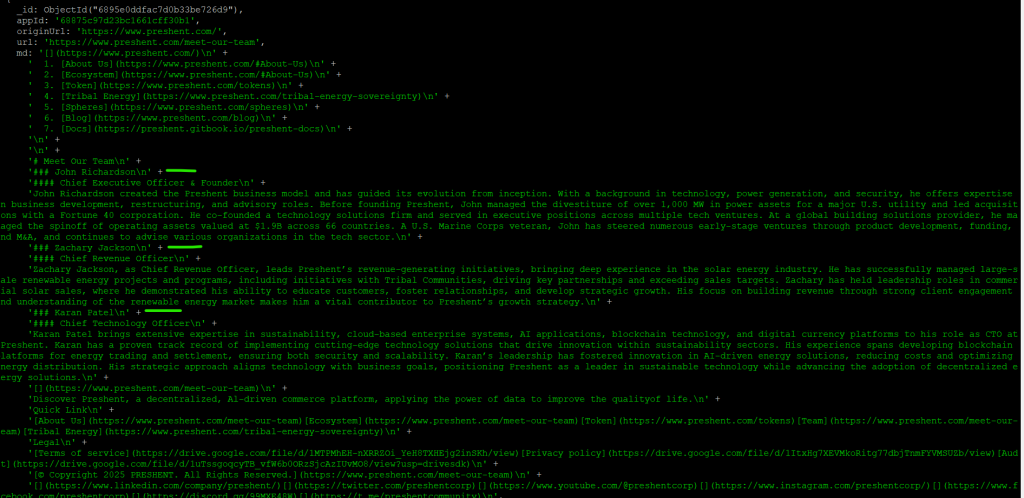
Figure 21: website information stored during RAG preparation (MD file before processing the vector embeddings)
The team is, the team page has been indexed like so. Then what happens is LLM is not, so AI agent is not reading the information from this plain text.
What we do behind the scenes is we convert this into a special vector space format, which is called the vector embeddings, vector space embeddings as mentioned here. Again, according to OpenAI format in this case, if we’re using another LLM, then we use embeddings according to its format, we use the vector space and dimensionality according to that LLM.
The Magic of Vector Embeddings
And then what happens, so here is like super exciting, at least for me, this is like magic. So this is where your business, you leverage the combined effects of this huge and super clever omni kind of knowledgeable LLM, plus you augment it with specific knowledge of your business.
So the way it works is when the request is sent, this query along with the prompt is augmented with the additional context extracted from this vector space, which was generated from all this plain documents, all this information that was indexed from your website.
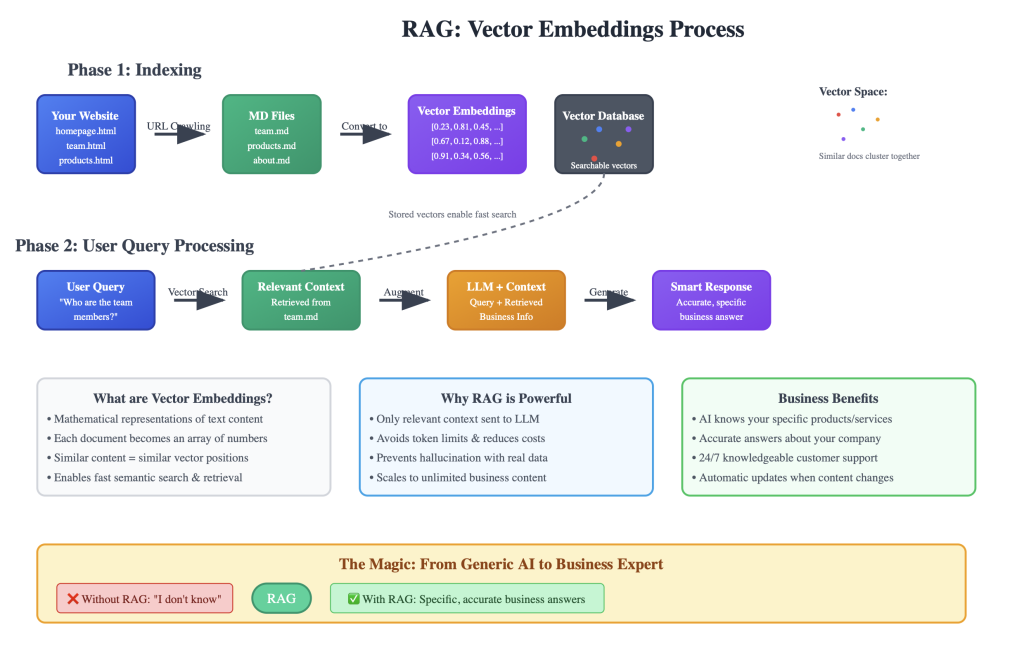
Figure 22: Vector embeddings explained within RAG assisted process of responding to user’s query
So imagine this as a special snapshot of your specific business, local business knowledge. So let’s say this website has been converted into special machine readable format, almost like memory stick, which is added to ChatGPT, let’s say if we’re using OpenAI, as an additional information every time it has to answer the query.
And the beauty of this, we are also, because this is a vector space embeddings, And it’s very easy using the mathematical algorithms and like distance between documents to retrieve only the relevant information.
Contextual Retrieval Process
So for example, when we ask, who is the team behind this business? Or what is this about? Or what is this product or that specific service? The context which is extracted from that augmented vector embeddings knowledge base that we have created here as additional layer.
That context is extracted only for that specific query. So when we ask about the team, the LLM is provided with additional helping guides. Like we can say that this is added to our request, to the user’s request.
So the LLM is able to answer the request using this guidance. It’s almost like you have an executive or president meeting the press and instead of having to read like a thousand pages book they are provided with short snapshot like specific paragraphs for each question somebody from the press asks.
So and this is done automatically with each query and this information is carbon specific. It’s very precise. It’s related to a business because it was indexed from your website. So this is brilliant technology and this is why I suggest you remember it and you use it. It’s called a RAG retrieval augmented generation.
Document Upload Options
And we have implemented crawling URL. That’s like the probably most important feature, the easiest for you to use. You just provide your business website and it does it automatically for you. Another option is to upload your documents.
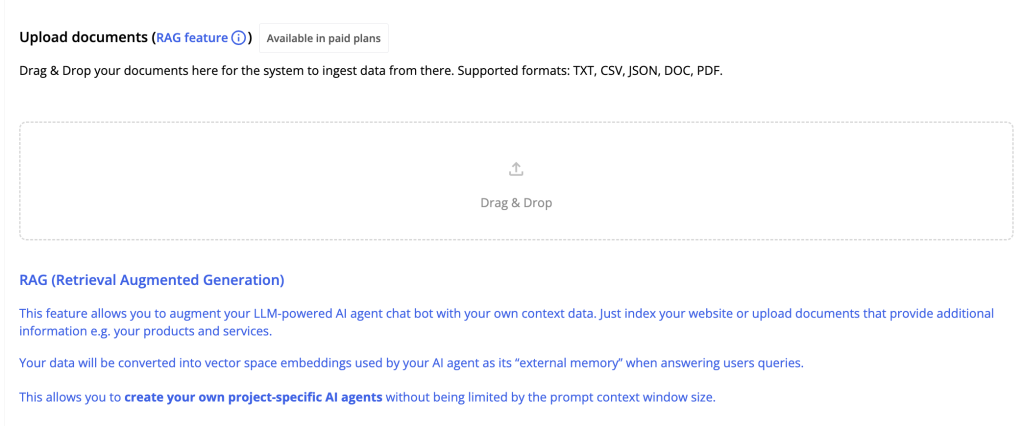
Figure 23: document upload option for RAG processing in Ethora admin panel
So it’s similar, you drag and drop your documents, the system will extract the text, the knowledge from the documents, will process it into specific format of the vector space that the LLM understands and will whenever relevant will be providing that information to the LLM when it’s related to the context of the question that user asks.
Alternative: Manual Prompt Approach
Now let’s quickly address the prompt section. So normally, like you have just seen, the URL indexing has taken care of the whole thing for us. So now we have the AI agent, it’s trained on our website. We didn’t have to do anything.
But prompt is normally, like if we didn’t have this RAG features, the URL crawling or documents processing features. In that case, the prompt window would be the only option available for us to provide additional information about our business to the LLM.
Otherwise, it’s like simple plain chat GPT, even worse than that because we’re limited by what’s available for the API. So here we could, for example, if we wanted the AI agent, we didn’t have this crawling URL feature, so upload documents features.
If we only had the prompt functionality, then what would happen is we would need to put all the information into prompt. So I would like take the take the text of the website, like from HTML, like copy paste into text, this, you know, CSV and D format, and copy and paste it here into the prompt window section.
Problems with Manual Prompt Approach
There are multiple problems with this approach. One is like, it’s tedious, it’s a manual process. Obviously, second is again, like related to that, we won’t be able to do this all the time. So somebody has to keep adding this information as soon as something updates.
And third is the context window limitation, which impacts the precision, the knowledge, the costs of using this. So in case you were just dragging, dropping and like sending everything in the prompt, This means that every question that your user asks, like I’m asking about the token, I’m asking about the team, every question will be supplemented, augmented with this prompt, sending the whole like corpus of your website pages, your documentation, each time to the LLM.
There are multiple problems with that, As you might figure out already, I’m sure you have figured out, you have tested maybe with some like existing LLM systems, context window is an important limitation which might affect your work.
LLM systems often have a limitation of certain amount of tokens. The more expensive advanced ones have like larger token context window size. The cheaper ones have, or faster ones have smaller context window size.
Advantages of RAG Over Manual Prompts
So you might hit this limit and it might just tell you I cannot accept more of your website pages or business documentation anymore. Even with the larger ones, you might hit that and also it will work slower and it will eat your tokens, consume more costs or GPU power if it’s hosted locally.
So those are the limitations. And again, the beauty of this approach of retrieval augmented generation is that And again, the beauty of this approach of retrieval augmented generation is that it doesn’t send all your context, doesn’t augment the queries, doesn’t spam the LLM with all the irrelevant context all the time.
It only provides the relevant context, which solves this problem of the context window. And this means that you can index pretty much as much as you want. You could have huge amounts of information indexed from your business specifics.
And during this prompting, this query and pipeline process, the system will automatically pick only the relevant information from your internal context that is relevant to this question or query of the user, will augment the question with it, and the LLM will provide a brilliant response based on that information provided.
Infrastructure and Hosting Options
Another important aspect I should mention is related to this is again like multiple options for hosting and for infrastructure for hosting this AI agent. So in this case, so it’s important to note that this AI agent is hosted partially at ethora.com.
So this is where this API layer, this back-end logic, the chat widget interface, and it’s called hosted. and also where this happens, the crawling, the indexing of the documents. This is where it happens.
And then there is an LLM server, which can be like one of the third parties, like OpenAI in this case. And it’s important to mention, there are additional and other alternative options available.
So for example, you could take, you could have your own server of Ethora. so under enterprise option. So you could have this whole logic working on your own server or on dedicated server hosted and managed by us for you.
That’s one thing, and second, the LLM can also be hosted on your server or dedicated server for you. That would be useful in instances where you would want like more control, more of a throughput, more availability for the system.
So you don’t want to rely on third-party providers. You don’t want to expose your business context or questions from your users potentially to those kind of two third-party systems, such as OpenAI.
Cost Considerations
In some cases, or many cases, if you have a high volume, it will be cheaper as well, because with OpenAI, you would have to pay at some point. So Ethora, our platform provides in free tier, we have an allowance, which is good, and it’s enough, it’s quite generous.
So it’s enough for small projects, for lower volumes, for like startups, to use it on the free plan. However, when you start using at higher volumes, you would have to pay to a system such as our Ethora, because we have to pay to OpenAI, or if you implement something like this from scratch, then you have to pay to OpenAI anyway for their tokens, for the use of their API, for the LLM, for embeddings and those kind of things.
So that creates additional transactional costs for you, which you might avoid and you might decrease them if you run a dedicated server, which means that you pay for a GPU server, which is running a powerful GPU that is able to run this large language model.
And you know that your flat fee for your server is certain amount per month. And then all the throughput that your server can handle will be included into that flat monthly cost for you.
Enterprise and Compliance Considerations
And obviously, this would be potentially a preferred feature for sensitive kind of compliance sensitive, security sensitive type of businesses and verticals, such as for example, as finance or healthcare.
So for HIPAA compliance, for additional finance compliance to make sure that any information, any questions from the users are not exposed, then a self-hosted dedicated instance of the system, including the Ethora server and the LLM server, which are provided together, would be the preferred options.
And there are multiple options that we can provide for the self-hosted LLMs. There are many open source LLM platforms which are commercially friendly and they are open source and they are cheaper to run on high volumes on your own GPU server.
So that is completely not a problem. The main reason that we use OpenAI API here in the free tier in the demo version is that it is easiest to demonstrate, it’s easier to use, and it’s enough for many projects, especially during initial test, demo, MVP, POC stages.
Also, for websites, for like essential websites, AI agents that provide information on your website and answer like questions specific to, for example, to websites, to open source documentation, this kind of implementation, deployment, is totally enough.
You are not exposing anything sensitive or secret here because all your website is indexable by search engines anyway. You’re open, you’re actually interested in your users and in the AI agents in your chatbot to ingest as much as possible information from your website.
And the questions of your users also will be mainly related to something like open and specific to your website.
Final Comparison: Before vs After RAG
Okay, and let’s summarize this a little bit, our whole thing we discussed today. And I just want to also provide you with this comparison of how the system, how our widget, our AI widget worked before RAG, Retrieval Augmented Generation, and how it started to work after RAG has been enabled, after we were able to successfully and quickly crawl and index our website.
So this is like, I copy pasted this from my previous experiment, but this is very similar to what we have just done. So in case before RAG, the answers are really generic. It doesn’t know about our business. It might know something, it might extract some information from my previous conversation with it, but it’s generally generic and sometimes misleading.
After we have indexed, the answer is specific, it explains what our business is and in which vertical or direction it works. Again, it’s like super specific. It’s based on our website information.
The members information is, it’s not able to answer. It quotes the cutoff time, knowledge cutoff, which is typical for large language model, bare bone API. So it’s the knowledge cutoff is October, 2023. It doesn’t know anything. It recommends to go to the website, not helpful.
After the URL crawling and RAG feature enabled, it’s able to provide more information. In my previous, this is actually, I should quickly explain what happened here is, in my previous run this morning, I saw that the system was only able to provide information about two members of the team, two out of three, and it didn’t provide information about the context for one of them.
This had to do with the token size limitation, which we set in the settings of our communication with OpenAI and also with the depths of the indexing of the pages. So afterwards, our team has adjusted and enabled additional depths of indexing and has fixed some things there.
So in the second run, which I have done here with you in this recording, it has done a better job. We still had hit context, the tokens limitation, I believe slightly, but it was able to provide all three members of the team and provide background, most of the background for them.
And in both cases, the system was able to correctly reference the website page, which obviously we never provided to it. We only provided the homepage URL. This is the website page that comes from our vector space embeddings from the system, learning about our website structure on its own. So this is pretty cool.
So again, helpful response, specific to the point, and it was actually better, you can see here, it provided the answers about all three members of the team, of the top management founders team.
Spheres and Token Comparison
Spheres, spheres again like in the first test run, it has provided some information about the spheres actually, even some of it has been useful, but it’s quite generic. In my second run, it didn’t even know what spheres is and it didn’t even know like similarly with the first response, it was actually worse in the second run.
And the reason for this could be that maybe I have chatted with the system before, maybe I have provided with additional information during that session. So the sessions get reset. That’s another aspect we can discuss, how to make them continuous.
But for this purpose, let’s just say that there could be fluctuations, but generally most of this is not useful if you don’t do the RAG, if you don’t provide your website index to all your documentation for the AI agent to augment its knowledge with it.
While again, with RAG, our system has provided clear, specific, correct information on all seven spheres of Preshent platform.
On the token, again, a bit slightly relevant, but quite generic and potentially misleading information without the RAG functionality, without indexing the website, just based on OpenAI LLM. I wouldn’t advise to use that sort of setup.
While with RAG, again, it’s clear, it’s specific, it’s based on the website information, so it is actually helpful.
Conclusion
That’s it. So I hope this was useful, and not just in terms of demonstrating our feature of AI widget with the Ethora platform, but also for educational purposes to understand what retrieval augmented generation is, how you can quickly and easily leverage within your business context, the LLM large language model, but how to avoid or cover its pitfalls with providing it with this additional augmented information about your business by indexing your website and converting it into vector space embeddings.
And similarly, you can do the same with your documents. Thank you for your attention and good luck with your AI-assisted business journey!
Bonus content – video version of this article:
Keep Reading
- Why RAG is critical for customer support AI
- Chatbot UI design — the best tools for effective UI
- New AI Bot tab — launch your own AI bot, no code
Fix your website chatbot properly — explore the Ethora AI SDK, use the agent chatbot builder, or start building for free.
More from Ethora: self-hosted LLM AI agent, self-hosted chat server on AWS.

Share with your community


More Articles

Development
Oct 5, 2026
Cross-Platform App Development Frameworks in 2026: 10 Options Compared, Real Trade-offs, and Chat + AI SDK Fit
In 2026, evaluating cross-platform frameworks is a complex matter. There are many practical questions: Which ones have solid chat and AI SDK support today? Which ones won’t force a painful migration when the next major OS version drops? And what are the real engineering trade-offs once you move past the marketing claims? We’ll look at […]


Healthcare
Oct 1, 2026
HIPAA-Compliant Video API in 2026: What Actually Makes One, Vendor Comparison, and Twilio Video Migration
Consultations, psychiatry meetings, medication management, triage, and other medical encounters often do not require physical presence. Adding video to your healthcare app or platform can be a great idea, as it allows you to hold sessions online without losing the human touch. Using a messaging API to incorporate video into your application makes the whole […]

Try Out Ethora in Action
Experience Ethora's messaging with a dedicated demo from our CEO or start building your App right now!
