


HIPAA Compliant AI Chatbot for Healthcare Websites and Patient Portals
Answer patient and member questions on your website, in your patient portal or in your app with an AI chatbot grounded in your own content. Run a public assistant for general questions on Ethora cloud, or a PHI-capable assistant on a dedicated or self-hosted deployment with a BAA, an audit trail, configurable retention and a language model that never sends PHI outside your environment.
The short answer
What makes a chatbot HIPAA compliant?
No chatbot is HIPAA compliant on its own. A chatbot can be part of a HIPAA compliant setup when every vendor that touches protected health information (PHI) signs a business associate agreement (BAA), including the company that runs the language model, and when the deployment has access controls, audit logs, encryption in transit and at rest, a defined retention period, a "minimum necessary" design that does not collect more than it needs, and hosting you can account for.
Ethora is HIPAA and SOC 2 compatible: it provides those technical safeguards and signs a BAA on Enterprise and dedicated deployments. Whether a specific project is compliant depends on its configuration, its hosting and your own HIPAA programme.
A public website assistant (no PHI) is enough if
- It answers general questions: services, hours, locations, insurance accepted, how to book
- It is told to send clinical or personal questions to a secure channel
- You want it live this week on the free plan
You need a PHI-capable setup with a BAA if
- Patients or members describe symptoms, conditions, claims or medications
- The chatbot sits inside a patient portal or app where people are identified
- Conversations must be kept, audited and retained under your policy
Best for: clinics, practices, digital health companies and health insurers that want an AI assistant now and a clear path to PHI later, on the same platform.
The safeguards
What a HIPAA chatbot setup needs, and how Ethora covers it
These are the controls a privacy officer will ask about. Ethora provides the technical side; the policies, training and risk analysis stay with your organisation.
A BAA with every vendor in the chain
Ethora signs a BAA on Enterprise and dedicated deployments. The LLM is either self-hosted (no BAA needed for the model, PHI stays inside your environment) or a cloud model provider under its own BAA with you.
Access controls
Admin roles decide who sees conversations and settings. Two-step verification (TOTP) protects staff accounts.
Audit trail
Conversations and admin actions are recorded so your compliance team can review who did what and when.
Encryption
TLS in transit and encryption at rest by default. End-to-end encrypted rooms are an optional per-app setting (off by default) and give up server-side moderation, search and export.
Retention and erasure
Set how long conversations are kept and erase a single user’s data on request.
Minimum necessary
Instructions keep the assistant from asking for more than it needs. Trust & Safety moderation (stop words, regex, AI moderation) can remove sensitive data a visitor shares by mistake.
Hosting you can account for
A dedicated server run by Ethora in your own cloud account, or self-hosted with Docker Compose, a Helm chart or the AWS and Azure Marketplace images. Pick the region for data residency.
Your HIPAA programme
Risk analysis, policies, staff training and breach procedures remain your responsibility. Ethora supports them; it does not replace them.
Two deployment patterns
Start without PHI, move to PHI when you are ready
Most healthcare teams need both: a public assistant on the marketing site today and a PHI-capable assistant in the portal or app later. Both run on the same agents, knowledge base and admin.
1. Public website assistant, no PHI
Runs on Ethora cloud and answers general questions from your website and documents: services, opening hours, locations, insurance accepted, how to book, what to bring. Its instructions tell it not to ask for personal or clinical details and to point anyone with a clinical or personal question to a secure channel, such as your patient portal or phone line. Visitors chat without signing in. This is the pattern for the free plan.
2. PHI-capable assistant
Runs on a dedicated or self-hosted Ethora deployment with a BAA (Enterprise). The language model is either self-hosted through an OpenAI-compatible endpoint such as Ollama or vLLM, so no PHI leaves your environment, or a cloud model provider under its own BAA. Conversations land in the audit trail, retention follows your policy, Trust & Safety moderation can remove sensitive data shared by mistake, and admin roles plus two-step verification control who can read what.
Pattern 2 in detail
What a PHI-capable chatbot on Ethora looks like
The chat server, the AI agents and the knowledge base run on a dedicated server Ethora operates in your own cloud account, or on infrastructure you run yourself. You choose the region. Each agent gets its own model setting, so a PHI assistant can use a local model while a public one uses a cloud API.
Our Ollama example shows the local route with four environment variables; retrieval needs Postgres with pgvector. In our test a 3B model on a 4 vCPU, 8 GB CPU-only VM answered short replies in 6 to 8 seconds. Larger models need more hardware.
- BAA with Ethora on Enterprise and dedicated deployments
- Self-hosted LLM (Ollama, vLLM) or a cloud model provider under its own BAA
- Audit trail, configurable retention, per-user erasure
- Trust & Safety moderation that can remove sensitive data shared by mistake
- Admin roles and two-step verification (TOTP) for staff
More on the local model route: self-hosted LLM AI agent. Self-install options: Get Ethora.
Where it lives
Put the chatbot where patients already are
The same agent can answer on your website, inside your portal or app, and next to your staff.
On your website
One script tag before the closing body tag, or the Ethora Chat Assistant plugin on WordPress. The widget loads asynchronously, opens from a floating launcher and keeps its styles isolated from your site.
AI chat widgetInside your patient portal or app
Chat SDKs for web, React Native, iOS and Android put the assistant inside the portal or app where patients and members are already signed in, alongside secure messaging and in-app voice and video calls.
Healthcare chat SDKAlongside your staff
When a question needs a person, a member of your team joins the same conversation and sees the history, so the patient does not repeat the story. Admins can review widget conversations in the console.
AI receptionistReview every conversation and control what it asks
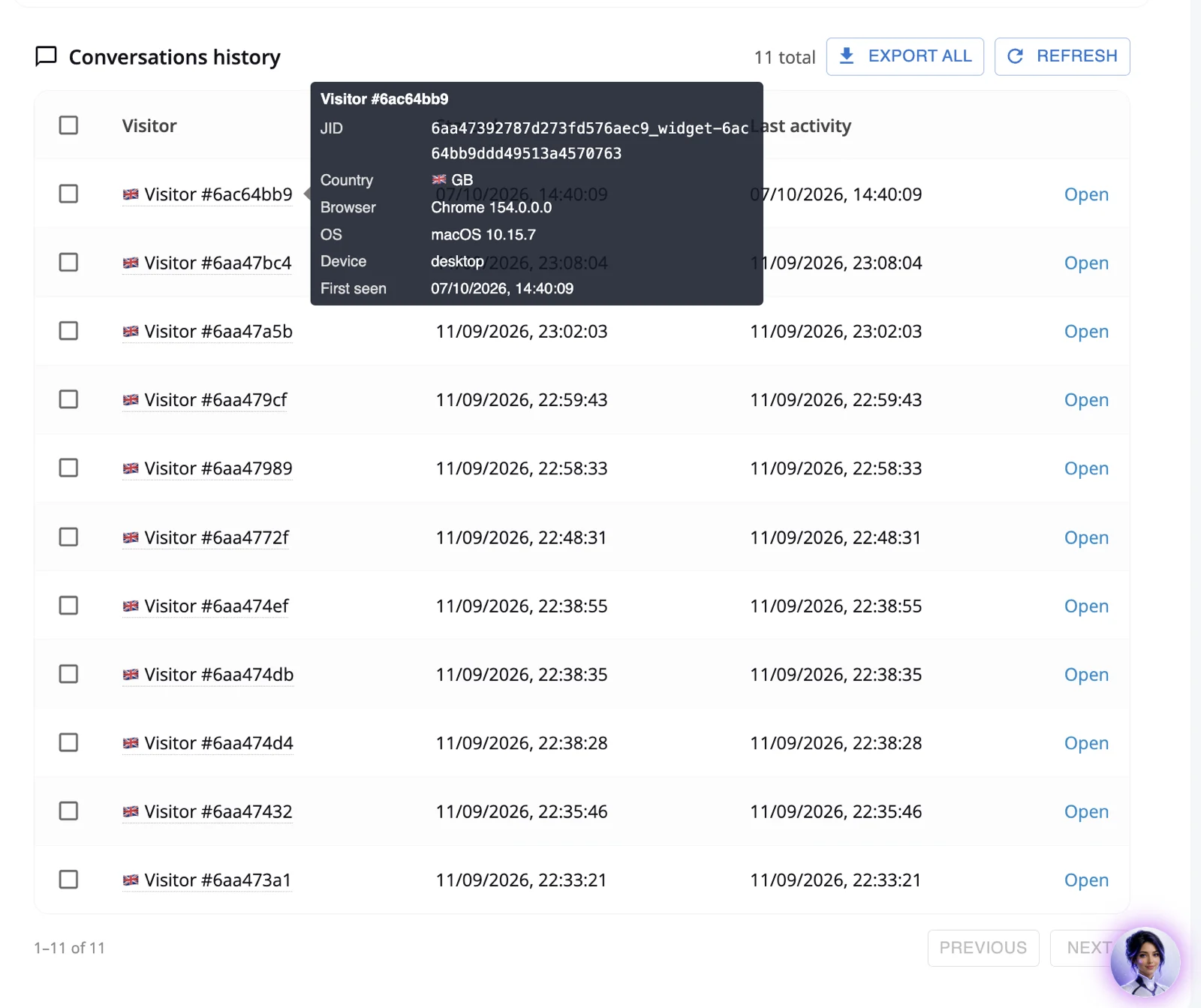
Every widget conversation appears under Conversations history in the admin console, with when it started, when it was last active and the visitor’s country, so your team can read what patients actually ask and spot where the assistant needs better content.
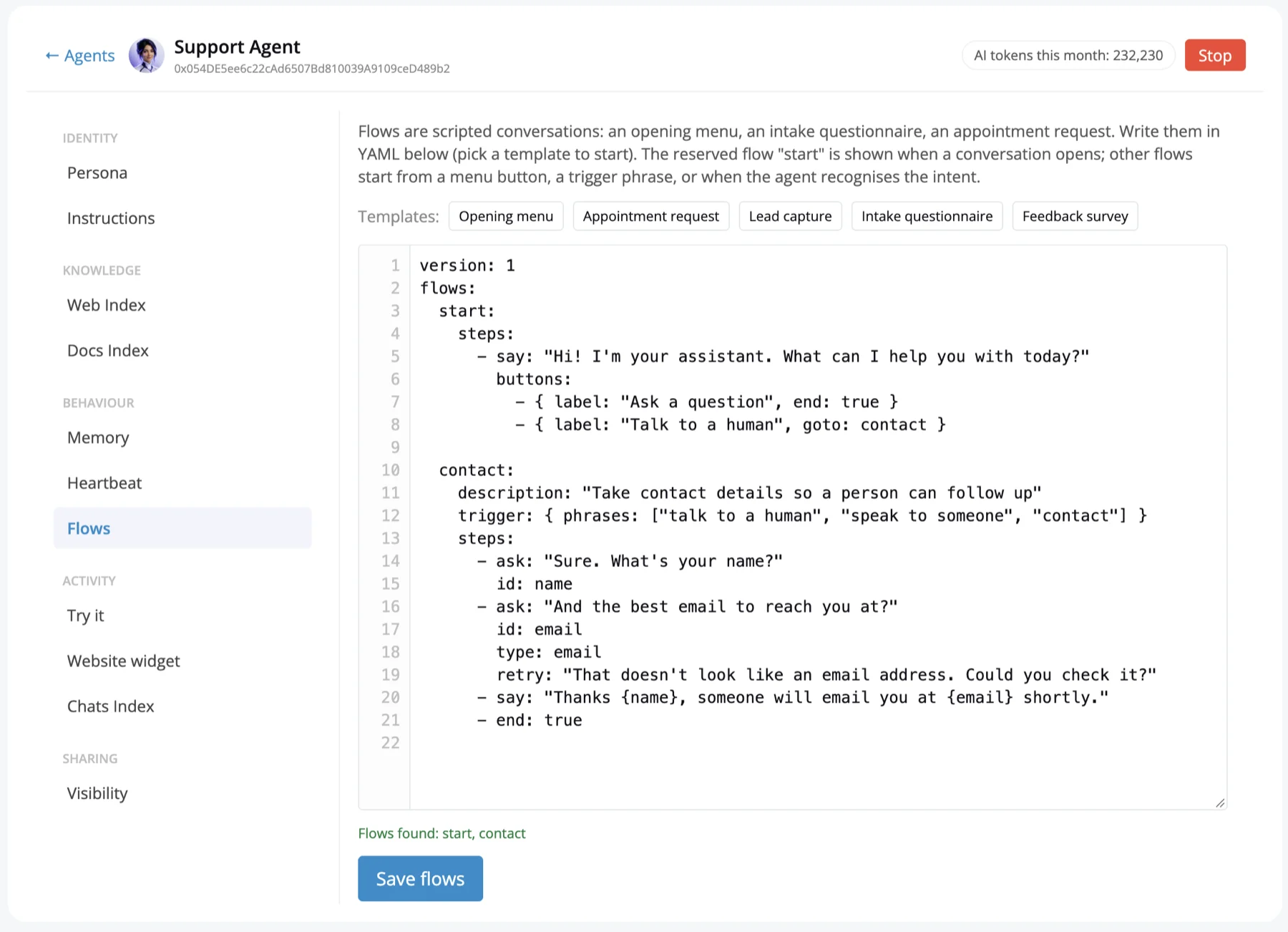
When you want the assistant to ask a fixed set of questions in order, Flows script them, for example from the Intake questionnaire template. On a public assistant, keep flows to non-clinical details such as the service or location; run clinical intake only on a PHI-capable deployment.
How it works
From sign-up to a live healthcare assistant
The public assistant can be live the same day. The PHI-capable version adds a deployment and a BAA, not a rebuild.
Decide what it may handle
Write down which questions the assistant answers and which it hands off. For a public assistant: general questions only, clinical and personal questions to a secure channel.
Give it your knowledge
Create an AI agent, crawl your website with the website crawler and upload documents such as service lists, FAQs and insurance policies. Answers are grounded in that content (RAG chatbot).
Set instructions and test
Add the instructions, name, avatar and greeting. Use the Try it chat to check each answer and the sources it used before anyone sees it.
Embed it
Paste one script tag or install the WordPress plugin, and match the colours and position to your site with the live preview.
Move to PHI when ready
Sign a BAA on Enterprise, move to a dedicated or self-hosted deployment, choose a self-hosted model or a provider under its own BAA, and set retention and roles. The agents and knowledge carry over.
Buyer checklist
How to evaluate any HIPAA chatbot vendor
Use these questions with any vendor, including us. A "yes" should come with a document or a setting you can see, not a badge on a website.
- Will you sign a BAA, and on which plan?
- Which company runs the language model, and is it covered by a BAA or hosted in my environment?
- Where is the data stored, and can I choose the region or run it in my own cloud account?
- Is data encrypted in transit and at rest? Who holds the keys?
- Is every conversation and admin action in an audit trail I can export?
- Can I set retention and delete one person’s data on request?
- Are my conversations used to train anyone’s model?
- What stops the bot from collecting PHI it does not need, and what happens when a visitor shares it anyway?
- Can staff accounts use roles and two-step verification?
- How does a person take over the conversation, and is that handoff recorded too?
When Ethora is not the right fit: if you want a ready-made clinical triage or symptom checker product with medical content included, or a vendor to run your HIPAA programme for you. Ethora is the chat and AI agent platform your team configures with its own content and policies.
Proof
Healthcare chat and AI projects on Ethora
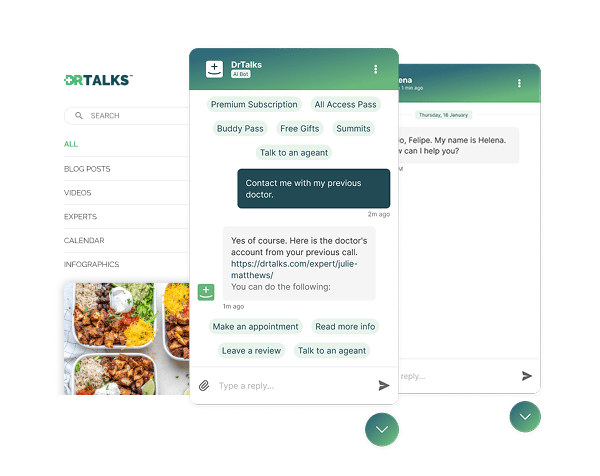
HIPAA-compliant AI assistant over a medical video library
A RAG assistant on a health education site (DrTalks) that answers from expert interviews and links to the exact moment in the video.
Read the case studyAI website agent for a mental health provider
A US community mental health provider (Greenleaf Outreach) put a public support assistant on its WordPress site the day it signed up.
Read the case studyHIPAA chat for a workers’ comp insurer
Case-based secure chat in an existing claims portal and a white-label mobile app, on a dedicated chat server in the provider’s own AWS account.
Read the case studySelf-hosted chat for a digital health platform
Ethora self-hosted in a Canadian health platform’s own AWS account, with one isolated tenant per clinic.
Read the case studyCase studies: healthcare chat and AI

Healthcare: HIPAA-compliant AI assistant (RAG) over a medical video library
Dr. Talks is one of the most prominent organizers of online healthcare conferences and summits.
Ethora enabled them to create a context-aware AI-powered chatbot to help users navigate thousands of pages of medical content, correctly referencing pages, authors, videos and timestamps. 100% secure and HIPAA-compliant.
This assistant enhances user experience by simplifying interaction with the platform and reducing search time.
- 1000+ summits indexed by AI bot
- Instant user engagement
- Vector embeddings enable intelligent domain expert AI responses
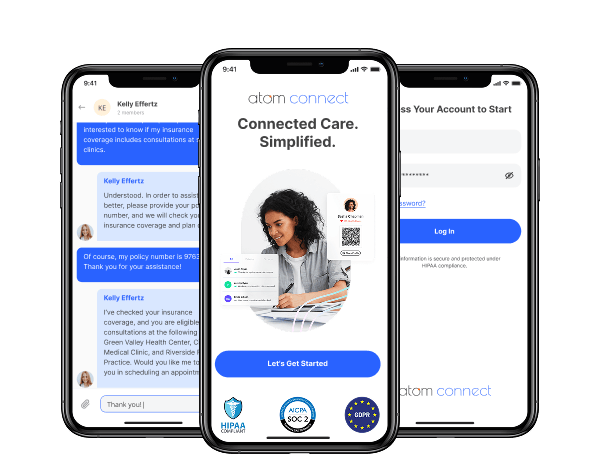

Insurance: in-app chat for a workers’ comp health insurance provider (HIPAA compliant)
Atom Advantage provides workers’ compensation and health insurance solutions in the United States.
On Ethora they built Atom Connect: secure, case-based chat between injured workers, nurses and case managers, embedded in their claims portal and a white-label mobile app. HIPAA and SOC 2 compatible.
Less manual work for case managers and a better experience for injured workers.
- Chat embedded in the case managers’ web portal
- White-label iOS and Android app for injured workers
- One secure room per claim, created automatically by API

Healthcare: self-hosted patient messaging for a multi-clinic digital health platform in Canada
VITALL is a Canadian digital health platform used by hospitals, clinics and private practices.
Ethora runs as a self-hosted chat server in VITALL’s own AWS account in Canada, with one isolated tenant per clinic, chat in the practitioner portal and in native iOS, Android and React Native patient apps.
Users, rooms and clinics are provisioned by VITALL’s backend through the Ethora API.
- Self-hosted in the customer’s AWS account in Canada
- One isolated tenant per clinic, created by API
- Web portal, iOS, Android and React Native SDKs
HIPAA compliant chatbot FAQ
Can a website chatbot collect PHI?
Only if the whole setup is built for it: a BAA with every vendor involved, access controls, an audit trail, encryption and a retention policy. A public website assistant on a standard plan should not collect PHI. Give it instructions to answer general questions only and to send clinical or personal questions to a secure channel; Trust & Safety moderation can remove sensitive data a visitor shares by mistake.
Do you sign a BAA?
Yes, on Enterprise and dedicated deployments. Talk to us about your setup and we will confirm the deployment model, hosting region and model provider before signing.
Which LLMs can a HIPAA chatbot on Ethora use?
Each agent has its own model setting. You can use a cloud model API such as OpenAI, which for PHI needs that provider’s own BAA with you, or a self-hosted model through an OpenAI-compatible endpoint such as Ollama or vLLM, which keeps PHI inside your environment.
Can it run on our own servers?
Yes. Ethora runs as a dedicated server we operate in your cloud account, or self-hosted with Docker Compose, a Helm chart or the AWS and Azure Marketplace images. See Get Ethora. You choose the region for data residency.
Is the free plan HIPAA compliant?
No. The free cloud plan is for non-PHI use, such as a public website assistant that answers general questions about your services. Anything that handles PHI needs Enterprise or a dedicated deployment with a BAA. See pricing.
Is Ethora HIPAA certified?
There is no official HIPAA certification for software. Ethora is HIPAA and SOC 2 compatible: it provides the technical safeguards and signs a BAA on Enterprise. Whether your project is compliant depends on its configuration, hosting and your own HIPAA programme.
Related
HIPAA compliant chat API
Secure patient and member messaging with a BAA on Enterprise.
Read moreHealthcare chat SDK
Chat, calls and AI agents for patient portals and health apps.
Read moreAI chatbot for your website
The embeddable AI chat widget: one script tag or the WordPress plugin.
Read moreSelf-hosted LLM AI agent
Run the model inside your own environment with Ollama or vLLM.
Read moreRAG chatbot
How answers stay grounded in your own documents and website.
Read moreBusiness associate agreement (BAA)
What a BAA covers and who needs one.
Read morePlan your HIPAA compliant chatbot with us
Tell us where the assistant should live, what it should handle and where PHI comes in. We will map the deployment, the model and the BAA. Or start free with a public assistant today.
