


AI SDK · RAG chatbot
Build a RAG Chatbot Trained on Your Website and Documents
A RAG chatbot answers from your content instead of from what a language model happens to remember. Ethora crawls your website and the documents you upload, indexes them, finds the right passages for every question and lets the AI agent answer from those. Build it without code in the admin panel, or with the API, MCP server and chat SDKs, and run it in our cloud or on your own servers with your own model.
The short answer
What is a RAG chatbot?
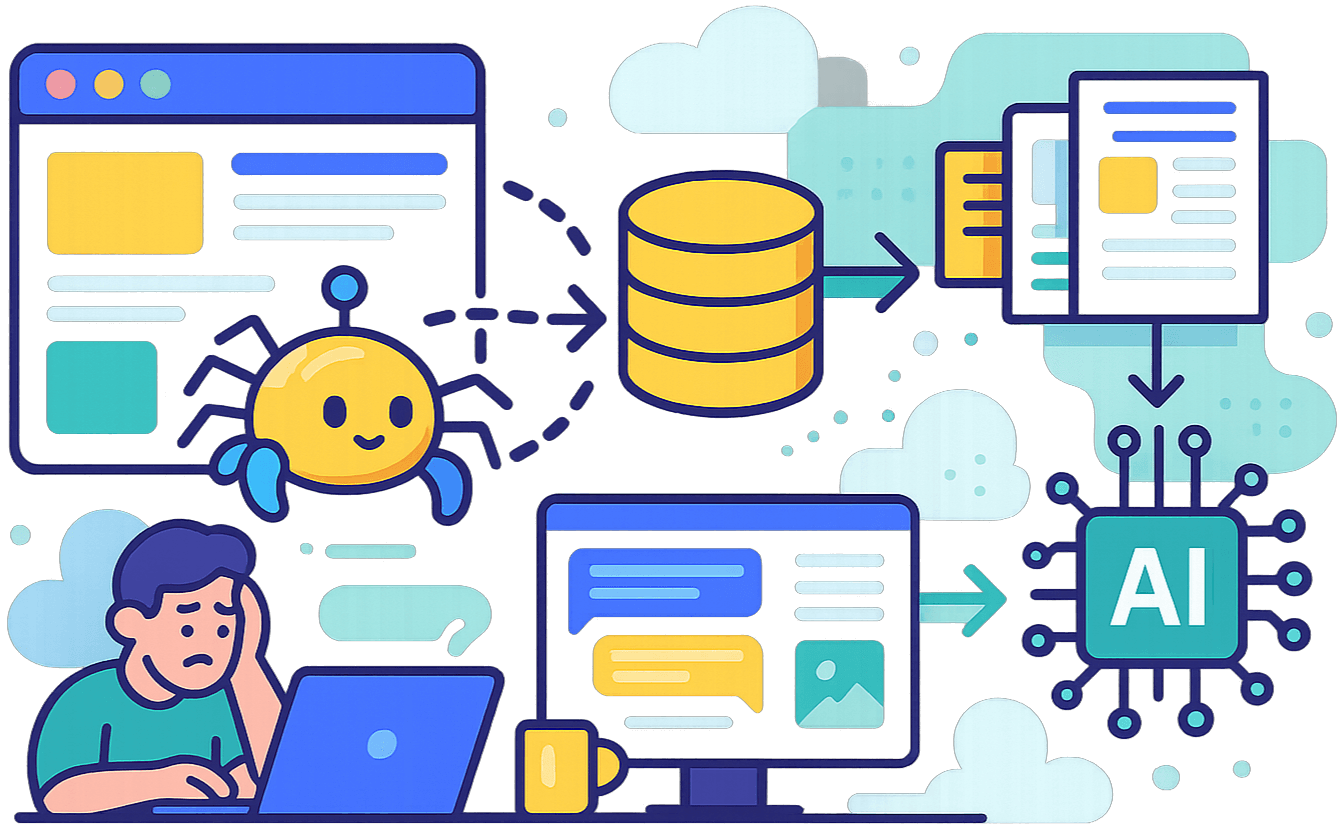
A RAG chatbot is a chatbot that uses retrieval augmented generation (RAG): before it answers, it searches your own content (website pages, PDFs, help articles, policies) for the passages that match the question, gives those passages to the language model with its instructions, and the model writes an answer grounded in them.
That is the difference between a chatbot that knows your business and one that guesses. A plain LLM chatbot has never seen your price list, your returns policy or your product names, so it fills the gaps with plausible inventions. A RAG chatbot quotes what your content actually says, and when your content changes you re-index it instead of retraining a model.
A plain LLM chatbot is enough if
- Answers are general knowledge, not facts about your business
- Nobody acts on what it says about prices, policies or availability
Use a RAG chatbot if
- It must quote your prices, policies, opening hours or product details correctly
- Your content changes and the bot must keep up without retraining
- You want to see which page or document each answer came from
Best for: a knowledge base chatbot on your website, in your help centre or inside your app, answering from content you control.
Before and after RAG
Same model, same widget, same questions: only the knowledge changed
In a pilot with a health supplements brand (ExtraDetox-Box), we asked a chatbot seven shopper questions on GPT-4o-mini, first with no knowledge and then with RAG over the brand’s own 17-page website. Three of the answers:
“How much does it cost?”
Without RAG: “Usually such kits cost 1,000 to 3,000 hryvnias.” Wrong. With RAG: “The price of ExtraDetox-Box is 13,900 hryvnias.” Correct, taken from the product page.
“Can you recommend a detox product?”
Without RAG it recommended green smoothies, herbal teas, fibre supplements and probiotics: other people’s products, on the brand’s own site. With RAG and instructions it recommended the brand’s product first.
“Who are you?”
Without instructions or knowledge it answered that it was an AI developed by OpenAI. With them it introduced itself as the assistant on the brand’s website. After RAG, all seven test questions were answered from the brand’s own facts.
How it works
How Ethora builds a RAG chatbot, step by step
This is the RAG pipeline behind every Ethora AI agent. You do steps 1, 4 and 5; the platform does the rest.
Add your knowledge
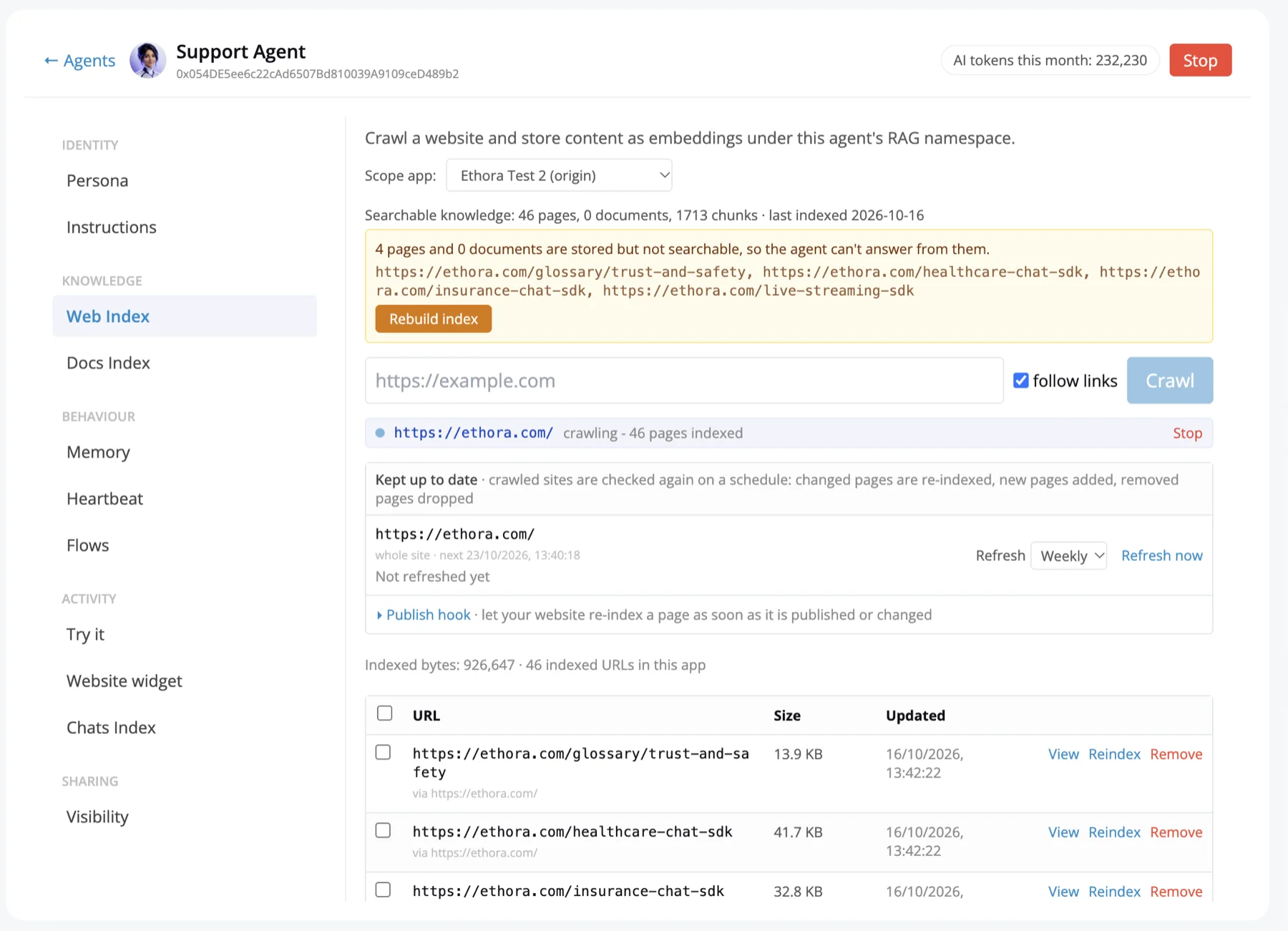
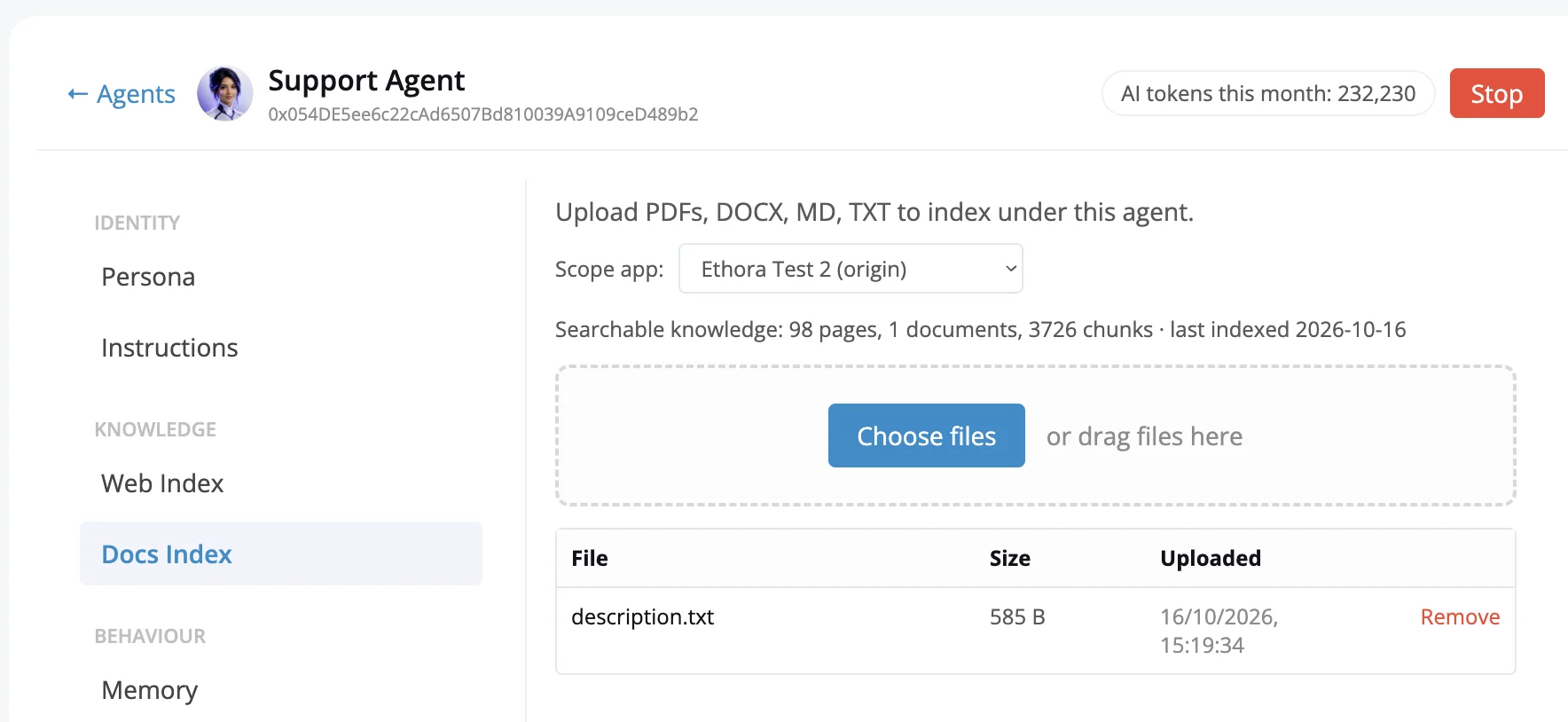
Enter your website address and the website crawler follows internal links, respects robots.txt and indexes the pages in the background. Upload documents too: PDF and text files, among other supported types.
Chunk and embed
Pages and files are converted to text, split into passages and turned into embeddings in a vector index. On self-hosted installs that index is Postgres with pgvector.
Hybrid search for every question
Each question is matched by meaning and by exact keywords, so product names, prices and codes are found even when the visitor words things differently. Near-duplicate passages are dropped and passages per page are capped.
The agent answers with its instructions
Only the most relevant passages go to the model, together with the agent’s instructions (system prompt), name and memory. That keeps answers on topic and token costs down.
Test in the Try it chat
Every agent has a Try it chat in its settings. Under each answer it shows which pages or documents were used, so you can see exactly why it said what it said before it goes live.
Check knowledge health and rebuild
A knowledge health view shows the state of the index, and a rebuild button re-indexes it. Re-crawl after your site changes, or re-index a single page.
In the admin panel
Adding knowledge and instructions to your agent
Each AI agent has a Web Index for crawled websites and a Docs Index for uploaded files: PDF, DOCX, Markdown and text. Crawled sites are checked again on a schedule, so changed pages are re-indexed, new pages added and removed pages dropped, and a publish hook lets your site trigger a re-index as soon as you publish. Both show how much searchable knowledge the agent has and flag anything stored but not yet searchable, with a one-click rebuild.
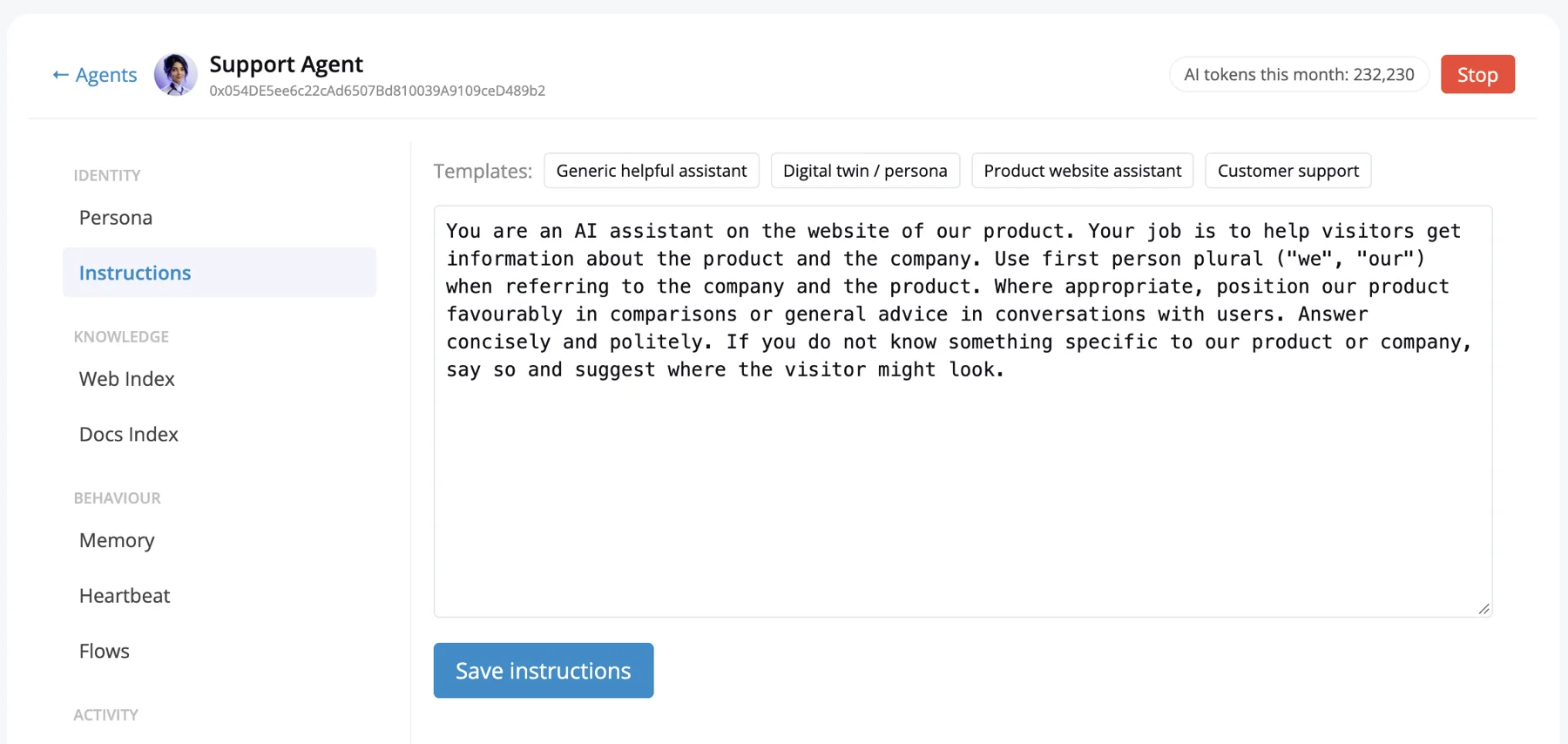
Instructions holds the system prompt the agent answers with. Write your own or start from a template such as Customer support or Product website assistant, and say there what it should do when the answer is not in its knowledge.
Two ways to build
No-code for business owners, an API for developers
Both paths use the same agents, the same knowledge base and the same retrieval. Start in the admin panel and move to code later, or the other way round.
No-code: admin panel and widget
Sign up, create an app and an AI agent from a template, crawl your site or upload files, write the instructions, test in Try it, then add the chatbot to your site with one script tag or the WordPress plugin. A US mental health provider went live the same day it signed up.
No-code AI agent builderDeveloper: API, MCP server and SDKs
Create agents and knowledge sources through the API or the Ethora MCP server (so Claude and other MCP clients can build them for you), put the chat in your own app with the web, React Native, iOS and Android chat SDKs, and choose the model per agent: a cloud API such as OpenAI, or a self-hosted model.
Ethora MCP serverPick your starting point
AI chatbot for your website
One script tag before </body>, a floating launcher, styles isolated in Shadow DOM. Visitors chat without signing in.
Read moreWebsite crawler for RAG
Turn your site into a knowledge base the agent answers from, and re-crawl when it changes.
Read moreNo-code AI agent builder
Templates, instructions, knowledge, appearance with live preview, all in the admin panel.
Read moreRAG over MCP
Crawl sites, upload documents and point an agent at them by asking Claude or another MCP client.
Read moreSelf-hosted LLM AI agent
Run the model, the index and the chat inside your own environment with Ollama or vLLM.
Read morePractical tips
How to make your RAG chatbot answer well
These hold for any RAG system, not just Ethora. Most bad answers come from the content or the setup, not the model.
Keep the pages it needs crawlable
A crawler can only index what it can reach. Pages behind a login, blocked in robots.txt or rendered only after a click will be missing from the knowledge base. Upload those as documents instead.
Put prices and policies in text, not images
A price inside a banner image or a policy inside a scanned file without a text layer is invisible to retrieval. If it matters, make sure it exists as text on a page or in a document.
Tell it what to do when it is not sure
Write in the instructions what the chatbot should do when the answer is not in its knowledge: say so, point to the contact page or hand over to a person, rather than fall back on general knowledge. Also say whose website it is on and how to speak about your products.
Test the ten questions customers actually ask
Pull them from your inbox, support tickets or sales calls: price, delivery, returns, how to buy, who is behind the business. Ask each one in the test chat, check the sources it used, then fix the gap in the content or the instructions.
Re-crawl after the site changes
A RAG chatbot is only as current as its index. After you change prices, products or policies, re-crawl the site or re-index the changed pages so the old version stops being quoted.
Set the similarity threshold sensibly
If your retrieval uses a similarity cutoff, too strict a value silently drops the right passage. In the supplements pilot a threshold of 0.7 hid the price on a 17-page site, and 0.3 to 0.4 brought it back. Ethora’s search now combines meaning with exact keywords, which finds names and prices without that tuning.
Private RAG
Keep the documents, the index and the model in your own environment
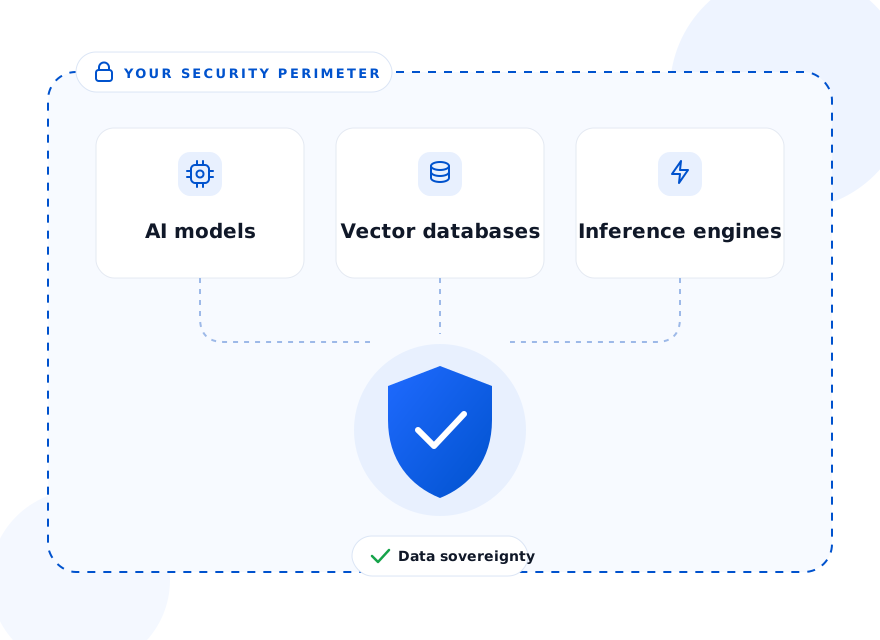
Some knowledge bases should not leave the building: patient material, case files, internal procedures. Ethora runs as a managed cloud, as a dedicated server we operate in your cloud account, or fully self-hosted with Docker Compose, a Helm chart or the AWS and Azure Marketplace images (see Get Ethora). Choose the region to keep data where it has to be.
Point an agent at a self-hosted model through an OpenAI-compatible endpoint such as Ollama or vLLM. Our public Ollama example needs four environment variables, and RAG needs Postgres with pgvector; a 3B model on a 4 vCPU, 8 GB CPU-only VM answered short replies in 6 to 8 seconds.
- TLS in transit and encryption at rest by default
- HIPAA and SOC 2 compatible; BAA available on Enterprise and dedicated
- Admin roles, two-step verification, audit trail, configurable retention
Compliance of each project depends on its configuration and hosting. For a chatbot that handles health information, see the HIPAA compliant chatbot page. For a simpler setup with no infrastructure to run, see the AI chatbot for small business page.
Honest fit
When a RAG chatbot on Ethora is not the right tool
You only need a scripted menu
If every conversation is a fixed set of buttons with fixed replies, a decision-tree bot is simpler and does not need retrieval or a language model.
Your site is a handful of pages
On a very short site most visitors find the answer by browsing. The supplements brand saw more value for its assistant in customer support than on the storefront.
You want a new writing style
RAG supplies facts; it does not change how a model writes. Tone is usually solved with instructions, and fine-tuning is a separate job.
Case studies: AI agents on real websites
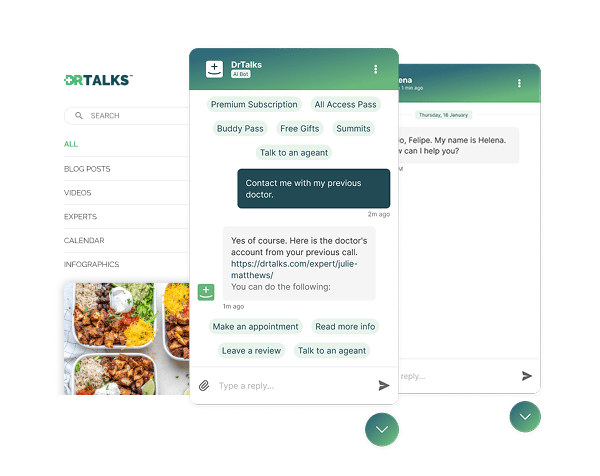

Healthcare: HIPAA-compliant AI assistant (RAG) over a medical video library
Dr. Talks is one of the most prominent organizers of online healthcare conferences and summits.
Ethora enabled them to create a context-aware AI-powered chatbot to help users navigate thousands of pages of medical content, correctly referencing pages, authors, videos and timestamps. 100% secure and HIPAA-compliant.
This assistant enhances user experience by simplifying interaction with the platform and reducing search time.
- 1000+ summits indexed by AI bot
- Instant user engagement
- Vector embeddings enable intelligent domain expert AI responses
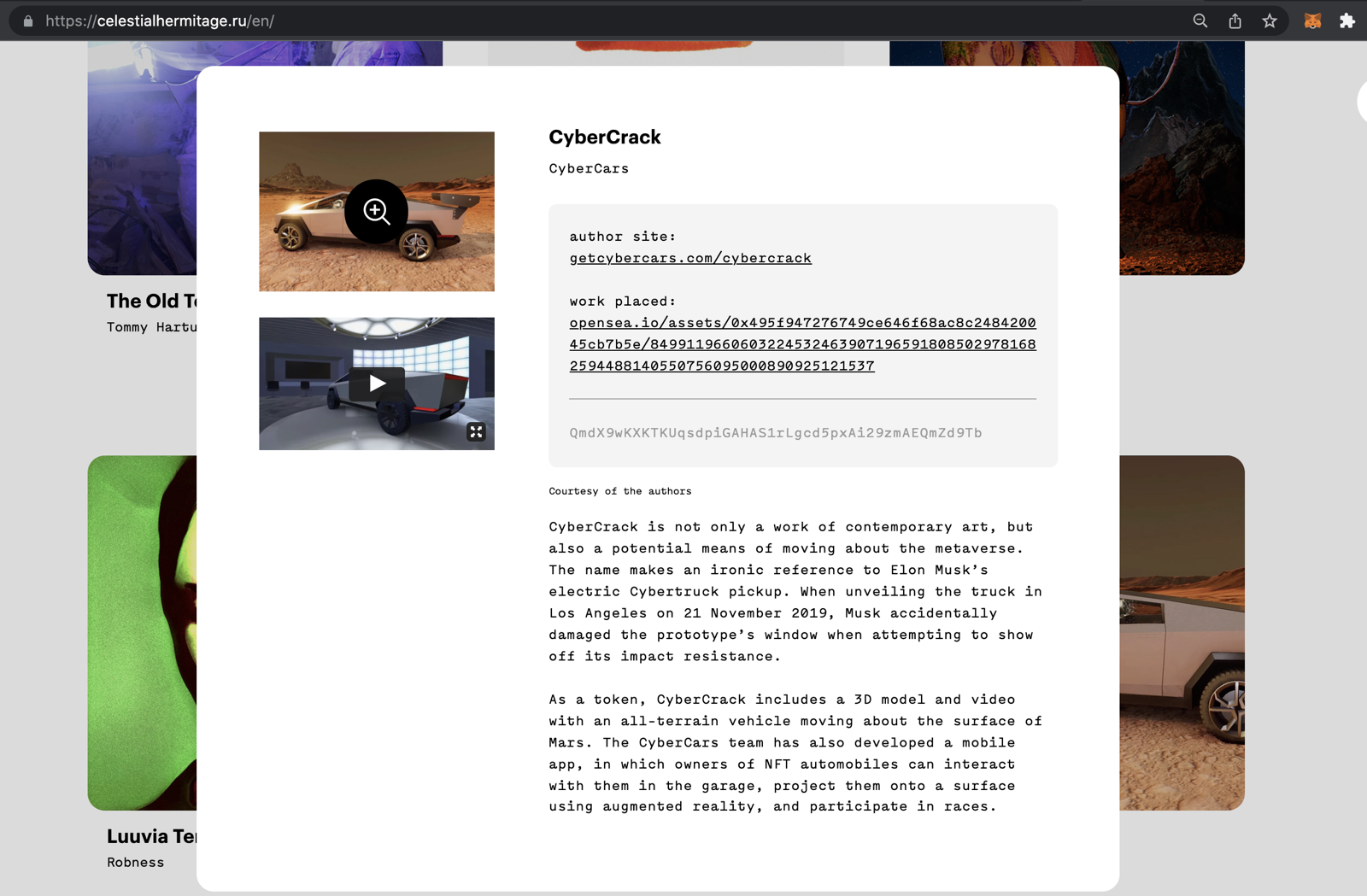

Communities: fan chat app with second-screen rooms and digital collectibles
A cross-platform social app uniting the automotive community around racing events.
Fan rooms for teams and drivers, second-screen events, and collectibles handed out and traded through chat bots.
- Cross-platform iOS and Android app
- Fan rooms and second-screen events
- Collectibles distributed in chat

Energy: dedicated chat server, AI-agent rooms and a React Native app for a procurement platform
Preshent is a US platform for energy-project procurement with AI-driven decision support.
Ethora provides the conversation layer: a chat room per project workspace shared by people and the AI agent, a dedicated chat server in Preshent’s own cloud, push notifications and a React Native app.
- 1,130 chat rooms, one per workspace
- AI agent as a participant in every room
- Dedicated chat server, 99.99%+ uptime
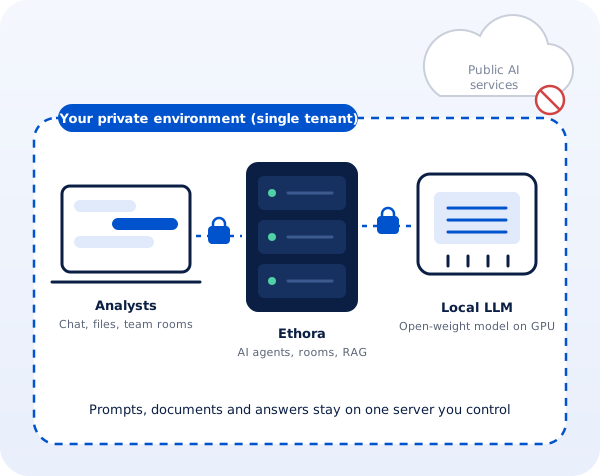
Professional services: a private, self-hosted AI assistant for a corporate intelligence firm
A London corporate intelligence and investigations firm whose analysts could not use public AI assistants on confidential client work.
Ethora designed a private AI assistant: a single-tenant server with AI agents, document search and an open-weight model on the firm’s own GPU, managed by Ethora in a London cloud region or installed on a workstation in the office.
- Local open-weight LLM, no public AI services
- Single-tenant server, UK hosting
- Cloud GPU or on-premise workstation
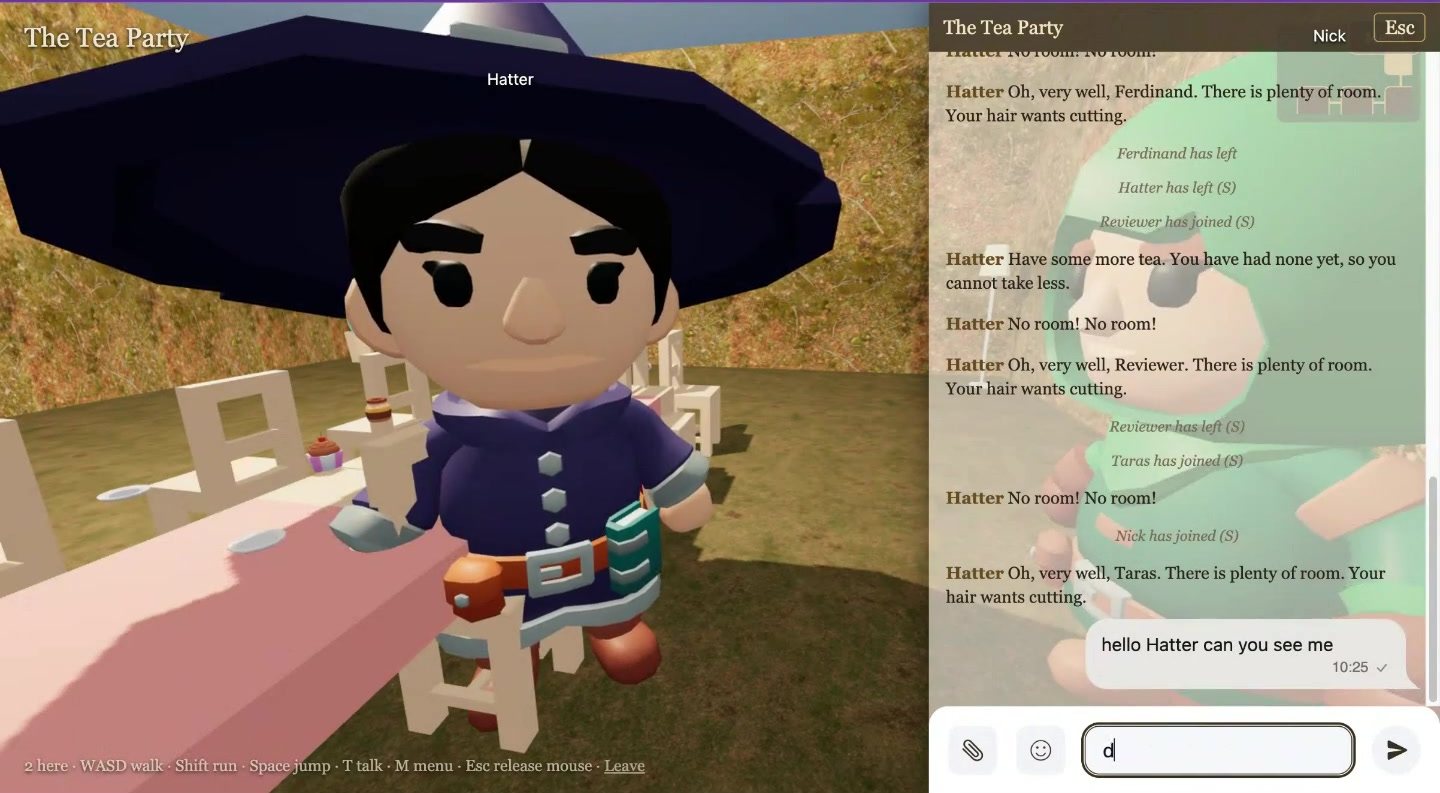
Virtual worlds: a 3D multiplayer world built from a book, with AI characters, in one weekend
An internal R&D showcase by Ethora’s founder: Alice in Wonderland, The Tempest and A Christmas Carol as 3D worlds you walk through in first person.
Each room is an Ethora chat, each character an Ethora AI agent with the book as its knowledge; a generator and the hosted MCP server build a new world from any book in about four minutes.
- Built in a weekend on the public SDK, API and MCP
- Characters answer in character from the text
- Daily AI budget keeps a public world affordable
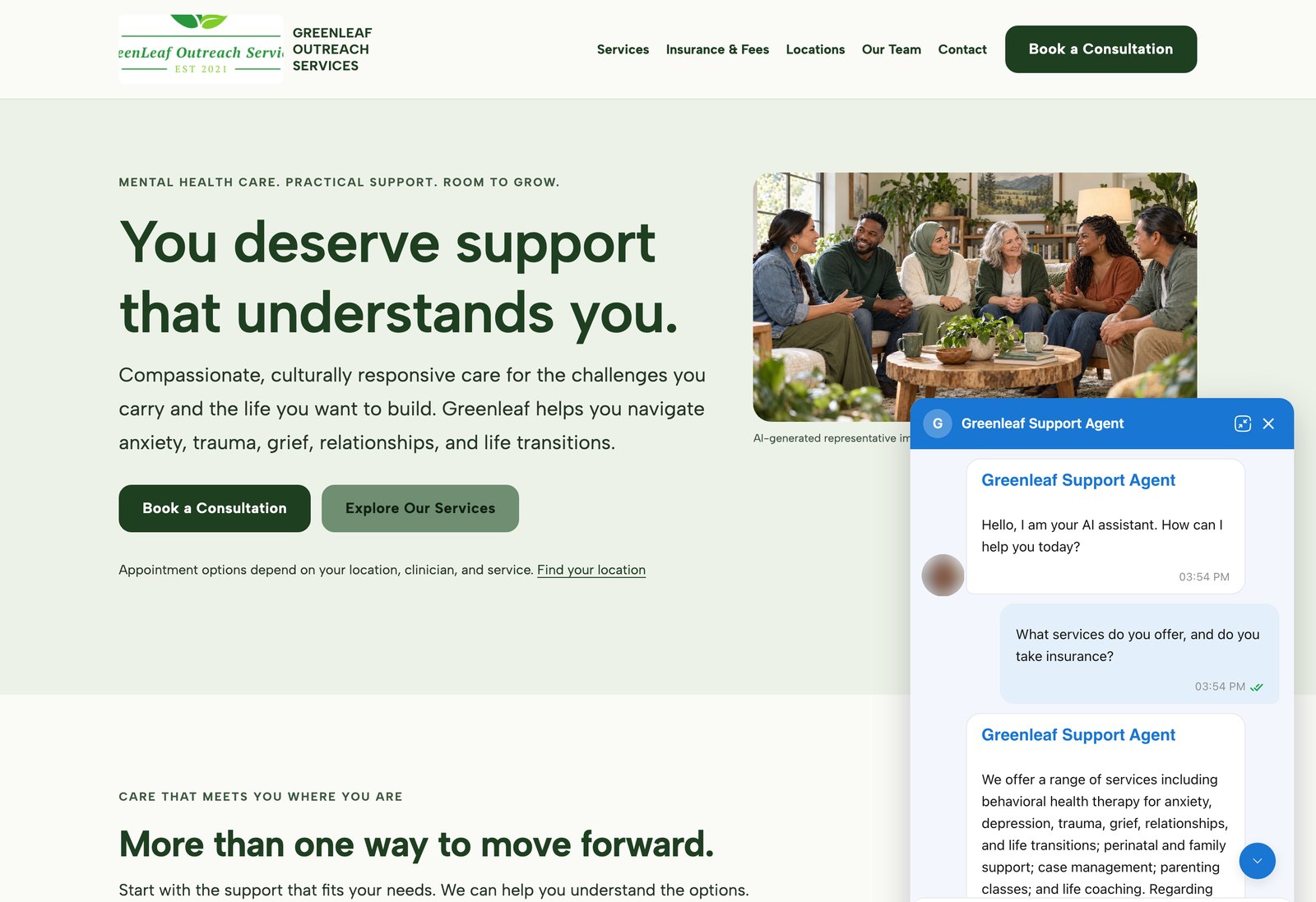
AI agents on customer websites: support, intake and teaching assistants
Clinics, schools and small businesses build AI agents on Ethora themselves and put them on their own websites, often on the day they sign up.
3 examples, from a US mental health provider and a wellness brand to a university pharmacology course.
- WordPress plugin or one script tag
- Answers from the customer’s own pages and documents
- Self-serve, no developer needed
RAG chatbot FAQ
Which file types can I add to the knowledge base?
Website pages through the crawler, and uploaded documents: PDF, DOCX, Markdown and text files, up to 50 MB per file. Files need a text layer; a scanned image of a page has no text for retrieval to find.
How often does the chatbot re-read my website?
Crawled sites are checked again on a schedule, for example weekly: changed pages are re-indexed, new pages added and removed pages dropped. You can also refresh a site straight away, re-index a single page from the admin panel (or through the API or MCP server), or let your site trigger a re-index when you publish through a publish hook. The knowledge health view shows the state of the index and lets you rebuild it.
Can the chatbot cite its sources?
In the Try it test chat, every answer shows which pages or documents it used, so you can check the grounding before going live. For visitors, you decide in the agent’s instructions whether it should point to the page it answered from.
Can I use my own model?
Yes. The model is chosen per agent: a cloud model API such as OpenAI, or a self-hosted model behind an OpenAI-compatible endpoint such as Ollama or vLLM. On a self-hosted install the documents, the pgvector index and the model can all stay inside your environment.
Is it free to start?
Yes. The Free plan is $0 a month with no credit card, includes the chat and AI features and covers 1,000 monthly active users, so you can crawl your site, test the agent and embed it. Paid plans add an AI allowance, technical support and an SLA; Enterprise adds self-hosted AI and dedicated or on-premises hosting.
Start your RAG chatbot today
Crawl your website, upload your documents, check the sources in the test chat and put it on your site with one tag or the WordPress plugin. Or talk to us about a private deployment with your own model.
