

Chat & Documents Wallet Mobile App Engine (Android)
Create more engaging experiences in your fintech app with Ethora’s Chat SDK. Add secure real-time messaging and file exchange features to your fintech, crypto, or other wallet-based app. Our comprehensive Android SDK documentation guides easy and quick integration.
Launch faster with low-code Android messaging & docs
You don’t have to worry about complex coding. Ethora’s low-code Android doc tools make it incredibly simple to embed chat into your apps. If you want to do it without any coding at all, you can use our no-code Android document and configuration files - no backend setup is required.
Developer SDK for real-time Android chat & files
Ethora’s engine comes with full Android SDK documentation. Whether you're working in Java or Kotlin, you’ll find complete guides for authentication, messaging flows, document uploads, push notifications, and more. We support Jetpack libraries, MVVM architecture, and Compose-based UIs.
Dive into hands-on examples in our chat app documentation for Android to quickly spin up secure messaging channels. Plus, with our Android chat documentation, you’ll have full access to endpoints, UI components, and customization hooks to fine-tune your app’s behavior.
Key features you can build with
Secure document sharing
All data is encrypted at rest and when transferred to ensure data privacy and compliance
Push notifications
Timely updates will keep users informed about new messages or updates even when the app is closed
Unread message tracking
This helps monitor which messages haven't been read to improve follow-up and engagement
Caching and offline sync
Enables users to compose and queue messages offline and send them automatically when reconnected
Delivery receipts
Improves communication transparency by informing users when messages are successfully delivered to recipients
SDK comparison table
 Ethora
Save Months of Work with Ethora
Build any chat use case into your product: in hours.
Free
- Community Support
- 30 Days of Free Support
- No Credit Card Required
Small Business
- Tech Support
- SLA 99.9%
- AI Allowance
- Custom Domain
Enterprise
- 24/7 Phone Support
- Self-hosted AI
- Custom Configuration
- Dedicated / On-prem hosting
What our clients say about our services.

Taras and the Ethora team are a reliable partner in messaging, tokenization and AI. Great communication and products.

I have worked with Ethora and team since 2018. They have been absolutely amazing and life-saving across multiple of my portfolio projects.

We partnered with Dappros/Ethora on an EU project and they successfully delivered the technology component. Highly recommended.

Ethora has successfully helped us ideate and deliver multiple digital transformation projects in Qatar and the MENA region. A reliable and knowledgable partner.

Ethora technology and expertise were instrumental in delivering Atom Connect, our product for streamlined communication in the workers’ comp market.

Ethora helped us deliver our AI agent solution, letting subscribers access context-specific insights from our vast library of expert content. Their LLM and chat-bot expertise is an excellent match for our AI strategy.

Ethora has been an exceptional strategic development partner for Preshent. Not just a vendor, but a core contributor to the future of our platform and company.

Ethora helped us ideate and deliver multiple digital transformation projects across Qatar and the MENA region. A reliable, knowledgable partner.

Our Case Studies
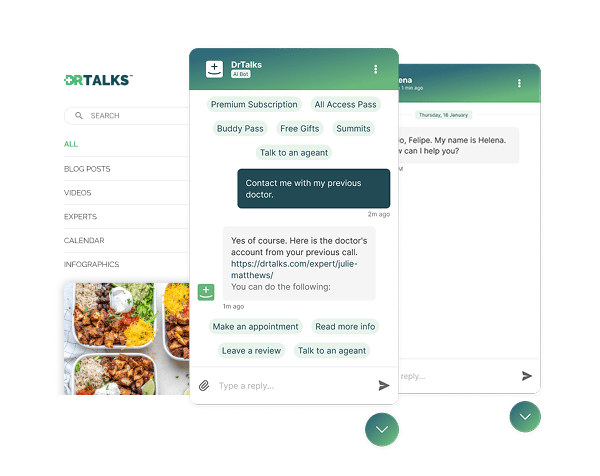

Healthcare: HIPAA-compliant AI assistant (RAG) over a medical video library
Dr. Talks is one of the most prominent organizers of online healthcare conferences and summits.
Ethora enabled them to create a context-aware AI-powered chatbot to help users navigate thousands of pages of medical content, correctly referencing pages, authors, videos and timestamps. 100% secure and HIPAA-compliant.
This assistant enhances user experience by simplifying interaction with the platform and reducing search time.
- 1000+ summits indexed by AI bot
- Instant user engagement
- Vector embeddings enable intelligent domain expert AI responses

Healthcare: self-hosted patient messaging for a multi-clinic digital health platform in Canada
VITALL is a Canadian digital health platform used by hospitals, clinics and private practices.
Ethora runs as a self-hosted chat server in VITALL’s own AWS account in Canada, with one isolated tenant per clinic, chat in the practitioner portal and in native iOS, Android and React Native patient apps.
Users, rooms and clinics are provisioned by VITALL’s backend through the Ethora API.
- Self-hosted in the customer’s AWS account in Canada
- One isolated tenant per clinic, created by API
- Web portal, iOS, Android and React Native SDKs
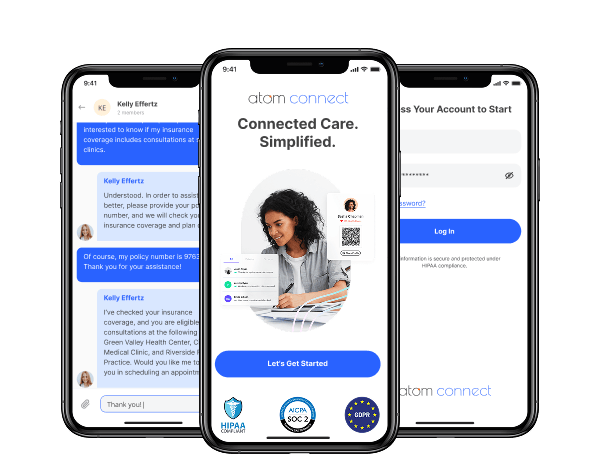

Insurance: in-app chat for a workers’ comp health insurance provider (HIPAA compliant)
Atom Advantage provides workers’ compensation and health insurance solutions in the United States.
On Ethora they built Atom Connect: secure, case-based chat between injured workers, nurses and case managers, embedded in their claims portal and a white-label mobile app. HIPAA and SOC 2 compatible.
Less manual work for case managers and a better experience for injured workers.
- Chat embedded in the case managers’ web portal
- White-label iOS and Android app for injured workers
- One secure room per claim, created automatically by API
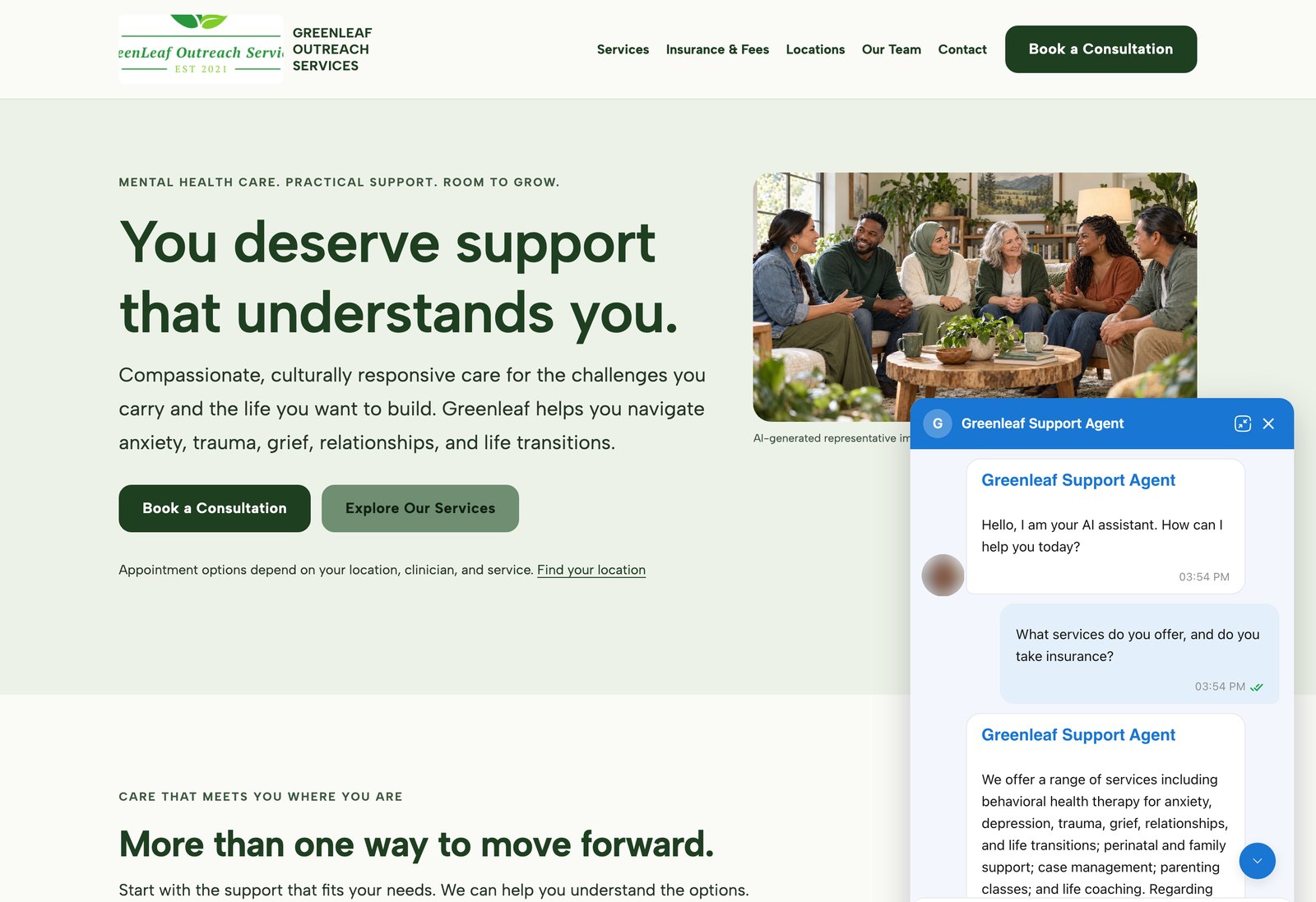
AI agents on customer websites: support, intake and teaching assistants
Clinics, schools and small businesses build AI agents on Ethora themselves and put them on their own websites, often on the day they sign up.
2 live examples, from a US mental health provider to a university pharmacology course.
- WordPress plugin or one script tag
- Answers from the customer’s own pages and documents
- Self-serve, no developer needed


Education: CRM-integrated member community app for an international honour society
Golden Key International Honour Society recognises high-achieving university students through chapters around the world. Its member app connects them across chapters and countries.
Social sign-on is bridged to existing CRM membership records, with verified email account linking and a verifiable trail for educational certificates.
- Cross-platform iOS and Android app
- CRM-linked member sign-in
- Verified email account linking
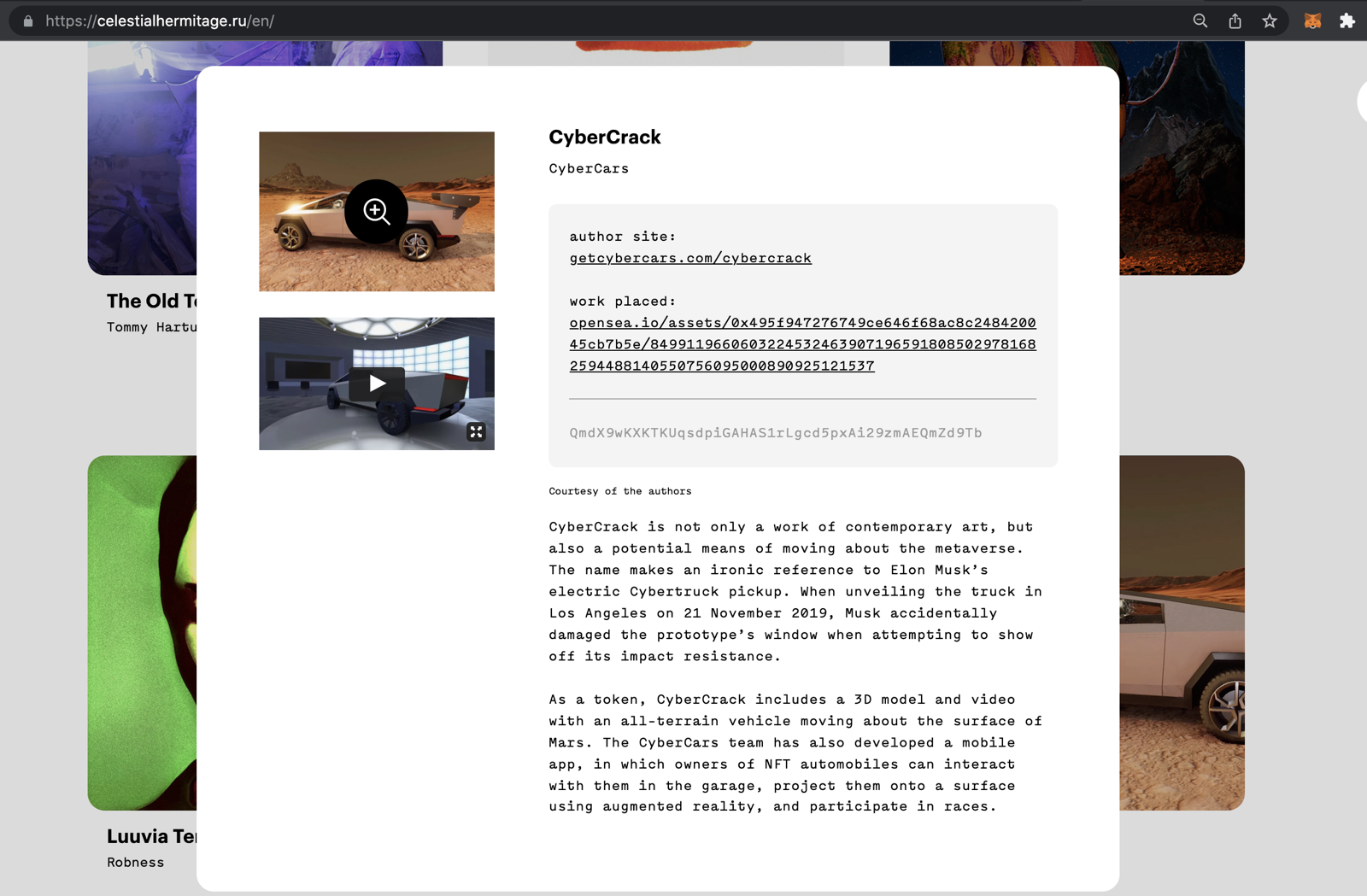

Communities: fan chat app with second-screen rooms and digital collectibles
A cross-platform social app uniting the automotive community around racing events.
Fan rooms for teams and drivers, second-screen events, and collectibles handed out and traded through chat bots.
- Cross-platform iOS and Android app
- Fan rooms and second-screen events
- Collectibles distributed in chat
FAQ
Does the SDK work with both Java and Kotlin?
Yes, Ethora’s SDK supports both of these programming languages natively.
Can I use this SDK with Jetpack Compose?
Absolutely. Our SDK includes Compose-ready components for easy UI integration.
Is offline messaging and local caching supported?
Yes. Messages and documents are cached locally and sync automatically when online. You can queue a message when offline, and it will be delivered once the connection is restored.
How are documents stored and secured in the app?
Documents are encrypted in transit and at rest. This means all documents are encrypted in transit and at rest to ensure 100% privacy. Also, we offer optional on-premise hosting.
Can I customize the UI components?
Sure. All components are fully customizable. You can apply themes, adjust layouts, modify styles, etc, to match your solution’s needs and branding.
How long does it take to integrate the engine into my existing Android app?
Ethora is designed to make integration fast and simple. You can integrate chat with core features in a few hours.
Is there support for push notifications?
Of course. The SDK integrates easily with FCM (Firebase Cloud Messaging) for push notifications. But you don’t have to implement FCM messaging yourself. You simply need to configure your mobile app to register device tokens using Firebase, and Ethora handles the rest, including queuing, formatting, and sending notifications from the server.
Can this be used in crypto or wallet-based mobile apps?
Absolutely. Ethora was built with wallet use cases in mind. It’s a perfect solution for web3 applications such as crypto wallets or other wallet-based software.
Is there any limit on document size or file types?
We didn’t set limits for that, but you can define custom limits and accept file types in the configuration if needed.