

Development
Visual Programming vs Vibe Coding in 2026: Which Approach Actually Ships?

Two years ago, the conversation was “no-code vs. code.” That framing is already outdated. The real question in 2026 is whether you’re building with a visual platform (visual programming), generating code with AI, or doing something in between – and which of those actually gets you to production.
The no-code wave made a real promise: non-developers could ship software. That promise was partially kept. Bubble has 6 million builders and 7 million apps. But anyone who’s tried to build real-time chat, a self-hosted HIPAA app, or a custom AI integration on Bubble knows where the ceiling is.
Meanwhile, “vibe coding” – Andrej Karpathy’s term for describing intent to an AI and letting it write real code – went from a Twitter meme to the dominant workflow at serious engineering teams. Cursor hit $1 billion ARR in November 2025. Half the Fortune 500 uses it. And now MCP (Model Context Protocol) is turning AI IDEs into something that can actually call production APIs, not just generate plausible-looking code.
This is an honest breakdown of where each approach wins, where it breaks, and how to pick the right one for what you’re actually building.
Why It Matters
Four terms that get lumped together but mean very different things:
- No-code. Also called a visual programming – the approach where logic, interface, and behavior are specified through a graphical interface (drag-and-drop, WYSIWYG) instead of writing code. You build entirely inside the platform’s visual language using tools like Bubble, Glide, and Adalo.
- Low-code. Visual scaffolding with custom code hooks. Retool, OutSystems. Faster than pure code, slower than no-code, and you can escape the platform if you need to.
- Vibe coding. You describe what you want in natural language, and an AI IDE writes real code. Karpathy coined the term in early 2024. The output is actual, exportable, modifiable code – not a proprietary platform artifact.
- SDK/full custom. You (or your team) write everything. Maximum control, maximum time.
These aren’t just different tools – they represent different commitments. Choosing no-code isn’t just a technology decision. You decide what you’re willing to give up in exchange for speed.
7M+ apps built on Bubble across 220+ countries
70% of new apps will use low/no-code by 2027 (Gartner)
$1B+ Cursor ARR by Nov 2025 – fastest SaaS to reach that milestone
13,000+ public MCP servers by March 2026, up from ~100 at launch (OpenClaw)
The Bubble numbers are real – 6 million builders have shipped 7 million apps. The Cursor numbers are just as real – $1M to $100M ARR in 12 months, then to $1B ARR by November 2025, making it the fastest-growing SaaS product ever. Both things can be true simultaneously: no-code solved a real problem, and something better came along for the harder problems.
Where Visual Programming Genuinely Works
Credit where it’s due. No-code tools built a category and made software accessible to people who had no business shipping software by the old rules. That matters.
The cases where no-code wins:
- MVP validation. You need to test an idea with real users before committing to a tech stack. Bubble or Glide gets you there in days, not months.
- Internal tools. Retool is genuinely excellent for building admin dashboards and internal ops tools. The use case fits the constraints perfectly.
- Non-technical founders. If the team has zero engineering capacity and the product doesn’t need real-time features or complex integrations, no-code is the only realistic option.
- Teaching and prototyping. Learning product logic without getting stuck in infrastructure is valuable. No-code abstracts the right things for beginners.
These are real use cases. The problem is they have limits, and those limits hit exactly when you’re trying to grow.
Where Visual Programming Hits the Wall
One of the biggest problems is the lock-in issue. Visual programming tools don’t support code export. The visual elements are the program. If you outgrow the platform (or it changes pricing, or a competitor offers a better deal), you can’t migrate. You rebuild.
But lock-in isn’t the only ceiling. The harder ones are technical:
- Real-time features. Chat, presence indicators, live collaboration, and offline sync – these require WebSocket connections, message queuing, and conflict resolution logic that visual platforms handle badly or not at all. For example, Bubble’s “real-time” is polling. That’s fine for a lot of apps. It breaks for messaging.
- Custom AI integration. Plugging in an OpenAI API call is doable. Building a RAG system with custom embeddings, your own knowledge base, retrieval tuning, and streaming responses – that needs real code. The visual workflow editor is not the right tool for this.
- Compliance requirements. HIPAA, SOC 2, fintech regulations. These require audit trails, specific encryption standards, BAAs, and often the ability to deploy on your own infrastructure. Visual programming tools host everything. You don’t own the stack. In healthcare and fintech, that’s frequently disqualifying before you’ve even started the feature comparison.
- Self-hosting. Some organizations can’t send data to a third-party SaaS for legal or security reasons. Every major no-code platform is SaaS-only or offers self-hosting as a very expensive enterprise add-on.
- Performance at scale. Applications hitting millions of concurrent users, processing high-frequency data, or doing anything that needs millisecond latency are still outside what visual platforms can reliably handle.
The fundamental issue with no-code isn’t any individual limitation – it’s that there’s no escape hatch when you hit one. Every other tier on the development spectrum lets you work around constraints. Visual elements are the language. When the language can’t express what you need, you’re stuck.
Vibe Coding: When AI Writes Real Code Using Real Tools
Andrej Karpathy coined “vibe coding” to describe a workflow most senior developers have now adopted: you describe what you want in plain English, the AI in your IDE writes the code, you review and steer rather than type every character.
The key distinction from no-code: the output is real code. It lives in your repo. You own it. You can modify it, migrate it, or hire a developer to extend it. There’s no platform to outgrow because the platform is just your tech stack.
The distinction from early AI code generators (Lovable, Bolt, early v0): those tools generate code from prompts but don’t connect to production APIs. They hand you a file. Vibe coding in a modern IDE – Cursor, VS Code with Copilot, Windsurf, Claude Code — does something different when you add MCP.
What MCP actually changes
MCP (Model Context Protocol) is an open standard Anthropic launched in November 2024 for connecting AI assistants to external tools. The pitch: instead of every AI client needing custom integrations for every tool, MCP provides one protocol that works everywhere. It was adopted by Claude, Cursor, VS Code, ChatGPT, Gemini, and Microsoft Copilot. In December 2025, Anthropic donated it to the Linux Foundation to ensure it stays vendor-neutral. MCP SDK downloads grew from 100,000 to 97 million per month in just over a year.
What this means in practice: your AI IDE doesn’t just write code that calls an API – it actually calls the API during development. It creates real resources, configures real services, and reads real documentation. The developer describes intent – the AI executes against production infrastructure.
Vibe coding + MCP workflow
- Developer prompt: “Set up a chat app with an AI bot and RAG knowledge base.”
- AI IDE: Cursor / VS Code / Windsurf / Claude Desktop
- MCP Server: Tool calls to platform APIs
- Platform API: Creates app, configures bot, crawls docs, enables messaging
- Working infrastructure: Real code you own. Minutes, not weeks.
Here’s the concrete version: you tell Cursor, “set up a HIPAA-compliant chat app with an AI-bot trained on our documentation.” The AI IDE loads the MCP server’s resources – auth guides, quickstart prompts, and code templates. Then it calls MCP tools to create the application, configure the bot, crawl your documentation into a RAG knowledge base, and set up encryption. You get working, production-ready infrastructure and the code that built it. You didn’t read a single API doc. You also own the output completely.
That’s not no-code. It’s not fully custom. It’s something genuinely new: the speed of a visual platform with the flexibility of real code and the power of production APIs.
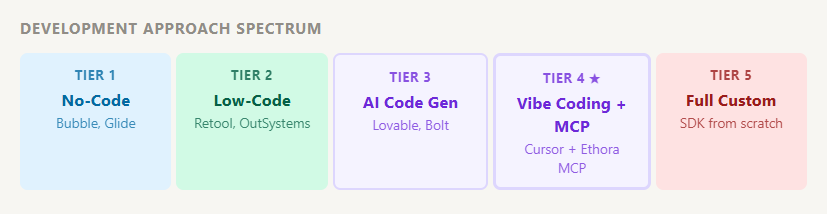
The Five-Tier Development Spectrum
Tier 1
No-Code (Bubble, Glide, Adalo)
Fully visual. Drag-and-drop everything. No code export. You’re renting the platform’s language to describe your app.
| Strengths | Limits |
| Fastest path to v1 | No code export ever |
| No dev team required | Real-time features are weak |
| Managed infrastructure | Self-hosting not available |
| Compliance is hard to prove |
Tier 2
Low-Code (Retool, OutSystems, Mendix)
Visual scaffolding with code hooks. Better for enterprise internal tools. You can write custom logic where the visual editor falls short.
| Strengths | Limits |
| Good for internal tools | Expensive at scale |
| Enterprise support options | Still partial lock-in |
| Some code ownership | Not designed for consumer apps |
Tier 3
AI Code Generation (Lovable, Bolt, v0)
Generate code from prompts. The output is real code, which is a genuine step forward from no-code. But these tools don’t connect to production platform APIs during generation – they hand you a file, and you wire up integrations yourself.
| Strengths | Limits |
| Real code output | No MCP / live tool calls |
| Fast prototyping | Integration still manual |
| No platform lock-in | Output quality varies |
Tier 4
Vibe Coding + MCP (Cursor + Ethora MCP, VS Code + MCP, Claude Desktop + MCP)
AI in your IDE writes real code and calls production platform tools via MCP. You describe intent. The AI executes against real APIs. You own every line of the output. This is the tier where speed-of-no-code meets flexibility-of-real-code meets production-grade infrastructure.
| Strengths | Limits |
| Full code ownership | Requires IDE familiarity |
| AI calls real platform APIs | MCP server quality varies |
| Production-ready output | Still needs dev judgment |
| No integration manual work | |
| Compliance-ready platforms |
Tier 5
Full Custom (Build everything from scratch)
Maximum control. No ceiling. Also, 6-12 months and a team, minimum. The right choice when your requirements are genuinely unique, and no existing platform comes close.
| Strengths | Limits |
| No constraints | 6–12 months minimum |
| Full code ownership | Expensive |
| Bespoke architecture | You own all the bugs |
Production App Requirements Checklist
Not every app needs everything on this list. But if you’re building something production-grade, this is where the differences between tiers actually show up:
| Requirement | No-Code (Bubble) | Vibe Coding + MCP | Full Custom |
| Real-time messaging | ✗ Polling only | ✓ WebSocket via SDK | ✓ |
| Custom AI / LLM integration | ⚠ Limited via plugins | ✓ RAG, streaming, custom models | ✓ |
| End-to-end encryption | ✗ | ✓ | ✓ |
| Self-hosting / on-premises | ✗ | ✓ | ✓ |
| HIPAA / fintech compliance | ⚠ Possible, complicated | ✓ With a compliant platform | ✓ You build it |
| Code ownership/export | ✗ No export | ✓ Full ownership | ✓ |
| Custom UI / brand | ⚠ Within platform constraints | ✓ React UI kits + full control | ✓ |
| Marketplace / multi-vendor chat | ✗ | ✓ Marketplace Chat SDK | ✓ |
| Time to working prototype | ✓ Days | ✓ Days to weeks | ✗ Months |
What to Choose?
The honest answer is that this depends less on features and more on what you’re trying to avoid. No-code avoids engineering investment. Full custom avoids vendor dependency. Vibe coding + MCP tries to avoid both, at the cost of needing an IDE and some developer judgment. So, if:
- You need to test an idea before committing any real resources – No-code (Bubble, Glide)
- You’re building internal operations or admin tooling – Low-code (Retool)
- You want AI-generated code but have no platform integration needs – AI code gen (Lovable, Bolt)
- You’re building a production app with chat, AI, compliance, or self-hosting requirements and want to move fast without giving up code ownership – Vibe coding + MCP (Ethora)
- Your requirements are genuinely unique, you have a full engineering team, and a 12-month timeline – Full custom
Most production apps with communication features – healthcare, fintech, marketplaces, enterprise SaaS – fall into the fourth row. The requirements that no-code can’t handle (compliance, real-time messaging, self-hosting) are exactly the requirements these apps have by default.
Building with the Ethora MCP Server
Ethora’s MCP server connects Cursor, VS Code, Windsurf, and Claude Desktop to Ethora’s platform tools – apps, chats, broadcast messaging, RAG sources, files, bots, and wallets – through standard MCP tooling. You describe what you want to build; the AI IDE executes against real Ethora APIs.
Setup is a single command:
npx -y @ethora/mcp-serverConfigure your environment variables, point your IDE at the MCP server, and you’re building. The server exposes built-in resources – auth guides, quickstart prompts for Vite, Next.js, and backend SDKs, code generators for App.tsx snippets and .env templates – so the AI has everything it needs to generate production-quality code without you having to paste documentation into the chat.
What you get out of the box:
- Chat & Docs Engine. End-to-end encryption, offline sync, full audit trails
- AI Bots SDK. Integrate OpenAI, Anthropic, or custom LLMs with built-in RAG
- RAG Crawler. Point it at a website or documentation, get a knowledge base
- Marketplace Chat SDK. Shopify, WooCommerce, Magento integrations
- React UI Kits. Drop-in chat components, customizable to your brand
- Self-hosted option. Deploy on your own AWS, Azure, or on-premises infrastructure
Teams using it report around 95% faster development time and ~60% lower cost compared to building the same messaging and AI infrastructure from scratch. Real deployments include Dr. Talks (a HIPAA-compliant AI medical assistant) and Atom Advantage (workers’ compensation communication platform).
Pricing: Free / $149/month for small business / $599+/month for enterprises.
Deployable on cloud, on-premises, or via AWS Marketplace.
The Bottom Line
Visual programming solved a real problem. Millions of builders shipped real products on Bubble and Retool that wouldn’t have existed otherwise. But the ceiling is fixed – and it sits right below the features that most production apps need: real-time messaging, custom AI, compliance infrastructure, self-hosting.
Vibe coding with MCP is the emerging answer to that ceiling. You get AI speed without giving up code ownership. You get production-grade infrastructure without reading weeks of API documentation. And because the output is real code running on real APIs, there’s no platform to outgrow.
The question for 2026 isn’t no-code vs. code. It’s whether you’re building with the right tier for what you’re actually trying to ship.

Share with your community


More Articles

Development
Oct 5, 2026
Cross-Platform App Development Frameworks in 2026: 10 Options Compared, Real Trade-offs, and Chat + AI SDK Fit
In 2026, evaluating cross-platform frameworks is a complex matter. There are many practical questions: Which ones have solid chat and AI SDK support today? Which ones won’t force a painful migration when the next major OS version drops? And what are the real engineering trade-offs once you move past the marketing claims? We’ll look at […]


Healthcare
Oct 1, 2026
HIPAA-Compliant Video API in 2026: What Actually Makes One, Vendor Comparison, and Twilio Video Migration
Consultations, psychiatry meetings, medication management, triage, and other medical encounters often do not require physical presence. Adding video to your healthcare app or platform can be a great idea, as it allows you to hold sessions online without losing the human touch. Using a messaging API to incorporate video into your application makes the whole […]

Try Out Ethora in Action
Experience Ethora's messaging with a dedicated demo from our CEO or start building your App right now!
