

How Ethora handles unread counts, why it has traditionally been a client-side job, and the new server-side endpoint that opens up re-engagement workflows for enterprise deployments.
Unread counts are harder than they look
“How many unread messages does this user have?” sounds like a trivial question. In a real chat system it is not. There is no single number sitting in a database waiting to be read. Unread state is relative: it depends on which messages exist in each room, and on the last point each individual user actually looked at that room. Multiply that across many rooms and many users and you have a surprisingly heavy computation.
Historically, Ethora has answered this question on the client, inside the chat SDK. With the latest platform release we now offer a server-side option too. Both approaches are valid, and which one is right depends entirely on the kind of application you are building. This post explains the trade-offs and when to reach for the new endpoint.
The conventional approach: counting on the client
In the traditional Ethora model, unread counts are computed entirely in the frontend app. Each client keeps a “last viewed” timestamp per room (persisted in the user’s private XMPP storage), pulls message history for the rooms it cares about, and counts how many messages arrived after that timestamp. The little unread badge you see next to a chat is the result of that local calculation.
This design has real strengths:
- The server stays thin and fast. The chat backend never has to compute counts. It just relays messages. This is exactly what you want when a single instance is serving very high message throughput.
- It is naturally real-time. The count updates the instant a message arrives, with no extra round-trip.
- It scales with your users, not your servers. Every client does its own small piece of work. Add a million users and you have added a million tiny, independent calculators.
It also has limits:
- Only the client knows the count. Your backend cannot see it, so you cannot act on it server-side (for example, to send a notification).
- It requires an active client. If a user has not opened the app, there is nothing computing their unread state.
- Every client reimplements the logic. Web, mobile, and any custom SDK integration each need to get the counting rules right.
For consumer-scale real-time chat, social feeds, live-streaming chat, and gaming, these limits rarely matter, and the performance benefit of keeping the server thin is decisive.
The new approach: a server-side unread-counts endpoint
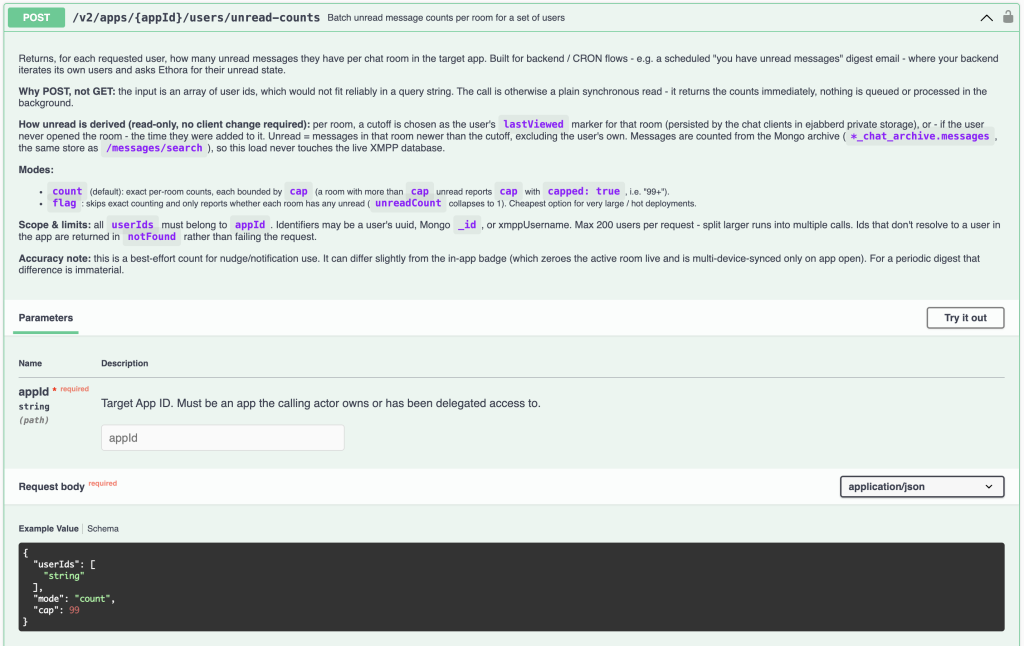
Some use cases genuinely need the server to know the counts. For those, the new endpoint returns unread counts per user, per room:
POST /v2/apps/{appId}/users/unread-counts
{
  "userIds": ["...", "..."],   // a batch of users in the app
  "mode": "count",              // "count" for exact numbers, "flag" for has-unread
  "cap": 99                     // report "99+" past this, to bound cost
}
It accepts a batch of users (so a backend job can process many at once), and for each one returns a per-room breakdown of unread messages. It is a plain synchronous read: you ask, you get the counts back immediately.
Crucially, this works without any client involvement. The server derives each user’s “last viewed” position from the same markers the clients already maintain, and falls back to the moment a user was added to a room when they have never opened it. That fallback matters, because the users you most want to reach are often the ones who have not logged in recently, and they still get a correct backlog count.
A flag mode is available when you only need to know whether a user has unread messages in a room, rather than the exact number. It is cheaper, and useful at higher volumes.
Client vs server: the trade-off at a glance
| Client-side (traditional) | Server-side (new endpoint) | |
|---|---|---|
| Server load | Minimal | Real, scales with users x rooms |
| Real-time | Instant | On request (best for batch jobs) |
| Backend can act on the count | No | Yes |
| Needs an active client | Yes | No |
| Logic lives in | Every SDK | One place, server-side |
| Best for | High-load chat, social, streaming, gaming | Enterprise, notifications, back-office workflows |
There is no universally “better” option here. It is a genuine engineering balance between keeping the server thin and giving the server more capability.
When to use which
Keep counting on the client if you are running high-throughput, real-time-first workloads: large public chat rooms, social platforms, live event and streaming chat, in-game chat. Here, load per instance is the constraint, and the thin-server model is what keeps things fast and cheap. Adding server-side counting to these systems would spend your performance budget in the wrong place.
Use the server-side endpoint in enterprise scenarios, where richness of functionality matters more than raw message throughput and the load per instance is comparatively low. Business messaging, professional services, healthcare, internal collaboration, and similar deployments typically have fewer, higher-value conversations per instance, and they benefit far more from being able to build workflows on top of unread state than they would from shaving microseconds off the chat hot path.
In our internal testing on a single modest instance, the endpoint processed on the order of a couple hundred users per second (roughly 1,000 users in a few seconds, 10,000 in under a minute), with cost scaling predictably with the number of users and rooms rather than with the total size of the message archive. That is comfortably within range for a scheduled job, while confirming why you would not want it in the real-time path of a high-load consumer app.
What this unlocks: re-engagement workflows
The clearest reason to want server-side unread counts is notifications. Because your backend can now see how many messages a user has waiting, it can act on that.
A typical pattern: run a scheduled job (say, once a day or once a week), ask the endpoint for the unread counts of all relevant users, and send each one a summary email of what they have missed. It is a simple, effective way to re-engage users who are not checking the app, and it is exactly the kind of workflow that was previously impossible when the count only ever existed inside the client. Because the endpoint is generic, you are free to implement whatever notification logic and cadence suits your product, including per-user preferences such as daily, weekly, or off entirely.
Infrastructure note: a read-only archive database
This endpoint is not a one-off feature. It is one of several capabilities made possible by a recent architectural improvement in the Ethora platform: a dedicated read-only archive of chat data, kept separate from the live chat system.
The principle is straightforward. The real-time chat engine is optimized for one thing: moving messages between participants with minimal latency. Analytical and read-heavy operations (counting, searching, reporting) have very different performance characteristics, and running them against the live system would compete with the chat hot path. So we keep a separate, read-optimized copy of the data and point all of that work at it instead.
That single change enables a whole family of features without affecting the performance of the main chat system:
- Chat history retrieval at scale
- Full-text message search (see the Messages Search API)
- Unread message counts (this endpoint – https://api.chat.ethora.com/api-docs/#/Chats/post_v2_apps_appid_users_unread_counts – available since Ethora server version 2607)
- Usage statistics and reporting
- AI chat widgets grounded in real conversation data
- AI agent training on historical messages
- and more to come
Because the archive is read-only and isolated, it can also be scaled or relocated independently. If read and analytical load ever grows, that layer can move to its own infrastructure without touching the real-time chat servers.
Availability
The unread-counts endpoint is available in the latest Ethora platform release (v26.07). If you are running a self-hosted or enterprise deployment and want to build re-engagement or notification workflows on top of it, or you want to explore the wider set of archive-backed capabilities, get in touch and we can help you roll it out.

Share with your community


More Articles

Development
Oct 5, 2026
Cross-Platform App Development Frameworks in 2026: 10 Options Compared, Real Trade-offs, and Chat + AI SDK Fit
In 2026, evaluating cross-platform frameworks is a complex matter. There are many practical questions: Which ones have solid chat and AI SDK support today? Which ones won’t force a painful migration when the next major OS version drops? And what are the real engineering trade-offs once you move past the marketing claims? We’ll look at […]


Healthcare
Oct 1, 2026
HIPAA-Compliant Video API in 2026: What Actually Makes One, Vendor Comparison, and Twilio Video Migration
Consultations, psychiatry meetings, medication management, triage, and other medical encounters often do not require physical presence. Adding video to your healthcare app or platform can be a great idea, as it allows you to hold sessions online without losing the human touch. Using a messaging API to incorporate video into your application makes the whole […]

Try Out Ethora in Action
Experience Ethora's messaging with a dedicated demo from our CEO or start building your App right now!
