

AI Chat Widget: Embed an AI Agent on Any Website
Add an AI chatbot to any website with a single line of code. Ethora’s embeddable AI widget works on WordPress, Shopify, React, or any HTML site — powered by RAG for context-aware answers from your own documents and knowledge base.
Bring AI Conversations to Any Website
An embeddable AI agent script is the fastest way to integrate intelligent chatbots into your website. Our JavaScript embed is lightweight and compatible with any platform, as it doesn’t require any additional dependencies or platform-specific installation. Supercharge your site with a smart AI assistant that can understand context, answer questions, integrate with your knowledge base, and even guide users through complex processes.
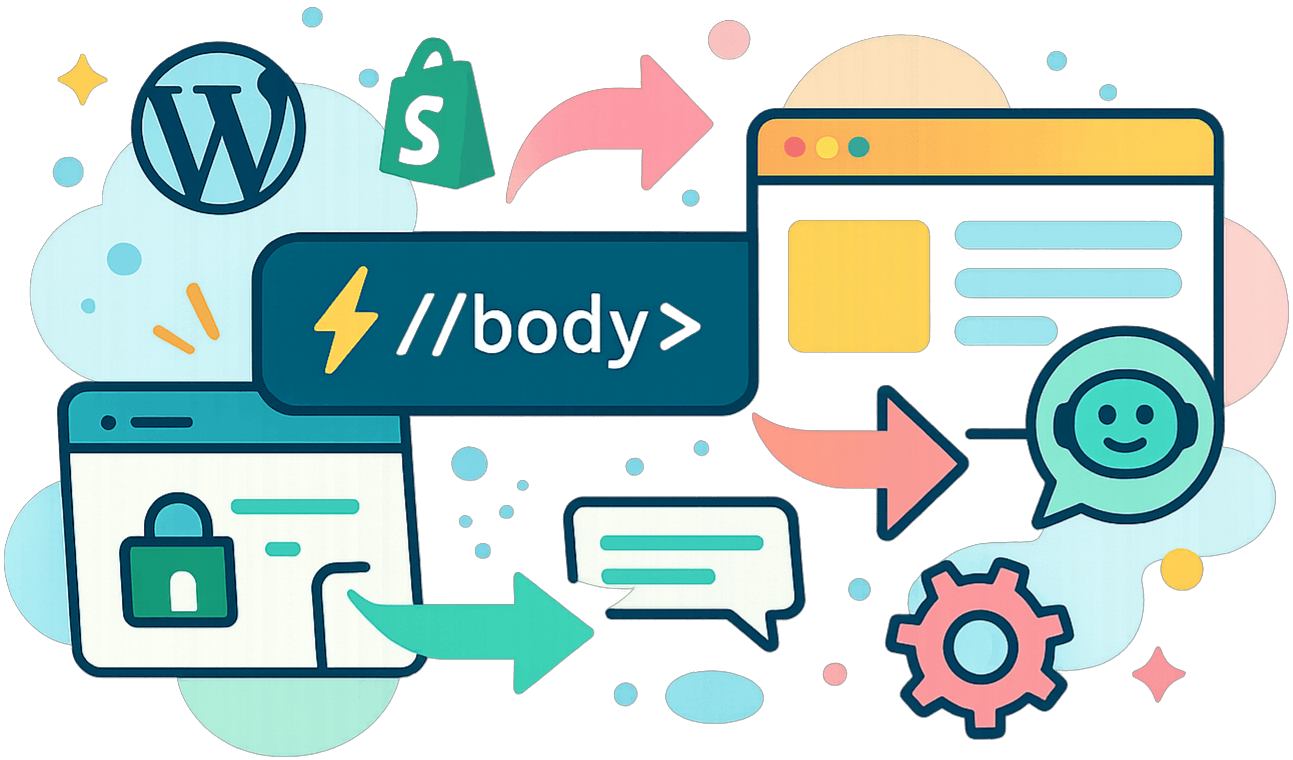
One-line Integration
Integration is as easy as it gets. Here’s the step-by-step guide:
- Copy the embed code from the Ethora admin panel.
- Paste it into your site’s HTML before the closing
</body>tag. - Save and refresh — your AI agent is live.
If you need a guide for a specific platform, here you are:
- WordPress – Use the HTML block in your page editor or insert via your theme’s footer.
- Shopify – Add the script to theme.liquid before the
</body>tag. - Custom websites – Paste into your base template or HTML file.
If you need conditional integration, we have code examples for that, too.
Make It Match Your Brand
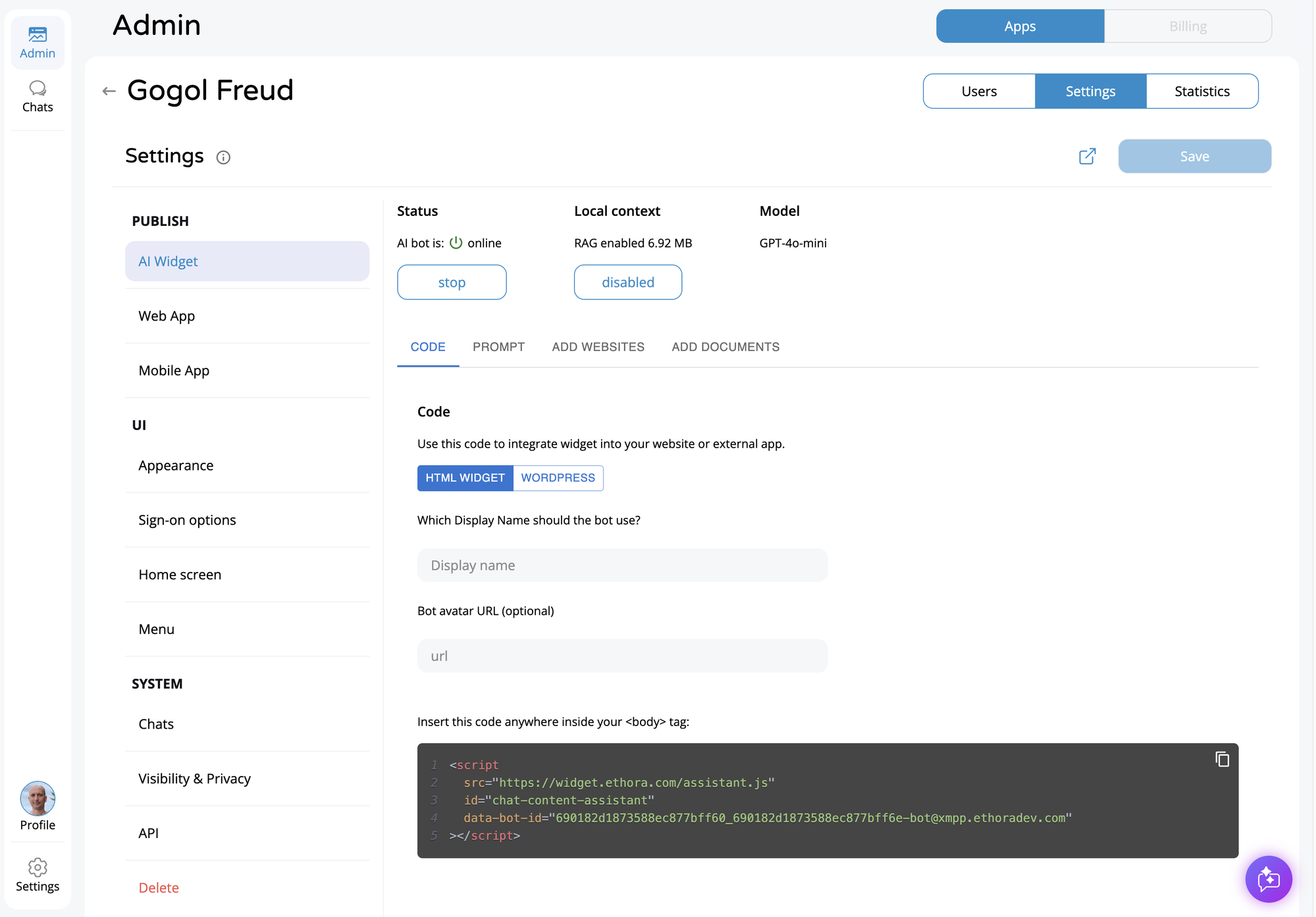
Everything is configured from the Ethora admin panel — no coding required after the initial embed. The Settings panel is organised into clear sections: PUBLISH (AI Widget, Web App, Mobile App), UI (Appearance, Sign-on options, Home screen, Menu), and SYSTEM (Chats, Visibility & Privacy, API). You can change colours, fonts, button styles, set the bot’s display name and avatar, configure sign-on options, and customise the chat menu — all from the browser.
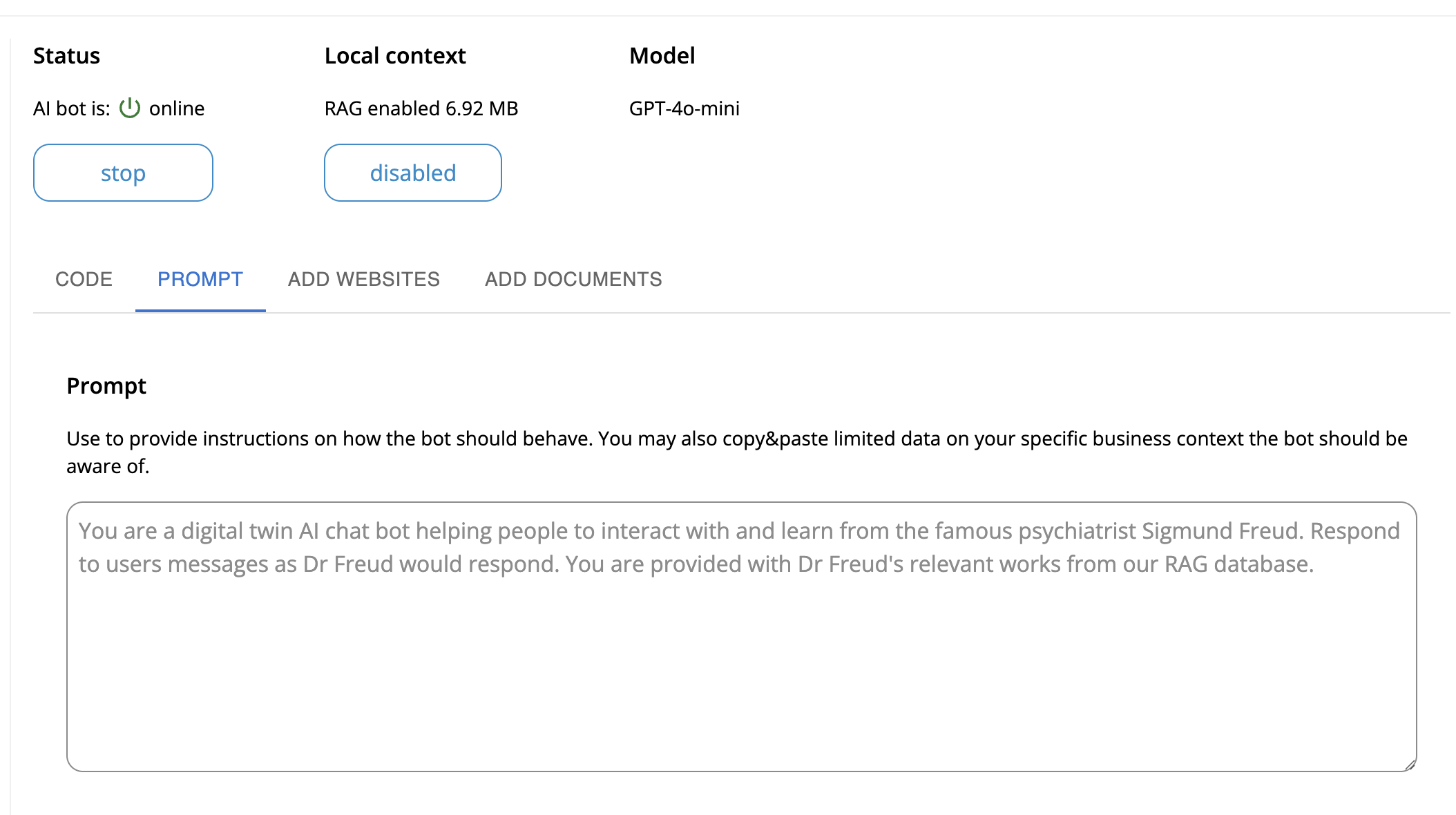
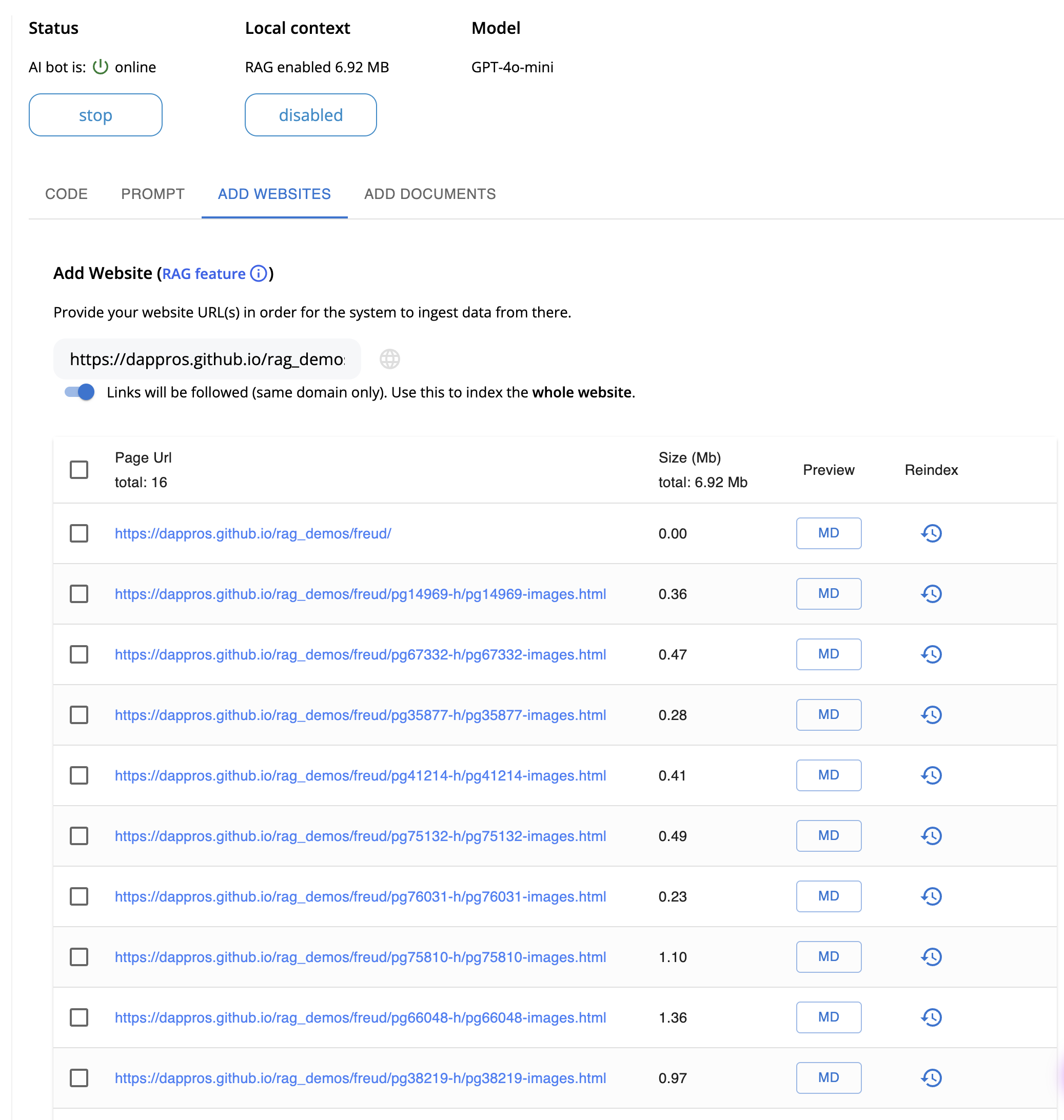
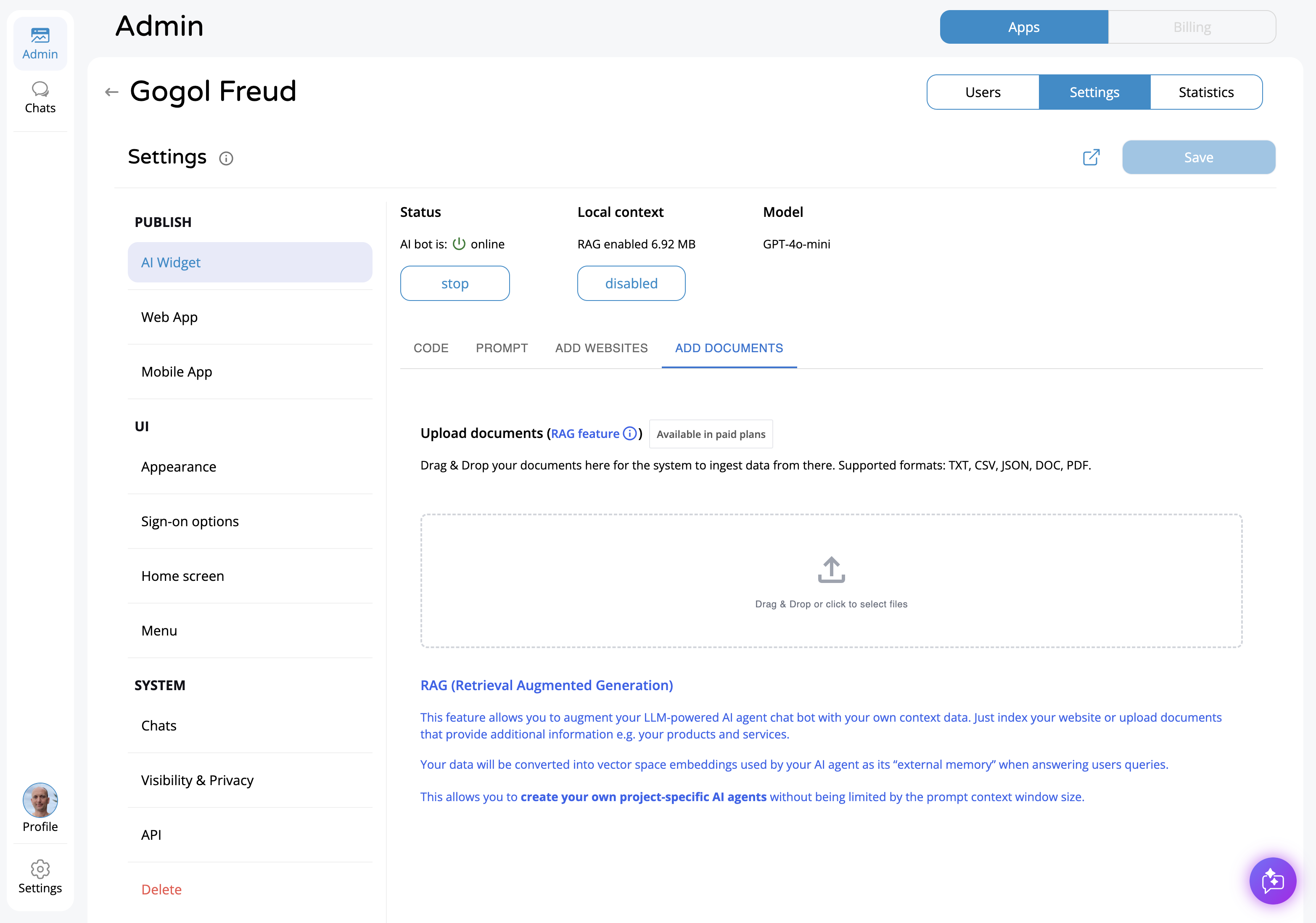
The bot configuration itself has four tabs: CODE (your embed snippet for HTML or WordPress), PROMPT (the system instructions that define the AI’s personality and behaviour), ADD WEBSITES (crawl your site for RAG), and ADD DOCUMENTS (upload PDFs and files for the AI’s knowledge base). You can also select which LLM model to use (GPT-4o-mini, GPT-4, etc.) and monitor the bot’s status and RAG context size in real time.
AI Agent Capabilities
This simple copy-pasting integration is more powerful than it may seem. Our embeddable conversational AI script goes beyond basic Q&A:
Natural language processing
AI understands questions, even if phrased differently.
Context-aware responses
Your chatbot will remember what’s been said earlier in the chat.
Continuous learning
AI will only get smarter, improving answers over time based on interactions.
Knowledge base integration
You can make AI speak like your brand by teaching it from your documentation.
What Is an AI Chat Widget?
An AI chat widget is a small, self-contained chat interface that you embed on your website to let visitors interact with an AI-powered assistant. It typically appears as a floating button in the corner of the page — visitors click it, a chat window opens, and they can ask questions in natural language.
Unlike traditional live chat widgets that require human agents to be online, an AI chat widget responds automatically using large language models (LLMs) like GPT-4, Claude, or Llama. When combined with RAG (Retrieval-Augmented Generation), the widget can answer questions based on your actual business data — product documentation, FAQs, knowledge base articles, policies — rather than generic AI responses.
AI chat widgets are used across industries to handle customer support, qualify leads, guide users through products, and reduce the volume of repetitive inquiries that human agents need to handle. They work 24/7, respond instantly, and can handle hundreds of conversations simultaneously.
Ethora’s AI chat widget goes beyond basic Q&A. Built on the XMPP messaging protocol, it supports real-time conversations with context awareness, conversation history, file sharing, and seamless handoff to human agents when needed. The widget uses Shadow DOM for style isolation, so it won’t conflict with your existing site styles.
Embed Code Example
Here is the actual embed code. Copy this single <script> tag and paste it into your website’s HTML, just before the closing </body> tag. Replace the data-bot-id value with your own bot ID from the Ethora admin panel:
<script
  src="https://widget.ethora.com/assistant.js"
  id="chat-content-assistant"
  data-bot-id="YOUR_BOT_ID_HERE"
></script>
That’s it — one script tag, no npm install, no build step, no framework dependency. The widget loads asynchronously, so it won’t block your page rendering. It uses Shadow DOM to isolate its styles from your site’s CSS.
For React / npm projects
If you’re building a React application, you can also install the widget as an npm package for tighter integration:
npm install @ethora/ai-chat-widgetThe npm package (@ethora/ai-chat-widget) provides a React component with the same capabilities plus programmatic control over the widget’s state, events, and styling. It uses Redux for state management and styled-components for theming.
How the AI Widget Works
When a visitor loads your page, the widget script initialises in the background. Here’s what happens under the hood:
1. Widget loads asynchronously.
The script downloads from Ethora’s CDN and renders a floating chat button on your page. It uses Shadow DOM to encapsulate its styles, so it cannot interfere with your site’s CSS and vice versa.
2. Anonymous session bootstrapping.
When the visitor opens the chat, the widget automatically creates an anonymous session — no login or registration required. The visitor can start asking questions immediately.
3. XMPP real-time transport.
Messages are sent via the XMPP protocol, the same battle-tested messaging standard used by WhatsApp and Google Talk. This ensures low-latency, reliable message delivery even on slow connections.
4. AI processes the query.
Your bot receives the message and processes it using the configured LLM (GPT-4, Claude, Llama, Mistral, or any supported model). If RAG is enabled, the bot first retrieves relevant content from your indexed documents and includes it as context.
5. Response delivered in real-time.
The AI’s response streams back to the visitor’s chat window. The widget maintains conversation context, so follow-up questions are understood in the context of the ongoing conversation.
Configuration and Customisation
The AI chat widget can be configured entirely through the Ethora admin panel — no code changes needed after the initial embed. You can also fine-tune settings via data attributes on the script tag or React component props.
| Setting | What It Controls | Configured Via |
|---|---|---|
| Bot personality and instructions | System prompt that defines how the AI responds — tone, scope, restrictions | Admin panel |
| Knowledge base (RAG) | Documents, web pages, and FAQs the AI can reference when answering | Admin panel |
| LLM model selection | Choose which AI model powers responses (GPT-4, Claude, Llama, Mistral) | Admin panel |
| Widget colours and branding | Primary colour, button style, chat header appearance to match your brand | Admin panel / data attributes |
| Button position | Bottom-right (default), bottom-left, or custom positioning | Admin panel / data attributes |
| Chat window size | Width and height of the popup chat window | Data attributes / React props |
| Bot avatar and display name | The avatar image and name shown in the chat header | Admin panel |
| Welcome message | The initial message shown when a visitor opens the chat | Admin panel |
AI Chat Widget Comparison
How does Ethora’s AI chat widget compare to other popular options?
 Ethora
Ethora’s key differentiators are self-hosting (your data stays on your servers), LLM flexibility (use any model, not just one vendor’s), and open source availability. For businesses in regulated industries (healthcare, finance, government) where data cannot leave your infrastructure, Ethora is the only option that provides full data sovereignty with an AI chat widget.
AI Widget Use Cases
Customer support automation
Handle the 60-80% of support queries that are repetitive (shipping status, return policies, account questions) instantly and 24/7. Escalate complex issues to human agents automatically.
Lead qualification
Engage website visitors in conversation, ask qualifying questions, and route high-intent leads to your sales team. The AI can collect contact information and schedule demos without human involvement.
Knowledge base assistant
Connect the widget to your documentation, help centre, or internal wiki via RAG. Visitors get accurate answers grounded in your actual content instead of generic AI responses.
E-commerce product advisor
Help shoppers find the right product by answering questions about features, compatibility, sizing, and availability. Reduce cart abandonment by providing instant answers during the buying process.
Healthcare patient intake
Collect patient information, answer insurance questions, and help schedule appointments — all within a HIPAA-compliant, self-hosted environment.
Internal employee assistant
Deploy on your intranet or internal portal to help employees find HR policies, IT procedures, onboarding guides, and company information without raising tickets.
Perfect for Older Websites and Portals
Our embeddable AI agent is perfect for legacy portals and sites. It’s lightweight and fully compatible with older browsers and HTML structures. It will supercharge your communications with advanced features without overwhelming your systems.
Enterprise-Grade Reliability
While being lightweight and easy to integrate, Ethora’s AI Agent Script is fit for enterprise projects.
Scalability
Our solution scales when you need.
Security
All communication is encrypted end-to-end.
Compliance
We meet GDPR, CCPA, and other data protection standards.
Save Months of Work with Ethora
Build any chat use case into your product: in hours.
Free
- Community Support
- 30 Days of Free Support
- No Credit Card Required
Small Business
- Tech Support
- SLA 99.9%
- AI Allowance
- Custom Domain
Enterprise
- 24/7 Phone Support
- Self-hosted AI
- Custom Configuration
- Dedicated / On-prem hosting
What our clients say about our services.

Taras and the Ethora team are a reliable partner in messaging, tokenization and AI. Great communication and products.

I have worked with Ethora and team since 2018. They have been absolutely amazing and life-saving across multiple of my portfolio projects.

We partnered with Dappros/Ethora on an EU project and they successfully delivered the technology component. Highly recommended.

Ethora has successfully helped us ideate and deliver multiple digital transformation projects in Qatar and the MENA region. A reliable and knowledgable partner.

Ethora technology and expertise were instrumental in delivering Atom Connect, our product for streamlined communication in the workers’ comp market.

Ethora helped us deliver our AI agent solution, letting subscribers access context-specific insights from our vast library of expert content. Their LLM and chat-bot expertise is an excellent match for our AI strategy.

Ethora has been an exceptional strategic development partner for Preshent. Not just a vendor, but a core contributor to the future of our platform and company.

Ethora helped us ideate and deliver multiple digital transformation projects across Qatar and the MENA region. A reliable, knowledgable partner.

Our Case Studies
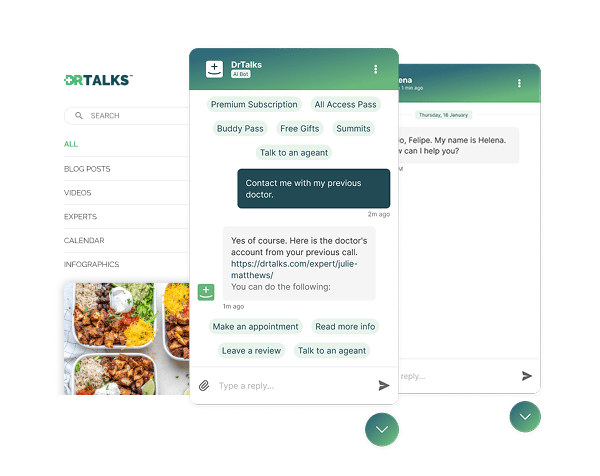

Dr. Talks is one of the most prominent organizers of online healthcare conferences and summits.
Ethora enabled them to create a context-aware AI-powered chatbot to help users navigate thousands of pages of medical content, correctly referencing pages, authors, videos and timestamps. 100% secure and HIPAA-compliant.
This assistant enhances user experience by simplifying interaction with the platform and reducing search time.
- 1000+ summits indexed by AI bot
- Instant user engagement
- Vector embeddings enable intelligent domain expert AI responses
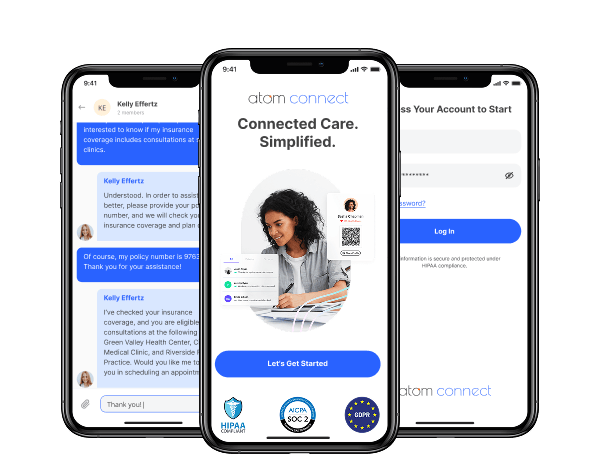

Atom Advantage is a provider of innovative AI powered workers compensation and health insurance solutions in the United States.
Ethora engine has enabled Atom Connect product used for communication between injured workers, nurses, and caseworkers. AI-powered, with documents exchange, and compliant with all regulations such as HIPAA and SOC2.
This solution reduces manual labour for caseworkers and improves patients experience.
- Integration into caseworkers web portal
- White-labelled mobile app for chat and health documents wallet for injured workers
- Instant messaging between caseworkers and injured workers
Sign up on Ethora
All heavy lifting is done. Add a smart assistant to your website just by copying and pasting the code.
Explore Related Solutions
Expand your AI capabilities with Ethora's full platform:
Self-hosted LLM AI agent
deploy AI on your own infrastructure with GPT-4, Llama, Mistral and full data control
Read moreRAG website crawler
automatically index your website content for AI-powered responses
Read moreDocument indexer for RAG
process PDFs and docs for your AI knowledge base
Read moreMCP server
connect AI agents to your chat platform via Model Context Protocol
Read moreSelf-hosted chat server
enterprise-grade messaging on AWS, Azure, GCP or on-premises
Read moreReact Chat SDK
add full messaging alongside your AI widget
Read moreSee pricing plans to get started.