

Have you ever built an AI chatbot powered by one of the popular LLMs only to watch it give generic, unhelpful responses to your customers? You’re not alone. Today, I’m going to walk you through the exact problem I faced with my technical support chatbot and the approaches to solve this.
Contents
- The Problem: When AI Agents Miss the Mark
- First Attempt: Better Prompting
- The URL Trap: Why Links Don’t Work
- The Copy-Paste Solution (And Why It’s Not Enough)
- The Real Solutions: MCP Servers and Vector Embeddings
- The Winning Combination
- Implementation Steps
- Key Takeaways
- Additional Content – Video Transcript
Watch the video for the full explanation, alternatively read summary below.
The Problem: When AI Agents Miss the Mark
Let me illustrate this with a real example from my product. I have a technical support chatbot powered by OpenAI’s API running on our Ethora platform. When users ask questions like “I want to create a dating app,” the bot responds with generic advice:
“There are many software development companies that can create a dating app and admin panel for you.”
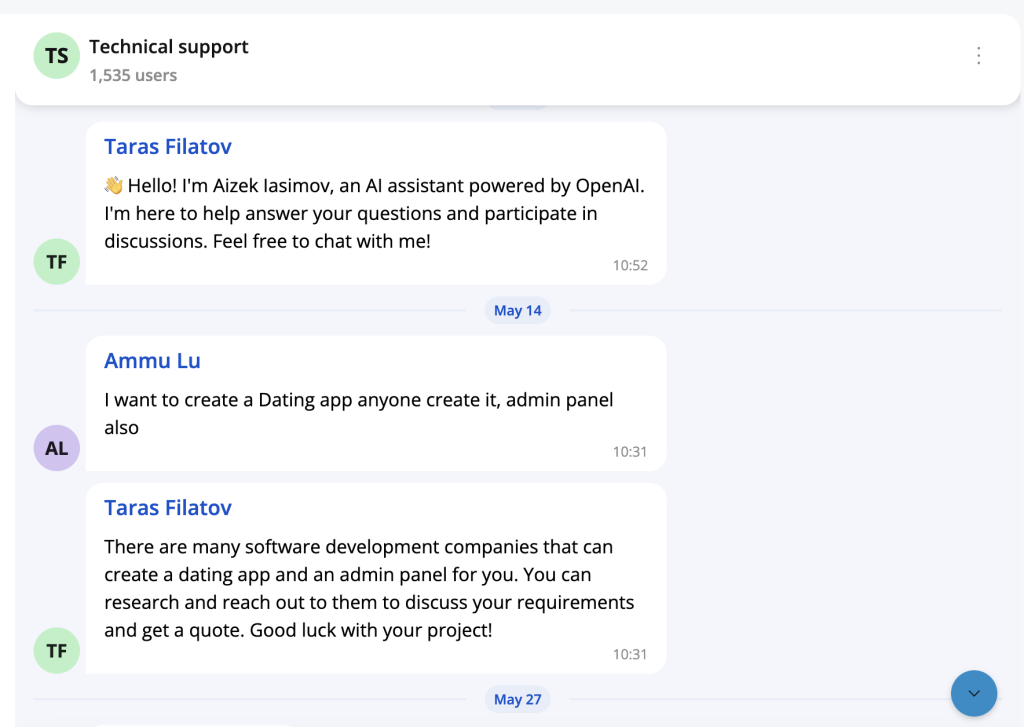
This is completely unhelpful because the customer is already on our platform! What they really need to hear is something like:
“For Ethora platform, you should go to the admin panel, hit “Create app”, […] and it will be created for you.”
The same issue occurs with questions like:
- “How can I make an app?”
- “Can I hire an app development professional?”
- “Can I export code?”
Every response lacks the specific context of our product and gives generic knowledge instead of actionable, platform-specific guidance.
First Attempt: Better Prompting
My initial assumption was simple: maybe I just need a better prompt. I was already sending a system prompt along with user questions to OpenAI’s API, something like:
“You are powered by the Ethora platform. You should provide assistance specific to our product.”
When I asked ChatGPT for help, it suggested improving the prompt with more context, examples, and terminology. While this was a good starting point, it quickly became clear that prompting alone wouldn’t solve the deeper issue: the AI simply didn’t have enough knowledge about my specific product.
The URL Trap: Why Links Don’t Work
My next thought was logical: “What if I just provide URLs to our documentation, GitHub repositories, or API documentation?”
Here’s the hard truth: OpenAI API models cannot directly read or fetch content from live websites or URLs during runtime. The AI doesn’t browse the web unless you explicitly fetch and inject that content into the prompt yourself.
This is a crucial difference between ChatGPT’s web interface (which can use tools and function calling) and the API we use to build our own agents. The web interface has additional capabilities that aren’t available through the API.
The Copy-Paste Solution (And Why It’s Not Enough)
The obvious workaround is to copy-paste all your documentation into each prompt. While this might work for small amounts of content, it has serious limitations:
- Manual maintenance: Every time your documentation updates, you need to manually update your prompts
- Context window limits: You’ll quickly hit size restrictions
- Cost and performance: Larger prompts mean higher costs and slower responses
Speaking of context windows, here are the current limits:
- GPT-3.5 Turbo: ~12,000 words
- GPT-4 Original: ~24,000 words
- GPT-4 Turbo: ~96,000 words
Even with GPT-4 Turbo’s large context window, you’ll struggle to fit comprehensive documentation for any substantial product.
The Real Solutions: MCP Servers and Vector Embeddings
After digging deeper, I discovered two powerful approaches that actually solve this problem: Model Context Protocol (MCP) servers and vector embeddings with RAG (Retrieval-Augmented Generation). Let me break down both.
Update, September 2026: Ethora now runs a hosted MCP server at mcp.chat.ethora.com/mcp with OAuth 2.1, revocable API keys and 90 tools. Claude, ChatGPT, Claude Code and Cursor can connect to it in under a minute and build the RAG-backed agent described below by asking. See the Ethora MCP server page and the tool reference.
Solution 1: MCP Servers
Think of an MCP server as an API for AI agents. It’s a gateway that allows your LLM to access your organizational knowledge, resources, and systems programmatically.
How it works:
- Creates an interface between your AI and your specific data sources
- Provides relevant information on-demand rather than stuffing everything into prompts
- Allows for dynamic, context-aware responses based on user roles or question types
Best for:
- When you need up-to-date answers without cramming everything into prompts
- Serving different contexts depending on user roles or tenants
- Accessing live data that changes frequently
Popular MCP servers already exist for systems like Google Docs, Stripe, Slack, and Outlook. But for your custom knowledge base, you’ll need to create your own.
Solution 2: Vector Embeddings + RAG
This approach transforms your documentation into a machine-readable format that enables intelligent information retrieval.
Here’s how it works:
- Document Processing: Your text documents are converted into numerical representations called vectors using models like OpenAI’s text-embedding-3-small
- Vector Database: These vectors are stored in a searchable database where similar content clusters together in multi-dimensional space
- Query Processing: When a user asks a question, their query is also converted into a vector
- Similarity Search: The system finds the most relevant chunks of information by calculating distances between vectors in this space
- Context Injection: The most relevant chunks are automatically added to your prompt before sending it to the LLM
The Simple Analogy:
Imagine you’re a president of a country or a CEO of a large corporation preparing for a press conference. Similarly to a Large Language Model, you’re generally very experienced and knowledgeable about many topics, but you’re about to be asked questions about a very specific niche you’re not an expert in.
Instead of reading a 1,000-page manual before every question, you have a smart assistant who:
- Listens to each question
- Instantly pulls the relevant 2-3 pages from the manual
- Hands them to you just before you answer
That’s exactly what vector embeddings + RAG does for your AI agent.
Best for:
- Large documentation sets or FAQs
- When you want semantic understanding even when users phrase things differently
- Cost-effective scaling with large knowledge bases
The Winning Combination
The most effective approach combines both solutions:
- Use vector embeddings + RAG to retrieve relevant content chunks from your knowledge base
- Serve those chunks via an MCP server or inject them directly into your prompt
- Send the enhanced prompt to your LLM (OpenAI API, Mistral, or any other model)
This workflow ensures your AI agent gets exactly the right context for each question without overwhelming the system or hitting context limits.
Implementation Steps
Here’s your action plan:
- Audit your knowledge base: Gather all documentation, FAQs, API docs, and product information
- Choose your approach: Start with vector embeddings + RAG for most use cases
- Process your content: Convert documents into embeddings using a service like OpenAI’s embedding API
- Set up retrieval: Implement a system to find and extract relevant chunks based on user queries
- Integrate with your chatbot: Modify your existing system to include retrieved context in prompts
- Test and iterate: Monitor responses and fine-tune your retrieval and prompting strategies
N.B.: The fastest way to test this is using Embeddable AI Chat Widget from Ethora AI SDK. This takes care of all the heavy-lifting for you, all you have to do is copy-paste the HTML code into your website. You can easily work with your website and documents indexing via the admin panel provided, so you don’t have to code anything.
Key Takeaways
- Generic AI responses happen because models lack your specific product context
- Simply providing URLs doesn’t work—APIs can’t browse the web
- Copy-pasting everything into prompts isn’t convenient or scalable
- Vector embeddings + RAG provides intelligent, automated content retrieval
- MCP servers offer dynamic access to live data and systems
- The best solution combines both approaches for maximum effectiveness
The difference between a generic chatbot and a truly helpful AI agent lies in giving it the right context at the right time. With these tools, you can transform your AI from a generic assistant into a knowledgeable product expert that actually helps your customers succeed.
Ready to make your AI agent smarter? Start with vector embeddings for your existing documentation—it’s often the fastest path to dramatically better responses.
Additional Content – Video Transcript
FULL TRANSCRIPT OF THE PRESENTATION:
Introduction: The Context Problem
Today we are going to talk about how to make AI agent or rather an LLM powered chatbot to be context aware of our specific business context relevant to our specific product or business enterprise knowledge base and things like that.
The problem is, and I can illustrate it with my specific issue, so I have in my product this, in technical support chat, the chatbot, which I run under my name right now at the moment, and it’s powered by OpenAI API.
Real-World Example: Generic vs. Specific Responses
The user asks, “I want to create a dating app,” for example.
So– and the bot is answering, “there are many software development companies that can create a dating app and admin panel for you,” which is not helpful because the customer is coming for our specific product.
And the chatbot should be able to tell it, “okay, actually for Ethora platform, you should go to the admin panel, hit create app, and it will be created for you.”
Similarly, “how can I make an app, hire an app development professional developer? Can I export code?”
It’s answering in generic knowledge. It’s answering without understanding my specific context of my specific product.
“Create the application for me. Reach out to professional app development team.”
Same problem.
First Attempt: Better Prompts
So I talk to chat GPT about how do I solve this problem. My initial simple assumption is, OK, maybe I need to provide some better prompt.
When I send an API request to OpenAI, I send my chatbot sends requests with the question from the user, from our customer. However, before that, I also add my specific prompt.
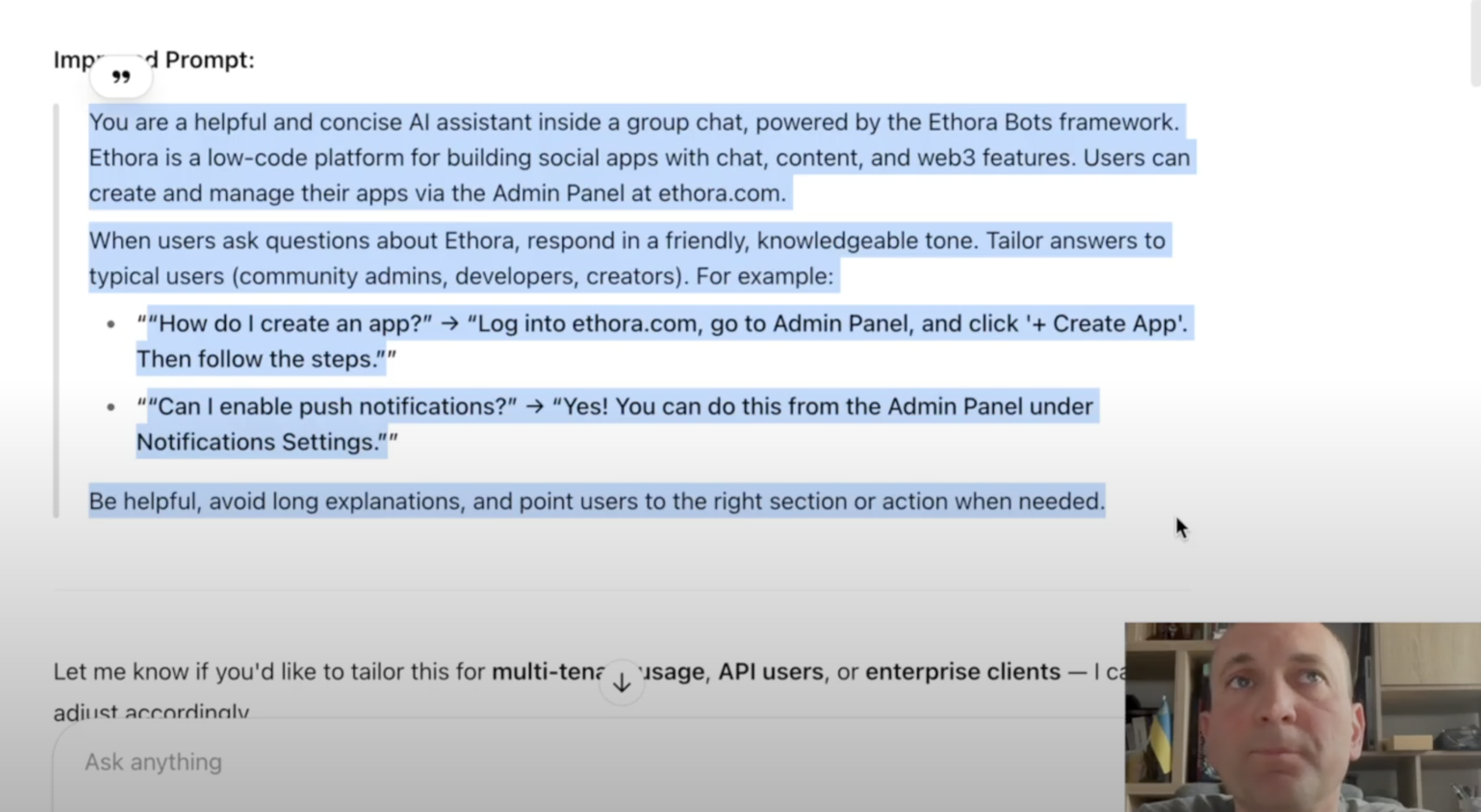
And this is the prompt that I used there. This prompt says, OK, you are actually powered by Ethora platform. So you should be able to help and provide assistance specific to our product. And even I provide an example of the response.
So, chat-gpt tells me that, okay, I mean, it’s a good starting point, but it might be not enough because it lacks background context. You don’t explain enough of common terminology. You don’t provide enough of examples. It’s a bit too narrow.
And a nice trick here that LLM, which is chat-gpt is providing me with a better prompt for LLM, so for itself. I could take this prompt and go and use it.
However, understanding this topic a bit deeper, I understand this is not enough. So this prompt will not provide the AI bot with enough of the local context knowledge to be able to answer the questions for my customers based on the understanding of my product.
The URL Problem: Can’t Access External Sources
I want it to consume more information about my product. How do I do that?
So my next question is, “What if I provide URL to website, to our documentation? Or for example, we have a lot of code samples on GitHub. There is API Swagger documentation, which is a really well-structured and interactive API document. What happens if I do that? Will OpenAI API be able to read that information and use it in its answers?”
The answer is no.
OpenAI API models cannot, unfortunately, directly read or fetch content from live websites or URLs during runtime. The AI does not browse the web unless you explicitly fetch and inject that content into the prompt yourself.
So basically, chat GPT tells us, go and do it yourself. Copy-paste your website content documentation swagger into the prompt or context window.
Providing a link and expecting the model, large language model to go there and read it live will not work. Similarly, including references or links to any other external sources.
The Copy-Paste Solution (And Why It’s Not Ideal)
So it pretty much tells us to copy and paste all of our enterprise knowledge or product documentation into the prompt, which might work, might not work.
It’s not very convenient, because it means we have to copy paste a lot of data, included it to every prompt. If anything updates, then we need to update our copy pasted information.
So documentation or any information knowledge updates, we have to somehow figure out how to do it automatically because we don’t want to do it manually.
GPT-4 it says can do some functional calling and tool use and, but I assume this is, this is about the web interface.
So this is core difference between the web interface of chat GPT, how it works right now, and the LLM itself, which is available for us where API.
Web interface system is able to do tool calls and function calling and search for us. It uses external tools. It doesn’t only use the knowledge of the LLM itself.
While we cannot use this web interface when we built our own AI agents or tech support chatbots because this functionality is not available there.
API Limitations vs. Web Interface
What is available where, via API of OpenAI, and the same thing will be applicable to any self-hosted LLM such as Mistral and others, it is not capable of doing the function calls while we send this API request and get the quick answer to us.
So then the chat-gpt back to our situation, back to solving our problem, It offers us an example of prompt injection.
So again, provide more information, explain your API endpoints, paste your key steps from documentation, include readme content from GitHub. So copy paste, this is what it suggests to do.
The Context Window Problem
Then I dig a little bit deeper And I want something better and some better ways, because we might not be able to– I mean, it’s not inconvenient.
And maybe the size of the context window, the size of how much prompt we can fit into API, it might not be enough to cover all the breadth and depth of our locally available knowledge base.
So what do we do?
Advanced Solutions: MCP and Vector Embeddings
My next question is, will it work if I create an MCP server or some vector embeddings?
Obviously, I’m able to ask these questions because I know what to ask. Ideally, the system should have suggested something like this to me.
But in any case, I just want to explain this is really important. And these are the tools that will help us to solve the problem, potentially.
And another question, which is relevant to our previous discussion, is what context window size can be used?
So what chat GPT tells me is absolutely these are two different but complementary solutions to make your support bot smarter.
Option 1: MCP Server (Model Context Protocol)
Option number one, model context protocol server.
MCP server is kind of a way to provide a gateway or interface to your resources, to your organizational knowledge.
like an API if you know what API is in software so it’s a way to it’s an application programming interface to talk to your software or to your server from other software to be able to exchange information with it programmatically and MCP is something similar and I covered it in previous materials but it’s for AI agents it’s for LLMs.
So MCP server allows to wrap or create like an addressing knowledge language wrapping addressing gateway to your organizational knowledge to your resources endpoints to your systems in in a way that LLM can access and address them and read information and even like manipulate them
there are by the way MCP servers for popular softwares and data systems for example Google Docs, Google Drive, Stripe for payments or Slack for communication, emails, Outlook, so there would be MCP servers for popular systems.
However, when you have your own local structure, infrastructure, enterprise, knowledge base, different type of knowledge and system structure, then you could create your own MCP server.
It doesn’t make the model smarter, but it fits the model relevant data on demand, which greatly improves response quality.
It’s best when you want to serve different contexts depending on user role, tenant, or question type. Or you need up-to-date answers without stuffing everything into the prompt.
It’s exactly what we needed. Potentially sounds like that.
Option 2: Vector Embeddings and RAG
Option number two. This is a bit, probably even more involved, to explain how this works for those who don’t understand vector embeddings. However, this is like really, really important. And once you go through this explanation, it’s actually becomes like really simple and really useful to to using your work.
So what is this story documentation /api/info as vector embeddings.
Example, via text embedding 3 small.
What Are Vector Embeddings?
What this says is it suggests us to process our local knowledge base, our local documents information about our product into a vector space, which is machine readable.
And there are special tools, models, allowing us to process into a lightweight vector database.
So what this means, it’s an information retrieval for the text, for the knowledge to become machine readable.
It’s a very, very common thing. the text, the words, the sentences are processed, transformed into numerical representation.
And the way to transform them into numerical representation so that they can be read by a computer is to create this special, it’s like a special code convention.
Simple Example of Vector Representation
So for example, you have a dictionary with different words in the language. You set certain number for each word. Then once you meet this word in your sentence, you say, okay, where there is, there are no words.
So I mean, at those positions where, so for example, like you, you, you have like a vector for your document size of your dictionary. And imagine there is no like word of, that specific word is not present in your sentence or your document. Then you have zero in that position.
But for those words which are present in the document, you have one or two or three, so you have certain number for those words which are present in the document.
And then you have this long vector or numerical representation with lots of zeros and some like smaller numbers.
This is like really simplistic and not ideal explanation of how this works. But the main idea is that your text document or sentence is transformed into numerical representation, which is called vector.
And this is what vector embeddings are about.
The Magic of Similarity Search
Then when user asks a question, the system, what is being suggested to us here is embed our query. Embed means transform our text query, our question from the user also into vector space.
Then retrieve the most relevant chunks and inject them into prompt.
Now, let’s quickly explain what this means. What does this mean, retrieve the most relevant chunks?
After we have transformed our documents, our knowledge corpus into the vector space, it is actually possible to do some information retrieval magic, which is based on simple math and simple geometry, pretty much, and find the relevance between different entries or between different documents and phrases.
3D Space Analogy
And the way this is done, so imagine you have a three-dimensional space, and because you convert your query of your customer into this 3D space, so we have a certain coordinate, certain point in the coordinates in that space, then you want to find your information that is relevant to that point, you simply need to find what’s in your 3D space closest, nearest to that point.
And the beauty is that all the phrases, all the documents can be and are represented as coordinates in that vector space.
So when you have the query, you do the same exercise and you establish the coordinate in your 3D map, you can easily find all the nearby chunks of information to the query of your customer.
High-Dimensional Reality
Now in reality, it’s not as simple and the space is multidimensional, so it’s not 3D because we have a lot of dimensions, a lot of words in your dictionary means it’s a high dimensional space initially.
I mean, there are different transformations and dimensionality reductions using, for example, principle component analysis and methods like that, that allow to reduce the space and get rid of those unnecessary zeros and things like that.
However, in the outcome, the space is still like high dimensional. So there are lots of dimensions and we cannot see it with our eyes. But we can still do the calculations using Euclidean distance or cosine angle distance between the coordinates of different documents or sentences.
So this is all what we need. and this is all we need to know for, to understand how this works.
Semantic Matching
This allows our computer system, our database, even to easily match the customer’s query, question written in text format, to other text knowledge stored in our vector space using this vector space representation and the calculations of closest, shortest distances between them.
And ChatGPT tells us that this is best when we have large documentation or FAQs and/or when we want our bot to understand semantic similarity, even when users phrase things differently.
Now, obviously, large language model understands the semantics of the language and semantics of all human knowledge that was fed to it. So it’s very clever.
However, it might not be the case with your local knowledge because what you are trying to expose here is your local context, your specific niche and local knowledge which has not been published on the internet before, most likely, and/or has not been used in training of the launch language model.
The CEO/President Analogy
We could provide an analogy, for example, imagine that there is a chief executive or a president of a country doing this press appearance, and this is the best person to speak on the topic.
They are like the most trusted, they look great, they are trusted, they’ve been elected into the office by everybody or most of the voters in the country. So they are the best positioned actor to be able to provide the answer.
And they have a lot of knowledge on all the different other topics. So they can connect the dots and combine the context and be able to deliver the answer in the best way.
However, they are going to be asked questions on this specific niche topic, which they are not necessarily really on top of.
So in order to prep, and this president or CEO is our LLM. So in our case, it’s like OpenAI LLM, but it could be the self-hosted LLM like Mistrial. And that’s the analogy.
The Briefing Document Process
And what we are doing here with vector embeddings is we are doing a preparation. So we are preparing briefing documents for this CEO or president, LLM, to be able to speak to our specific niche topic.
So we are kind of taking the some, like they do in the movies, take a professor, like physicist, there is asteroid or something flying to hit the earth, and there is an astrophysicist or certain professor who has spent decades learning this topic.
We extract the knowledge of this professor, or like the knowledge about our product, into a 1,000 pages book, and we use it to prepare the president for the election. their speech.
The problem is the president will not be able to read this 1,000 pages book when they answer the specific question.
So what we do is we create this automatic system which is called vector embeddings plus rag which means that once the question from the journalist is received this question is transformed into vector space, our system automatically retrieves the relevant chunks from our 1000 page manual on our niche topic and it extracts relevant paragraphs or pages and gets it into the teleprompter for our president to read
And obviously, the LLM is able to consume, read, and analyze information much faster than the human can. So we can provide a few pages or dozens of pages, but we don’t need it to read the whole 1,000 or million pages thing.
So this is pretty clever and this is what we do with vector embeddings. We don’t feed whole local knowledge and whole context. We only feed the most relevant chunks, which helps us because it will be faster, it will be more relevant and specific, it will be cheaper or it will be more accessible because, or it will be simply possible because many LLM systems and APIs will not simply just not accept huge prompts to start with.
Context Window Sizes
Then the side question that we have is, what is the size, the typical size for the context window we can use?
And this is important and important to understand. And this is like why we actually, this is one of the reasons why we need to go through these tricks of vector embeddings or MCP server or both.
So the context size for GPT 3.5 Turbo is 16,000 tokens. I mean, or rather 12,000 words, because token is like almost like a stem of the word. It’s like the system prompts, helps us to explain in that it’s about three fourth of a word on average for English language.
So GPT 3.5 Turbo is around 12,000 words.
GPT 4 Turbo is 96,000 words.
GPT 4 original is around 24,000 or 26,000 words. Sorry, it’s like 6,000 or 24,000 depending on the version.
So it might be not enough. It will be not enough for any large knowledge or documents corpus, and this is why we just discussed the ways to solve that.
The Best Practice: Combining Both Approaches
And what we are being told here is that the best practice would be to combine both.
So the ideal setup is use vector embeddings plus rag to retrieve relevant content chunks. So we receive the query from the customer. We translate it into the vector space, transform it into numerical format. We do the mathematical distance evaluation and find the closest information chunks from our locally stored vector database of our local context.
We serve those chunks via a lightweight MCP server or similar middleware.
If we didn’t have the MCP server, then we just simply extract those chunks as text information and add it into our prompt.
The Complete Workflow
So again, on each user question, we embed the query. So embed means we transform it into numerical vector space.
We retrieve the top n. So n is arbitrary number, so how many chunks we want to retrieve based on our settings. From our local knowledge, we inject those chunks into the prompt, which we then send to our LLM, which in our case is OpenAI API.
For example, GPT-4 Turbo. But it could be any other LLM, and it could be a self-hosted LLM such as Mistral or any other LLM prefer to use for this purpose.
Summary and Conclusion
So that’s it. And we have started from trying to solve the problem of feeding our agent with more of our context, local context, niche understanding of our product.
We found out that the current LLMs working via API are not able to do website search function calls. They’re not able to consume information externally. So we need to do some prep work for them.
A workaround solution would be to just copy paste all of our information into the system, into the prompt. However, that is not ideal for many reasons, including the context window size limitation, which we just discussed.
So the solutions would be to either build and implement or use an existing MCP server for your data, or do the vector embeddings plus reg for the pre-processing stage.
And as we have been just told and we discussed, we could combine these two approaches into a working solution.
So that’s been really helpful and we can go ahead and implement this now. And that would be all from me today and thank you for watching!
Keep Reading
- Case study — RAG AI chatbot for a health supplements business
- Why RAG is critical for customer support AI
- How to run LLM models locally
Build a context-aware AI agent — explore the Ethora AI SDK, try the self-hosted LLM agent, or start building for free.

Share with your community


More Articles

Development
Oct 5, 2026
Cross-Platform App Development Frameworks in 2026: 10 Options Compared, Real Trade-offs, and Chat + AI SDK Fit
In 2026, evaluating cross-platform frameworks is a complex matter. There are many practical questions: Which ones have solid chat and AI SDK support today? Which ones won’t force a painful migration when the next major OS version drops? And what are the real engineering trade-offs once you move past the marketing claims? We’ll look at […]


Healthcare
Oct 1, 2026
HIPAA-Compliant Video API in 2026: What Actually Makes One, Vendor Comparison, and Twilio Video Migration
Consultations, psychiatry meetings, medication management, triage, and other medical encounters often do not require physical presence. Adding video to your healthcare app or platform can be a great idea, as it allows you to hold sessions online without losing the human touch. Using a messaging API to incorporate video into your application makes the whole […]

Try Out Ethora in Action
Experience Ethora's messaging with a dedicated demo from our CEO or start building your App right now!
