


MCP Server for Chat, AI Agents & Messaging
No need to switch between dashboards or manually wire up APIs — tell your AI what you want to do. Ethora’s Model Context Protocol (MCP) Server connects AI IDEs and agents (Cursor, VS Code MCP, Claude Desktop, Windsurf) to Ethora tools: Apps, Chats, Broadcasts, Sources (RAG), Files, Bots, Wallets.
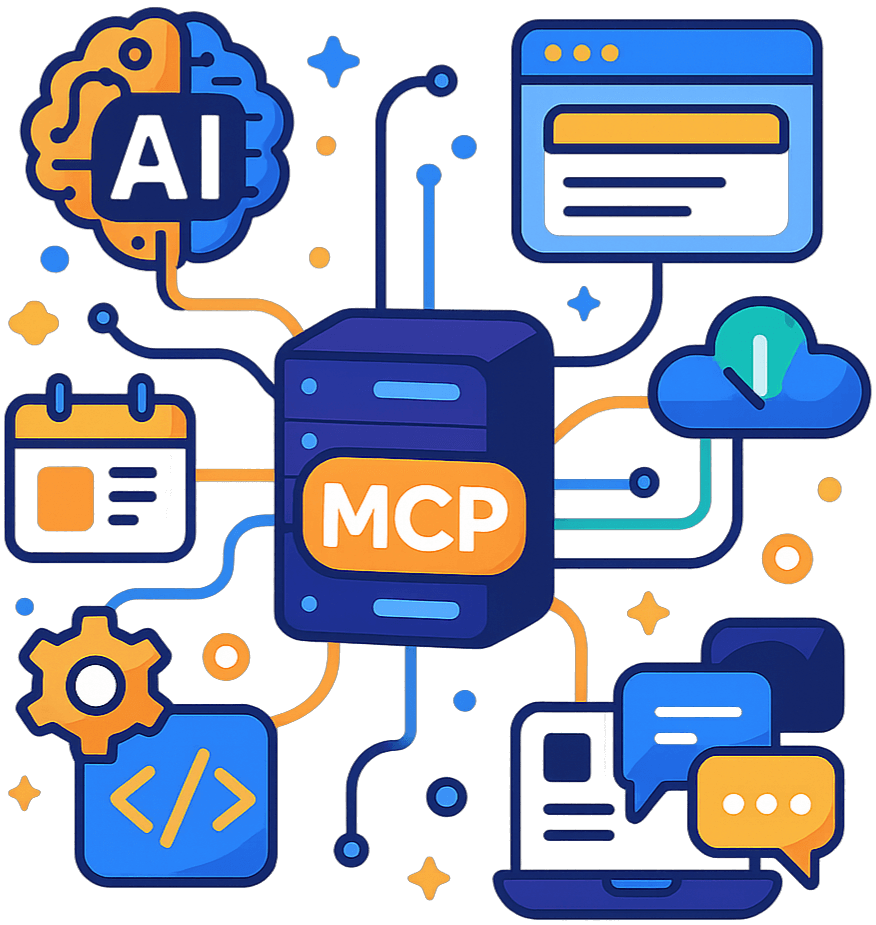
Why MCP matters
Every agent, model, and framework speaks a different language. MCP is a standard protocol that lets them share context and use tools safely and consistently.
With Ethora MCP Server, your AI can:
- call Ethora REST APIs through approved tools (instead of ad-hoc code)
- load integration docs into context (resources)
- use repeatable "how to integrate" prompts (prompts)
- generate copy/paste snippets (generators)
Get started (2 minutes)
Get Ethora MCP Server running in seconds. Compatible with Cursor, VS Code MCP, Claude Desktop, and Windsurf.
Run the server
Configure it (env vars)
Set these in your MCP host environment (or configure at runtime using the ethora-configure tool):
Connect from your IDE
Add "Ethora MCP Server" in your MCP client settings and point it to the local command:
What you get (actual capabilities)
Apps (B2B automation)
Create, update, list, delete apps
Select a "current app" context for subsequent tools
Chats & messaging
Broadcast a message to many rooms via a background job
Poll job status and per-room results
Sources ingestion (RAG automation)
Crawl a website URL for indexing
Reindex and delete previously ingested URLs
Upload documents for ingestion, delete ingested documents
(Includes app-token variants so integrations can run without user credentials)
Files
Upload, list/get, delete files (user-auth flows)
Bot / Agent management
Get/update bot configuration; enable/disable bot for an app (app-token flows)
Wallet tools (Web3)
Get balances; ERC-20 transfers
Auth map: appJwt vs appToken vs b2bToken
Ethora supports multiple auth modes depending on who is calling.
App JWT (appJwt)
Use for: user login/register bootstrap
Where it lives: MCP host env (ETHORA_APP_JWT) or ethora-configure
Typical caller: your frontend + backend during initial user auth
App Token (appToken)
Use for: app-scoped B2B operations (broadcast / sources ingest / bot management)
Where it lives: per-app secret in your infra / admin config
Typical caller: partner integrations automating a single app
B2B Token (b2bToken)
Use for: server-to-server automation (create apps, bootstrap environments)
Sent as: x-custom-token header (JWT with type=server)
Where it lives: secure backend/MCP host secret store (ETHORA_B2B_TOKEN)
Rule of thumb
- Need to log in a user → App JWT
- Need to automate one app (broadcast/sources/bot) → App Token
- Need to create apps / bootstrap partner flows → B2B Token → then App Token
| Field | appJwt | appToken | b2bToken |
|---|---|---|---|
| Purpose | User-level operations | Application-level operations | Organization-level operations |
| Where Used | User-specific actions, personal assistants | Backend services, automation, AI agents | Enterprise automation, multi-tenant systems |
| Where Stored | User session or secure storage | Environment variables, secrets manager | Enterprise secrets vault, CI/CD |
| Best Practices | Rotate regularly, use HTTPS only | Store in .env (never commit), use service accounts | Use least-privilege tokens, audit access |
| Environment Variable | ETHORA_APP_JWT |
ETHORA_APP_JWT |
ETHORA_B2B_TOKEN |
Prompts & Resources (built-in integration docs)
Ethora MCP Server includes developer-facing prompts and loadable resources that mirror how people actually integrate Ethora.
Resources (load docs into the AI context)
ethora://docs/auth-mapComplete authentication guide and token comparisonethora://docs/chat-component/quickstartQuickstart guide for Ethora Chat Component integrationethora://docs/sdk-backend/quickstartBackend SDK integration guide and examplesethora://docs/recipesCommon integration patterns and code recipesPrompts (reusable integration prompts)
ethora-auth-mapUnderstand authentication modes and token usageethora-vite-quickstartGenerate Vite + React integration codeethora-nextjs-quickstartGenerate Next.js integration codeethora-backend-sdk-quickstartGenerate backend SDK integration codeethora-recipesAccess common integration patterns and examplesRelated Documentation
Explore additional resources to enhance your integration
Generators (no shell, no file writes)
These tools output copy/paste artifacts directly in your MCP client.
ethora-generate-chat-component-app-tsx— ready-to-paste App.tsx snippetethora-generate-env-examples— .env.example templates (frontend / backend SDK / MCP)ethora-generate-b2b-bootstrap-runbook— ordered runbook of MCP tool callsethora-generate-chat-component-app-tsx
Generates a complete React TypeScript component for integrating Ethora Chat Component. Produces ready-to-use JSX/TSX code that you can copy into your application.
Output: TypeScript React component with proper imports, hooks, and configuration.
ethora-generate-env-examples
Generates example environment variable configurations for different authentication modes and use cases. Helps you set up .env files correctly.
Output: Formatted environment variable examples with comments and best practices.
ethora-generate-b2b-bootstrap-runbook
Generates a step-by-step runbook for bootstrapping a B2B integration, including authentication setup, app creation, and initial configuration.
Output: Markdown-formatted runbook with commands, code examples, and verification steps.
Note: Generator tools produce code and documentation only. They do not execute commands or modify your filesystem. You control when and how to use the generated code.
Common recipes
Broadcast to rooms (app-token)
- Select app context (sets appId and appToken)
- Switch to app-token auth
- Enqueue broadcast job
- Poll job status until complete
Ingest a website (RAG) (app-token)
- Select app context
- Switch to app-token auth
- Run site crawl, then reindex later if needed
Full B2B bootstrap (create app → ingest → enable bot)
- Configure API URL + B2B token
- Switch to B2B auth
- Run bootstrap tool (creates app + indexes sources + enables bot)
- Switch to app-token auth for follow-up bot tuning
Broadcast Message
App-Token Auth • Send a broadcast message to a chat room
Sources Ingestion / RAG
App-Token Auth • Ingest documents and URLs for RAG-powered AI applications
Full B2B Bootstrap
B2B → App-Token • Complete workflow for bootstrapping a B2B integration
What is Model Context Protocol (MCP)?
Every agent, model, and framework speaks a different language. MCP is a standardized protocol that enables them to share context and collaborate effectively. Ethora MCP Server implements the MCP specification, allowing AI IDEs like Cursor, VS Code MCP, Claude Desktop, and Windsurf to access Ethora platform capabilities through a unified interface.

Why MCP Matters
Lack of a common framework leads to one-off integrations, which are difficult to maintain and reuse. MCP eliminates this friction and provides developers with:
- Standardization across AI models and platforms
- Reusable connectors for multi-agent systems
- Secure tool usage and context management
- Developer-friendly AI interaction layer
Connect Any AI Agent or System
Ethora MCP Server works with the most popular AI-assisted development tools. It doesn’t matter what LLM model you use for coding—Ethora integrates seamlessly.
| Supported Hosts | Compatible AI Agents and Models |
|---|---|
| Cursor | Claude (Anthropic), GPT-4, custom models |
| VS Code MCP | Any model supporting MCP protocol |
| Claude Desktop | Claude 3 (Opus, Sonnet, Haiku) |
| Windsurf IDE | Integrated AI models |
| Custom Agents | Any AI agent that communicates via MCP |
Real-World Use Cases
Multi-agent AI Systems
Use standardized tools and prompts to coordinate agents in real-time. Build complex workflows where multiple AI agents collaborate on tasks.
B2B Automation
Automate processes for digital assets, documents, and chat. Integrate Ethora capabilities into enterprise workflows and systems.
RAG Ingestion & Knowledge Bases
Ingest documentation, support articles, and knowledge bases for AI-powered search and Q&A systems. Build context-aware assistants.
AI-IDE Development
Leverage Ethora’s extensive functionality by letting AI create your app through "vibe coding." Build faster with AI-assisted development.
Enterprise-Grade Security
We understand that keeping your data safe is crucial in the modern interconnected world. That’s why Ethora MCP Server uses the best security practices.
End-to-end encryption
Data is encrypted when transferred and stored.
Access control and authentication
Multiple authentication modes prevent unauthorized access and misuse.
Compliance
Alignment with AI governance and industry standards.
Data privacy protection
Across all deployments and authentication modes.
How to Get Started with MCP Server
Whether you’re using Cursor, VS Code MCP, Claude Desktop, or another AI-assisted IDE, the process is almost the same: run the server locally and point your environment to it.
- Install the MCP Server: npx -y @ethora/mcp-server
- Configure environment variables (ETHORA_API_URL, ETHORA_APP_JWT or ETHORA_B2B_TOKEN)
- Add Ethora as a new MCP server in your IDE’s settings
- Start building with access to Ethora’s features
Save Months of Work with Ethora
Build any chat use case into your product: in hours.
Free
- Community Support
- 30 Days of Free Support
- No Credit Card Required
Small Business
- Tech Support
- SLA 99.9%
- AI Allowance
- Custom Domain
Enterprise
- 24/7 Phone Support
- Self-hosted AI
- Custom Configuration
- Dedicated / On-prem hosting
What our clients say about our services.

Taras and the Ethora team are a reliable partner in messaging, tokenization and AI. Great communication and products.

I have worked with Ethora and team since 2018. They have been absolutely amazing and life-saving across multiple of my portfolio projects.

We partnered with Dappros/Ethora on an EU project and they successfully delivered the technology component. Highly recommended.

Ethora has successfully helped us ideate and deliver multiple digital transformation projects in Qatar and the MENA region. A reliable and knowledgable partner.

Ethora technology and expertise were instrumental in delivering Atom Connect, our product for streamlined communication in the workers’ comp market.

Ethora helped us deliver our AI agent solution, letting subscribers access context-specific insights from our vast library of expert content. Their LLM and chat-bot expertise is an excellent match for our AI strategy.

Ethora has been an exceptional strategic development partner for Preshent. Not just a vendor, but a core contributor to the future of our platform and company.

Ethora helped us ideate and deliver multiple digital transformation projects across Qatar and the MENA region. A reliable, knowledgable partner.

Our Case Studies
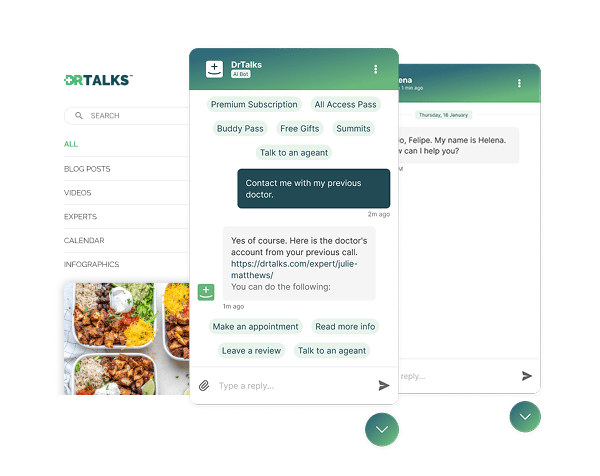

Dr. Talks is one of the most prominent organizers of online healthcare conferences and summits.
Ethora enabled them to create a context-aware AI-powered chatbot to help users navigate thousands of pages of medical content, correctly referencing pages, authors, videos and timestamps. 100% secure and HIPAA-compliant.
This assistant enhances user experience by simplifying interaction with the platform and reducing search time.
- 1000+ summits indexed by AI bot
- Instant user engagement
- Vector embeddings enable intelligent domain expert AI responses
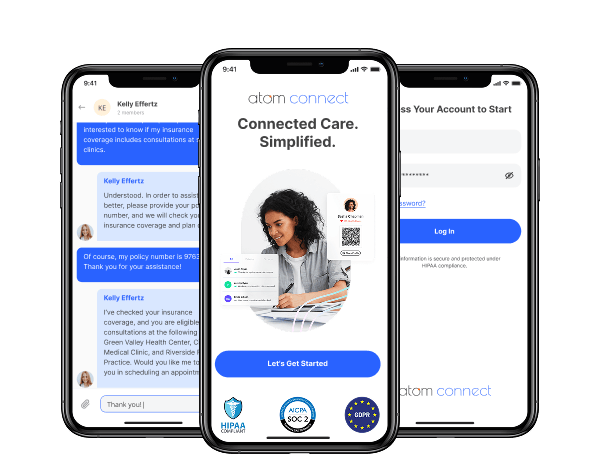

Atom Advantage is a provider of innovative AI powered workers compensation and health insurance solutions in the United States.
Ethora engine has enabled Atom Connect product used for communication between injured workers, nurses, and caseworkers. AI-powered, with documents exchange, and compliant with all regulations such as HIPAA and SOC2.
This solution reduces manual labour for caseworkers and improves patients experience.
- Integration into caseworkers web portal
- White-labelled mobile app for chat and health documents wallet for injured workers
- Instant messaging between caseworkers and injured workers
Implementation options
Local (recommended for developers)
Run via npx and connect from Cursor/VS Code/Claude Desktop
Self-hosted
Run inside your infrastructure for centralized governance and shared access controls
Docker/Kubernetes
For enterprise environments and scaling
Security notes
- Never commit tokens to git.
- Prefer env vars / secret managers / your IDE’s secure secret store.
- For production integrations, prefer App Token / B2B Token over sharing user credentials.
Start building with Ethora MCP
Run it locally and connect from your AI IDE:
npx -y @ethora/mcp-server
FAQ
Can I use it without user credentials?
Yes. Many automation features support app-token and B2B flows.
Which IDEs are supported?
Any MCP host, including Cursor, VS Code MCP, Claude Desktop, and Windsurf.
What are the main use cases for Model Context Protocol Server?
The Ethora MCP Server enables AI agents to act as intelligent platform assistants that can:
- Manage community interactions
- Provide customer support through real-time messaging and smart responses
- Facilitate transactions using Web3 tools and digital assets
- Moderate content
- Employ gamification and social features to improve engagement and UX
- "Vibe-coding" (Automate development tasks via AI-assisted IDEs)
- B2B automation and enterprise workflows
- RAG ingestion and knowledge base management
