According to Material UI documentation, Box component is a generic, theme-aware container with access to CSS utilities from MUI System. Box is typically used for grouping other components. It has become an important building block in MUI - almost like an extended functionality <div> with extra conveniences such as access to your app's CSS theme and the sx prop.
Embedding chat using Box Material UI component
Ethora Chat Component utilizes Box to seamlessly embed chat screen into your existing web application code. This is very handy in cases where you need to:
- add chat to your existing legacy web app
- embed messaging into web portal for your employees while having a stand-alone (Ethora powered) mobile / web app for end users
- add chat into a main page or sidebar of your website
Code example:
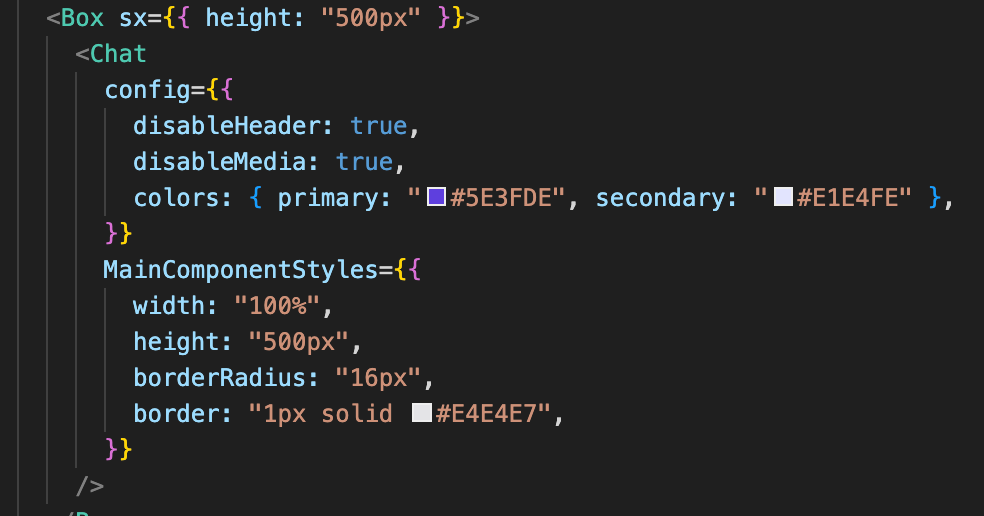
Result:
(note in this case the chat is embedded within a tab):

This is an example of Ethora Chat Component embedded within the code of client's application (in this example, a web portal for security cameras surveillance where chat is added as a tab to allow the surveillance team to communicate).
Alternative option via <div> (no MUI required)
In case Material UI libraries are not loaded in the web application, <div> can be used instead of <Box> component. Instead of <Box sx={}>, use <div style={}> in such case.